What is MeetGeek?
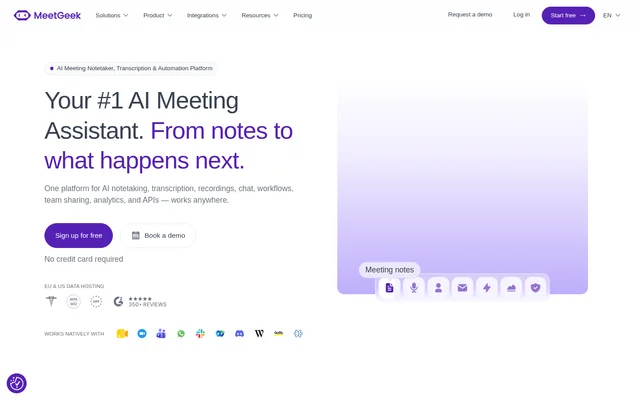
MeetGeek is an AI meeting assistant and automation service for capturing conversations and turning meeting content into notes, searchable records, and follow-up work. MeetGeek supports online, hybrid, and in-person meetings, with tools for recording, transcription, summaries, chat, collaboration, and conversation analytics.
MeetGeek serves departments including sales, customer success, HR, leadership, marketing, product, and engineering. MeetGeek combines meeting records with agents and workflows that act on information from calls. Available capture methods include a meeting bot, a bot-free desktop app, a mobile app, and a browser extension.
What MeetGeek can do
MeetGeek combines meeting capture with tools for finding information, sharing context, and completing follow-up tasks. MeetGeek can identify speakers, detect meeting languages, generate summaries, and answer questions across calls. Meeting Skills extend these records into actions such as creating tickets, updating customer records, and notifying colleagues.
- MeetGeek records, transcribes, and summarizes meetings.
- MeetGeek automatically detects 100+ languages and identifies speakers.
- MeetGeek answers questions across individual calls or multiple team meetings.
- MeetGeek creates tasks, drafts emails, and updates CRM fields through Meeting Skills.
- MeetGeek shares comments, clips, playlists, and meeting context with teams.
- MeetGeek provides cross-meeting search and individual and team analytics.
- MeetGeek offers voice agents that assist live or handle inbound calls.
How MeetGeek works
MeetGeek offers a meeting bot that joins calls to record, transcribe, and summarize them, alongside bot-free capture options. The desktop app records desktop activity, including meetings and training sessions, while the mobile app captures in-person conversations, calls, and interviews. Both desktop and mobile options list offline operation.
MeetGeek connects with Zoom, Google Meet, and Microsoft Teams. Meeting Skills can run when a meeting ends, when a keyword or pattern appears, or on a schedule. MeetGeek also supports connections through Zapier, Make, and n8n, a public API, and an MCP server for meeting context in tools such as Claude and ChatGPT.
Who MeetGeek is for
MeetGeek is designed for teams that need meeting information to support ongoing business processes rather than remain in separate notes. MeetGeek describes department-specific workflows for customer conversations, hiring interviews, executive reporting, research, and technical discussions. These workflows connect recorded conversations with structured records, shared insights, and assigned follow-up work.
- MeetGeek helps sales teams capture qualification details, update deals, and draft follow-ups.
- MeetGeek helps customer success teams detect churn signals and summarize account health.
- MeetGeek helps recruiters score interviews against rubrics and sync notes to applicant tracking systems.
- MeetGeek helps marketing teams extract customer language, objections, and content ideas.
- MeetGeek helps product and engineering teams surface feature requests and create issues in Jira or Linear.
MeetGeek pricing and plans
MeetGeek offers a free Basic plan with 3 hours of recording per month, basic AI summaries, and core integrations. MeetGeek lists Pro for regular meetings, with unlimited recording, summary templates, and AI chat. Business adds Meeting Agents, workflows, app integrations, team analytics, and sharing. Enterprise uses custom pricing.
MeetGeek allows Free, Pro, Business, and Enterprise seats to coexist in the same workspace rather than requiring a bulk upgrade. Free signup does not require a credit card. Enterprise options include SSO, SCIM, custom retention policies, on-premise storage options, and dedicated onboarding and account management.
MeetGeek strengths and limitations
MeetGeek supports several capture methods and connects meeting information to both collaboration and automation tools. MeetGeek states that meeting data is never used to train models and lists EU and US data hosting. Workspace security features include encryption, security logging, and monitoring, while advanced organizational controls appear in the Enterprise offering.
- MeetGeek limits free Basic recording to 3 hours per month.
- MeetGeek lists Meeting Agents, workflows, and team analytics under Business.
- MeetGeek lists SSO, SCIM, and custom retention policies under Enterprise.
MeetGeek FAQ
What is MeetGeek?
MeetGeek is an AI meeting assistant that records, transcribes, and summarizes conversations, then automates follow-up work. MeetGeek includes AI chat, team sharing, conversation analytics, Meeting Skills, and voice agents for online, hybrid, and in-person meeting workflows.
Is MeetGeek free?
MeetGeek offers a free Basic plan with 3 hours of recording per month, basic AI summaries, and core integrations. MeetGeek also offers paid Pro and Business plans and a custom Enterprise plan. Free signup does not require a credit card.
Can MeetGeek record meetings without a bot?
MeetGeek supports bot-free recording through a desktop app that can capture meetings, training sessions, and internal calls. MeetGeek also offers a mobile app for in-person conversations, calls, and interviews. Both desktop and mobile apps list offline operation.
Does MeetGeek have an API or integrations?
MeetGeek provides a public API and an MCP server, plus integrations with Zoom, Google Meet, and Microsoft Teams. MeetGeek connects business workflows through Zapier, Make, and n8n, and supports tools including Notion, Slack, Jira, Linear, Greenhouse, and Lever.
Does MeetGeek use meeting data to train AI models?
MeetGeek states that meetings are never used to train models. MeetGeek lists encryption at rest and in transit, security logging and monitoring, and EU and US data hosting. Enterprise options include custom retention policies and on-premise storage.
From the community
No reviews yet
Be the first to review this tool. What you write helps the next person choose.