What is Grain AI?
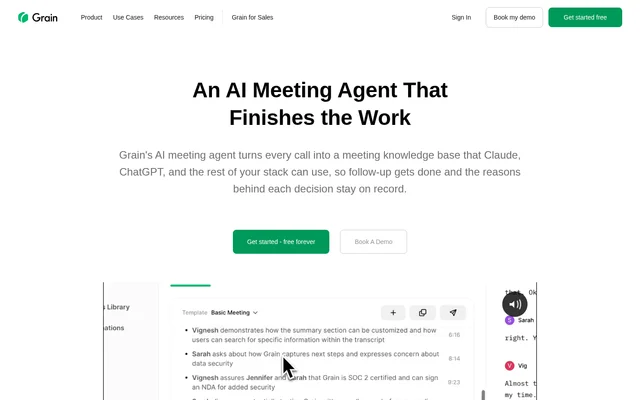
Grain AI is an AI meeting agent that turns calls into searchable meeting knowledge, structured notes, and recordings that teams can share. Grain AI serves customer-focused teams, including sales, customer success, product, and user research. Meeting context is available within the product and through connected AI assistants.
Grain AI combines meeting capture with access to what participants actually said. Users can ask questions about recordings, preserve answers in meeting notes, and retrieve relevant calls through connected tools. The source also describes meeting transcription and summarization without requiring a bot.
What Grain AI can do
Grain AI captures conversations and turns their contents into notes, answers, clips, and information for other systems. Every plan includes AI meeting notes, next steps, and automatic recaps. Additional capabilities depend on the plan, including custom note structures, coaching, follow-up emails, and team interaction insights.
- Grain AI records, transcribes, and summarizes meetings.
- Grain AI answers questions about meeting recordings and saves answers as note sections.
- Grain AI uses custom templates to structure meeting notes on Pro and above.
- Grain AI summarizes highlighted transcript moments.
- Grain AI combines clips from different meetings into Stories.
- Grain AI sends meeting data automatically to Slack, HubSpot, and Salesforce.
- Grain AI gives connected AI tools access through a Claude connector, ChatGPT plugin, MCP server, and API.
How Grain AI works
Grain AI works with Zoom, Google Meet, Microsoft Teams, Webex, and Slack huddles. Connecting a Google Workspace or Microsoft O365 calendar enables automatic recording rules for all meetings or selected internal and external meetings. Users can search transcripts, highlight moments, share recordings, and ask questions about captured conversations.
Grain AI makes meeting memory accessible from Claude and ChatGPT, while custom agents can connect through the MCP server or API. Within shared workspaces, administrators configure team recording and sharing settings. Meetings can also be shared manually, and external viewers can access recordings and notes through an invitation or link.
Who Grain AI is for
Grain AI is designed for customer-focused teams that need meeting information beyond the original conversation. Sales teams can keep call notes in their CRM, researchers can retain customer feedback and context, and product or customer success teams can share relevant recordings and insights with colleagues.
- Sales teams can use Grain AI to send call notes to HubSpot and Salesforce.
- User researchers can use Grain AI to search interviews and share customer clips.
- Product teams can use Grain AI highlights to share customer feedback.
- Customer success teams can use Grain AI to retrieve account conversation context.
- Teams can use Grain AI Stories for onboarding and sales enablement.
Grain AI pricing and plans
Grain AI offers a free individual plan and paid Pro, Business, and Enterprise plans, with monthly or annual billing available. Pro adds longer meetings, full history, custom AI prompts, and custom note templates. Business adds shared workspace meeting memory, while Business and above include AI coaching, custom follow-up emails, and team interaction insights.
- Grain AI offers a 14-day free trial.
- Grain AI workspaces on Business and Enterprise require at least two Paid seats.
- Grain AI allows unlimited Free viewer seats in Business and Enterprise workspaces.
- Grain AI offers a 30-day money-back guarantee.
Grain AI strengths and limitations
Grain AI combines support for multiple meeting services with searchable recordings, AI-generated notes, and connections to business and AI tools. Free viewer seats let colleagues collaborate without recording access. Grain AI states that meeting data is not used to train AI on any plan, and the service holds SOC 2 Type II.
- Grain AI restricts custom prompts and note templates to Pro and above.
- Grain AI provides shared workspaces only on Business and Enterprise.
- Grain AI Free viewer seats cannot record, upload, or import meetings.
- Grain AI allows only workspace members to edit meetings.
Grain AI FAQ
What is Grain AI?
Grain AI is an AI meeting agent that records, transcribes, and summarizes conversations into searchable meeting knowledge. Grain AI also answers questions about recordings, creates shareable clips, and connects meeting information to AI assistants and business tools.
Is Grain AI free?
Grain AI offers a free individual plan alongside paid Pro, Business, and Enterprise plans. Grain AI also advertises a 14-day free trial. Custom AI prompts and note templates require Pro or above, while shared workspaces require Business or Enterprise.
Which meeting platforms does Grain AI support?
Grain AI supports Zoom, Google Meet, Microsoft Teams, Webex, and Slack huddles. Grain AI also supports Google Workspace and Microsoft O365 calendars, with automatic recording rules for all meetings or selected internal and external meetings.
Does Grain AI connect to Claude, ChatGPT, or an API?
Grain AI provides a Claude connector, ChatGPT plugin, MCP server, and API for accessing meeting context. Connected AI tools can retrieve relevant calls, transcripts, and notes, while custom agents can connect through the MCP server or API.
What can free viewer seats do in Grain AI?
Grain AI Free viewer seats can view and collaborate on shared meetings, access AI meeting notes, and use non-recording features available on the workspace plan. Free viewer seats cannot record, upload, or import meetings.
Does Grain AI train AI on meeting data?
Grain AI states that meeting data is never used to train AI on any plan. Grain AI also holds SOC 2 Type II and hosts data on AWS infrastructure in the USA within a dedicated virtual private cloud.
From the community
No reviews yet
Be the first to review this tool. What you write helps the next person choose.