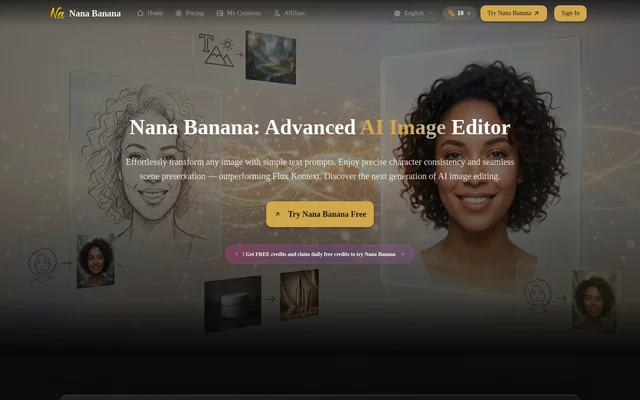
What is Nana Banana AI Image Editor?
Nana Banana AI Image Editor is an AI image generator and editor that accepts text descriptions and uploaded reference images. Nana Banana AI Image Editor serves content creators, marketing teams, digital artists, and businesses producing visual content. The website describes applications ranging from photorealistic portraits and artistic illustrations to product shots, social media images, and complex scenes.
Nana Banana AI Image Editor emphasizes character consistency and preserving an existing scene during edits. These capabilities support recurring characters, brand mascots, and AI influencer content without requiring every image to begin from a new visual concept. The website identifies the service as an independent product that is not affiliated with AI model providers.
What Nana Banana AI Image Editor can do
Nana Banana AI Image Editor combines image generation with changes to existing photos. Text instructions can describe a new composition or specify adjustments to subjects, objects, backgrounds, lighting, and style. Multi-image context allows uploaded references to inform the result, while the editing features cover both creative transformations and photo enhancements.
- Nana Banana AI Image Editor generates images from text descriptions.
- Nana Banana AI Image Editor processes multiple reference images together.
- Nana Banana AI Image Editor maintains character details across images.
- Nana Banana AI Image Editor creates or replaces backgrounds.
- Nana Banana AI Image Editor adds, removes, or modifies objects.
- Nana Banana AI Image Editor applies artistic styles and corrects colors.
How Nana Banana AI Image Editor works
Nana Banana AI Image Editor starts with a written prompt, uploaded images, or an image selected from previous creations. The upload interface accepts JPEG, PNG, and WebP files through file selection or drag and drop. Users can select a prompt template, describe the requested changes, and choose resolution, aspect ratio, and output format before generating.
Nana Banana AI Image Editor includes optional Google Search for additional context and provides PNG or JPG output. The interface also offers downloading, HD upscaling, and a My Creations area. The website recommends specifying style, colors, mood, lighting, and composition, and using multiple references when working from existing images.
Who Nana Banana AI Image Editor is for
Nana Banana AI Image Editor is intended for creators and businesses making images for marketing, social media, storytelling, and professional design. Character consistency is relevant to recurring visual identities, while background and object editing support changes to existing imagery. The website also names AI UGC creation and product imagery as commercial applications.
- Content creators can generate social media visuals.
- Marketers can create campaign images and product shots.
- Designers can develop artistic illustrations and complex scenes.
- Influencers can create consistent character-based content.
Nana Banana AI Image Editor pricing and plans
Nana Banana AI Image Editor uses credit-based access with free credits, subscriptions, and one-time credit purchases. Signed-in users can claim +1 credit every 24 hours. The generation interface lists 1K output at 2 credits, 2K output at 4 credits, and 4K output at 6 credits, making resolution a direct factor in credit consumption.
Nana Banana AI Image Editor lists Basic, Pro, Max, and Pro Max paid plans. Listed plan benefits include commercial usage rights, priority support, priority processing, and watermark removal. The pricing area provides annual, monthly, and one-time options, and the displayed subscription offers describe credit allowances alongside full credit allocations issued at once.
Strengths and limitations of Nana Banana AI Image Editor
Nana Banana AI Image Editor brings text generation, reference-based editing, and photo adjustment tools into the same interface. Multiple reference images and character consistency support related visual assets, while selectable formats and aspect ratios provide output control. Access remains credit-dependent, and the upload interface places explicit limits on supported file types and the number of reference images.
- Nana Banana AI Image Editor accepts up to 14 uploaded images.
- Nana Banana AI Image Editor supports JPEG, PNG, and WebP uploads.
- Nana Banana AI Image Editor charges more credits for higher-resolution output.
- Nana Banana AI Image Editor requires sign-in to claim daily free credits.
Nana Banana AI Image Editor FAQ
What is Nana Banana AI Image Editor?
Nana Banana AI Image Editor is an AI image generation and editing tool that works with text prompts and uploaded images. Capabilities include character consistency, background replacement, object editing, artistic style transfer, and photo enhancement for creative and commercial content.
Is Nana Banana AI Image Editor free?
Nana Banana AI Image Editor offers free credits and a daily +1 credit claim for signed-in users, alongside paid subscriptions and one-time credit purchases. Image generation consumes credits, with the required amount increasing according to the selected output resolution.
What image formats does Nana Banana AI Image Editor support?
Nana Banana AI Image Editor accepts JPEG, PNG, and WebP uploads and offers PNG or JPG output. The upload interface supports up to 14 images, and users can select output resolution and aspect ratio before generating an image.
Can Nana Banana AI Image Editor keep characters consistent?
Nana Banana AI Image Editor includes a character consistency feature intended to maintain character details across multiple images. The website identifies AI influencers, brand mascots, and storytelling content as uses for this capability, alongside multi-image context processing.
Can Nana Banana AI Image Editor be used commercially?
Nana Banana AI Image Editor supports commercial applications including marketing campaigns, social media content, AI UGC creation, and professional design work. The listed paid plans include commercial usage rights, as well as watermark removal, priority support, and priority processing.
How many credits does Nana Banana AI Image Editor use?
Nana Banana AI Image Editor lists generation costs of 2 credits for 1K output, 4 credits for 2K output, and 6 credits for 4K output. The interface displays the credits required before generation.
From the community
No reviews yet
Be the first to review this tool. What you write helps the next person choose.