What is NocoBase?
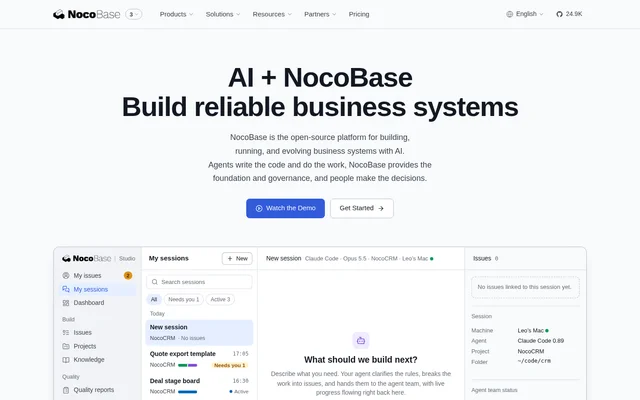
NocoBase is a self-hosted platform for teams building and running business systems with AI. NocoBase Core provides an open-source application foundation, NocoBase Studio coordinates software development across people and agents, and NocoBase Solution provides ready-made business apps. Teams can use Core to build a custom system or start from a Solution app and adapt it to their business.
What NocoBase can do
NocoBase provides reusable components so coding agents can focus on business logic rather than rebuilding permissions, approvals, and other common features for each application. NocoBase Core also provides project scaffolding and development standards, giving teams a consistent structure when developers, models, or coding agents change.
- NocoBase Core controls access to pages, actions, and data through roles.
- NocoBase Core runs workflows, scheduled jobs, and single-approver approvals.
- NocoBase Core connects to existing databases as external data sources.
- NocoBase Studio schedules agents across machines to work on issues in parallel.
- NocoBase Studio supports checks, review, and human sign-off before merges.
How NocoBase works
NocoBase Studio brings coding agents such as Claude Code, Codex, and OpenCode into a shared workspace. A coordinator agent assigns work to agents connected from different machines, and team members can monitor issue activity, workload, and model usage. When a decision needs human input, agents can attach reports, checklists, screenshots, and recommendations. NocoBase Studio keeps team methods in skills, business documents in a knowledge base, and lessons from agent work in project memory.
Who NocoBase is for
NocoBase is intended for teams that maintain business systems with complex requirements, multiple contributors, or ongoing changes. Developers can build on Core, while business experts can review evidence from agents and make decisions without reading code. Teams that need an existing sales, growth, or project app can start with NocoBase Solution instead of building from scratch.
- Build a custom system on NocoBase Core.
- Run sales workflows with NocoCRM.
- Support growth work with NocoReach.
- Manage projects with NocoProject.
NocoBase pricing and plans
NocoBase offers a free Community edition with Core building blocks, project scaffolding, and Solution apps. Professional costs $8,000 as a one-time purchase for a perpetual license, with 1 year of upgrades and support. Professional adds Studio, advanced approvals, and enterprise SSO. Enterprise is custom-quoted and also uses a one-time perpetual license, with features such as high availability, audit logs, and air-gapped delivery. NocoBase directs buyers of commercial editions to contact the company.
NocoBase strengths and limitations
NocoBase lets teams keep business code in their own repositories and data on their own servers while choosing which models and coding agents to use. Released business apps run independently of Studio, so day-to-day requests do not pass through the workspace used to build and review changes.
- Studio is not included in Community.
- Advanced approvals and enterprise SSO require a commercial edition.
- Clustering, audit logs, and air-gapped delivery require Enterprise.
- Teams pay server, model, and coding agent providers directly.
Getting started with NocoBase
NocoBase offers separate starting points depending on what the team needs. Teams building a new system can start with Core and use their own coding agents with its scaffolding and components. Teams that already have a use case covered by a Solution app can install it as provided or have a coding agent customize it. Teams that want to coordinate agents and add review and sign-off can compare the commercial editions that include Studio.
NocoBase FAQ
What is NocoBase?
NocoBase is a self-hosted platform for building and running business systems with AI. NocoBase Core provides reusable components such as permissions and workflows, NocoBase Studio coordinates development across people and agents, and NocoBase Solution offers ready-made business apps.
Is NocoBase free?
NocoBase has a free Community edition that includes open-source Core components and Solution apps for production use and client delivery. Studio is available in the commercial editions. Professional costs $8,000 one-time, and Enterprise pricing is available by custom quote.
Can NocoBase be self-hosted?
NocoBase Core, Studio, and Solution apps can all run on a team's own servers. Teams can keep their code in their own repositories, retain control of their data, and choose their own models and coding agents.
Which AI coding agents work with NocoBase?
NocoBase Studio brings Claude Code, Codex, and OpenCode into a shared agent team. NocoBase Studio can connect agents running on different machines, schedule their work centrally, and show project progress, agent workload, and model usage.
What apps can you build or run with NocoBase?
NocoBase supports custom business systems built on Core and ready-made apps such as NocoCRM for sales, NocoReach for growth, and NocoProject for project work. Teams can run a Solution app as provided or have a coding agent customize it.
How does human review work in NocoBase Studio?
NocoBase Studio supports checks, review, and human sign-off before merges. When a decision needs human input, agents can attach reports, checklists, screenshots, and recommendations. Review options include CI or agent self-checks, previews, and review by another vendor's model.
From the community
No reviews yet
Be the first to review this tool. What you write helps the next person choose.