What is NoNolo?
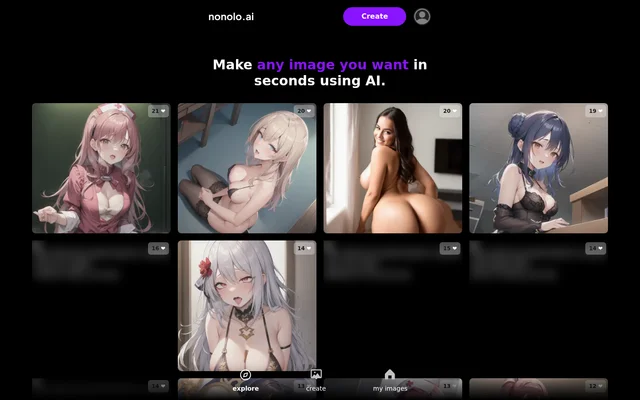
NoNolo is a web-based AI image generator for people who want to make images or browse examples. Image generation is the main function described on the page, which says users can make images in seconds. The page pairs that description with a feed of images and visible reactions, so it presents both a creation tool and a place to explore what is on display. The timing is the page’s own description rather than a measured result.
What NoNolo can do
NoNolo presents image generation and image browsing as separate activities. The Create entry is associated with making images using AI, while Explore provides a way to browse. A My Images entry also appears in the navigation, though the page does not describe what visitors can do there.
- NoNolo generates images with AI through Create.
- NoNolo provides an Explore entry for browsing images.
- NoNolo displays reaction counts alongside images.
- NoNolo lists a separate My Images entry.
How NoNolo works
NoNolo shows Create as the starting point for generating an image, but the page text does not describe the steps after opening it. On the browsing side, images appear with counts beside heart, laugh, disgust and flag icons. The counts are shown separately by icon, so visitors can distinguish different kinds of feedback rather than seeing only one overall score. The page does not explain how a visitor adds a reaction or what happens when an image is flagged.
Who NoNolo is for
NoNolo is relevant to people who want to make an image with AI and to people who prefer to look through existing images for ideas. The browsing view can be useful on its own: visitors can look at images and compare the reactions shown alongside them without having to start by generating an image. The page describes the tool in general terms and does not name a particular profession or industry.
- Make an image with AI.
- Browse displayed images for visual ideas.
- Compare the reaction counts shown on different images.
NoNolo strengths and limits of the page information
NoNolo makes the distinction between browsing and generating images clear in its navigation. The displayed reactions add context to the browsing experience, while My Images gives personal images a separately labeled entry. The page is less specific about the creation process: it does not say what kinds of input are accepted or how images are saved or exported. No pricing details are shown, so the page does not establish whether creating images requires payment.
NoNolo FAQ
What is NoNolo?
NoNolo is an AI image generator with a browsing view that shows images and their reaction counts. The page lists Explore, Create and My Images as separate navigation entries.
Is NoNolo free?
NoNolo does not state whether image generation is free or paid. The page shows the image creation and browsing interface but does not list prices, plans or usage allowances.
How do you create images with NoNolo?
NoNolo shows Create as the entry point for making images with AI. The page says images can be made in seconds, but it does not explain what inputs the tool accepts or what steps follow.
Can you browse images on NoNolo?
NoNolo includes an Explore entry and displays a feed of images with reaction counts. The visible counts appear alongside heart, laugh, disgust and flag icons, allowing visitors to compare the feedback shown on different images.
From the community
No reviews yet
Be the first to review this tool. What you write helps the next person choose.