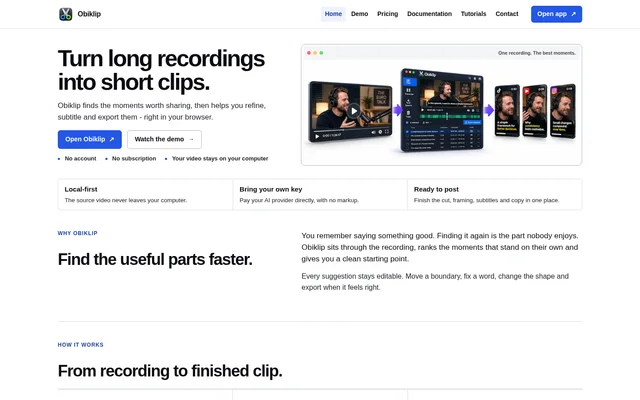
What is Obiklip?
Obiklip is a browser-based tool for turning long spoken videos into short clips. Obiklip finds and ranks moments that stand on their own, then provides tools to refine and export those selections. Supported recording examples include podcasts, interviews, lectures, sermons and webinars. The intended audiences include podcasters, teachers, speakers, coaches, consultants and people who want to reuse an archive of recordings.
Obiklip combines clip selection with finishing tasks such as framing, subtitles and accompanying copy. Suggested clips remain editable rather than fixed: users can move a boundary, correct a word or change the output shape. The source video stays on the user's computer, and projects, transcripts, clips and edits live in the browser.
What Obiklip can do
Obiklip provides tools for finding useful passages and preparing them for posting. Ranked suggestions include clean starts and endings, timestamps and context, giving users a starting point for editing. Obiklip also supports transcript search, subtitle correction, output framing and text around the finished clip, including titles, post copy and translation.
- Obiklip ranks suggested clips from long recordings.
- Obiklip lets users adjust clip start and end boundaries.
- Obiklip supports subtitle correction, styling and burned-in captions.
- Obiklip exports vertical, square, portrait, wide or original framing.
- Obiklip searches transcripts and downloads them as SRT or plain text.
- Obiklip provides titles, post copy and translation.
How Obiklip works
Obiklip runs in the browser without installation or an account. Users open the app, configure their own API key and select a video from their computer. Users then review ranked suggestions, refine the cut, framing and subtitles, and export the version they want to post. Editing and export run on the user's computer.
Obiklip keeps source footage on the user's computer rather than uploading the video. Projects, transcripts, clips and edits remain in the browser. Only the audio and text needed for the AI work a user requests leave the page. The user's AI provider handles billing for transcription, analysis, translation and other AI requests.
Who Obiklip is for
Obiklip is designed for spoken video rather than a general-purpose production workflow. The website names creators and professionals whose recordings contain explanations, conversations or answers that can be reused as shorter clips. Obiklip also addresses people with existing archives who want to find useful material in older long recordings.
- Podcasters can turn episodes into shareable moments.
- Teachers and speakers can extract explanations from recordings.
- Coaches and consultants can reuse answers their audiences keep asking for.
- Archive owners can repurpose older long recordings.
Obiklip pricing and access
Obiklip is free to use, with every feature available and no subscription, license key or checkout required. Users bring their own API key and pay their AI provider directly, without usage markup. Optional development support is handled through a Stripe-hosted page, but support payments do not change product access or unlock additional features.
Obiklip strengths and limitations
Obiklip combines ranked clip discovery, editable cuts, subtitles, framing and export in the browser, with no feature gates or upgrade prompts. Local source-video handling is a stated privacy benefit. However, free access to Obiklip does not remove AI provider charges, and local video storage does not mean all requested processing stays on the computer.
- Obiklip requires users to supply and configure an API key.
- Obiklip AI requests incur charges billed by the user's provider.
- Obiklip sends required audio and text outside the page for requested AI work.
Obiklip FAQ
What is Obiklip?
Obiklip is a browser-based tool that turns long spoken recordings into short clips. Obiklip ranks suggested moments and lets users refine cuts, framing and subtitles before export, with support for podcasts, interviews, lectures, sermons and webinars.
Is Obiklip free?
Obiklip is free to use with all features included and no subscription, account, license key or checkout required. Obiklip users supply their own API key, and their AI provider bills them directly for transcription, analysis, translation and other AI requests.
Does Obiklip upload my video?
Obiklip keeps the source video on the user's computer, with projects, transcripts, clips and edits stored in the browser. Obiklip sends only the audio and text needed for requested AI work outside the page; editing and export run locally.
Who is Obiklip for?
Obiklip is for podcasters, teachers, speakers, coaches, consultants and people with archives of long recordings. Obiklip helps these users extract shareable moments, explanations and recurring answers from spoken videos.
Can Obiklip add subtitles and export different video formats?
Obiklip supports correcting subtitle text, choosing subtitle appearance and burning captions into clips. Obiklip also offers vertical, square, portrait, wide and original framing, plus searchable transcripts that users can download as SRT or plain text.
Do you need to install Obiklip or create an account?
Obiklip requires no installation or account. Obiklip users open the browser app, configure an API key and choose a video from their computer, then review suggested moments, edit clips and export.
From the community
No reviews yet
Be the first to review this tool. What you write helps the next person choose.