What is Onlyfakes HuggingFace?
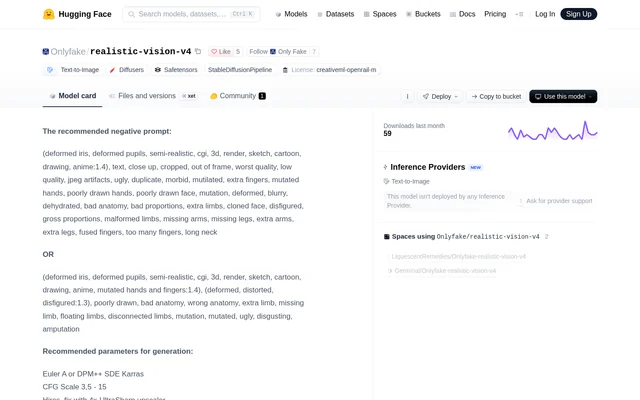
Onlyfakes HuggingFace is a text-to-image model listed on Hugging Face under the repository name Onlyfake/realistic-vision-v4. The page labels the model as a Stable Diffusion pipeline, lists Safetensors files, and names CreativeML Open RAIL-M as the license. The model card is a reference for people who want to generate still images using Diffusers, a notebook environment, or one of the listed local apps.
What Onlyfakes HuggingFace can do
Onlyfakes HuggingFace generates a still image from a written description. The example prompt describes an astronaut in a jungle and specifies a cold, muted color palette. The model card also provides negative prompts that describe traits to avoid, such as cartoon styling, blurry output, or malformed hands. These are recommended inputs rather than guarantees about the resulting image.
- The Diffusers pipeline generates still images from text prompts.
- The model card supplies negative prompts for unwanted styles and artifacts.
- The model card recommends samplers and guidance settings.
- The model card suggests a high-resolution workflow using 4x-UltraSharp.
How Onlyfakes HuggingFace works
Onlyfakes HuggingFace can be loaded through the Diffusers library. The Python example starts by installing Diffusers, Transformers, and Accelerate, then loads the repository with DiffusionPipeline and passes a text prompt to the pipeline. The example is configured for CUDA and includes a note about using MPS on Apple devices. Google Colab and Kaggle are listed under notebooks, while Draw Things and DiffusionBee are listed under local apps.
Who Onlyfakes HuggingFace is for
Onlyfakes HuggingFace suits Python users who want to call an image generation pipeline directly and creators who prefer working in notebooks or local diffusion apps. The model card gives users a starting point for testing how a scene description, negative prompt, or set of generation parameters changes the output. Its example shows how a prompt can describe both the subject and the desired visual treatment.
- Generate a still image from a scene description.
- Compare outputs with different negative prompts.
- Test recommended sampling and upscaling settings.
Onlyfakes HuggingFace pricing and access
Onlyfakes HuggingFace is distributed through a Hugging Face model repository that lists files and a license but gives no model-specific price. The Hugging Face Pro plan shown in the supplied pricing text is a separate platform subscription, not a plan for this model. The model page says no Hugging Face Inference Provider has deployed the model, so the Pro plan's inference credits do not establish provider access to this repository.
Onlyfakes HuggingFace strengths and limitations
Onlyfakes HuggingFace provides both a short working pattern for Diffusers and model-specific recommendations for image generation. The sampler, negative prompt, and upscaling guidance gives users a starting point without requiring them to choose every setting from scratch. The page also lists two Hugging Face Spaces that use the model, separately from its notice that no Inference Provider has deployed it.
- No Hugging Face Inference Provider deployment is listed.
- The Python example requires installing dependencies.
- The documented Python setup uses device-specific configuration.
Onlyfakes HuggingFace FAQ
What is Onlyfakes HuggingFace?
Onlyfakes HuggingFace is a Stable Diffusion text-to-image model listed on Hugging Face as Onlyfake/realistic-vision-v4. The repository lists Safetensors files and the CreativeML Open RAIL-M license, and its model card shows how to generate an image from a text prompt with Diffusers.
Is Onlyfakes HuggingFace free?
Onlyfakes HuggingFace is available as downloadable model files, and its repository does not list a model-specific price. The Hugging Face Pro pricing shown alongside the model information applies to a separate platform subscription, not to a paid tier for this model.
Can you run Onlyfakes HuggingFace locally?
Onlyfakes HuggingFace can be used locally through the options listed on its model page, which include Draw Things and DiffusionBee. The page also provides a Python example for loading the model with Diffusers, using CUDA in the example and mentioning MPS for Apple devices.
Does Onlyfakes HuggingFace have hosted inference?
Onlyfakes HuggingFace is not deployed by any Hugging Face Inference Provider according to its model page. The repository separately lists Hugging Face Spaces using the model, along with notebook and local app options for getting started.
What generation settings does Onlyfakes HuggingFace recommend?
Onlyfakes HuggingFace recommends Euler A or DPM++ SDE Karras for sampling and lists 4x-UltraSharp for its suggested high-resolution workflow. The model card also provides guidance scale and denoising settings, plus example negative prompts covering unwanted styles, anatomy errors, and visual artifacts.
From the community
No reviews yet
Be the first to review this tool. What you write helps the next person choose.