What is OpenResearch?
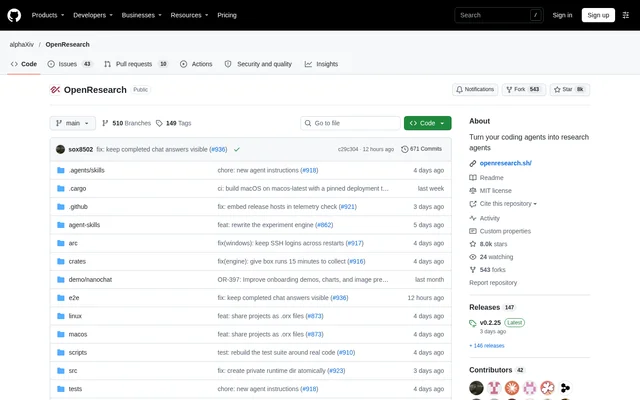
OpenResearch is an open-source, local-first harness and workspace for research agents, developed as an alphaXiv project. OpenResearch connects coding agents with research workflows that include literature review, hypothesis development, experiments, and research artifacts. The project supports both copilot-style assistance and autoresearch workflows, with a desktop interface for inspecting agent activity and results.
What OpenResearch can do
OpenResearch combines literature access, experiment execution, and persistent experiment records in a local workspace. OpenResearch gives agents access to relevant papers and previous experimental results so they can connect new work to existing research and decide what to try next. The desktop app lets users inspect the evidence behind results.
- OpenResearch works natively with Claude Code, Codex, OpenCode, Cursor, and Google Antigravity.
- OpenResearch integrates with alphaXiv, bioRxiv, and PubMed to find relevant papers.
- OpenResearch supports hypothesis development, experiments, and research artifact creation.
- OpenResearch records every experiment in a local SQL database.
- OpenResearch keeps experiment logs, code, and artifacts on the user's machine.
- OpenResearch supports local models through OpenCode using LM Studio, oMLX, Ollama, or a custom endpoint.
How OpenResearch works
OpenResearch recommends the desktop app, with downloads for macOS, Windows beta, and Linux. OpenResearch also offers a standalone CLI for macOS and Linux. Running orx up opens a local dashboard. The desktop app can install the orx terminal command through Settings, then Updates, then Install the orx command.
OpenResearch lets users choose where experiments run rather than requiring a single compute environment. Supported options include local execution, SSH, Slurm, Kubernetes, Modal, Tinker, Ray, Hugging Face Jobs, and managed OpenResearch compute. Creating an account at openresearch.sh provides access to managed compute and email updates.
Who OpenResearch is for
OpenResearch is for researchers who want coding agents to participate in research work, from reading papers to running experiments. OpenResearch supports users who want an interactive copilot as well as those exploring autoresearch. Local experiment records make the workspace relevant to workflows that need to revisit prior results and inspect supporting evidence.
- OpenResearch helps researchers review literature before developing hypotheses.
- OpenResearch helps researchers connect experiments to existing published work.
- OpenResearch lets researchers inspect logs and artifacts behind experimental results.
- OpenResearch gives agents previous experiment records to inform subsequent work.
OpenResearch pricing and access
OpenResearch is available as an open-source project under the MIT license, with desktop downloads and a standalone CLI installation path. OpenResearch does not list product subscription plans or managed compute prices in the supplied repository text. Managed OpenResearch compute is accessed through an account at openresearch.sh.
OpenResearch strengths and limitations
OpenResearch combines local ownership of research records with support for multiple agents, literature sources, and compute environments. OpenResearch states that code and agent traces are not collected. Official release builds nevertheless send opt-out product analytics and detailed agent feedback tied to a random installation ID; users can disable both in Settings or with orx telemetry off.
- OpenResearch requires macOS 11+ for the macOS app.
- OpenResearch Windows support is in beta and requires Git for Windows.
- OpenResearch requires glibc 2.35+ for the Linux app.
- OpenResearch's standalone CLI installer may be blocked by managed Mac policies because the installed CLI is not yet signed.
- OpenResearch offers a signed and notarized desktop app as the alternative for affected managed Macs.
OpenResearch FAQ
What is OpenResearch?
OpenResearch is a local-first, open-source harness and workspace for research agents from alphaXiv. OpenResearch turns coding agents into research agents that can review literature, develop hypotheses, run experiments, and produce research artifacts.
Is OpenResearch open source?
OpenResearch is an open-source project distributed under the MIT license. OpenResearch provides desktop downloads and a standalone CLI, while the supplied repository text does not state subscription plans or prices for managed OpenResearch compute.
Which coding agents does OpenResearch support?
OpenResearch works natively with Claude Code, Codex, OpenCode, Cursor, and Google Antigravity. OpenResearch also supports using a local model with OpenCode through LM Studio, oMLX, Ollama, or a custom endpoint.
Can OpenResearch run experiments locally or remotely?
OpenResearch supports experiments on local compute and through SSH, Slurm, Kubernetes, Modal, Tinker, Ray, Hugging Face Jobs, and managed OpenResearch compute. OpenResearch records every experiment in a local SQL database and keeps logs, code, and artifacts on the user's machine.
Does OpenResearch collect research data or analytics?
OpenResearch states that code and agent traces are not collected and research records remain on the user's machine. OpenResearch official release builds send opt-out product analytics and detailed agent feedback tied to a random installation ID. Both can be disabled in desktop Settings or with orx telemetry off.
Which operating systems does OpenResearch support?
OpenResearch offers desktop apps for macOS 11+, Windows beta with Git for Windows, and Linux requiring glibc 2.35+. OpenResearch also provides a standalone CLI installation path for macOS and Linux.
From the community
No reviews yet
Be the first to review this tool. What you write helps the next person choose.