What is Opera Browser?
Opera Browser is a free web browser that combines browsing, AI assistance, tab management, and sidebar applications. Opera Browser serves people moving between research, work, conversations, and personal projects. The browser is available for Windows, macOS, Linux, Android, and iOS, with synchronization features for continuing browsing across devices.
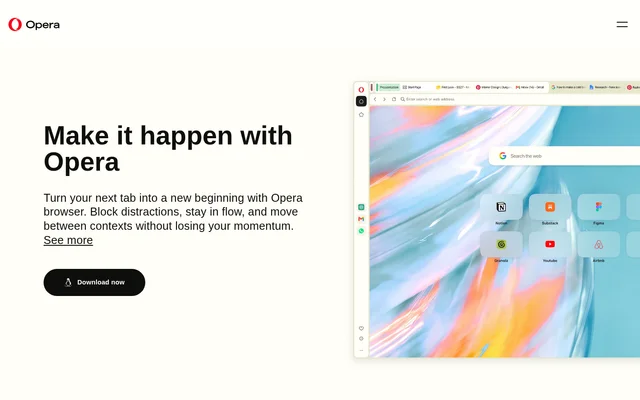
Opera Browser brings several everyday tools into the browsing window rather than requiring separate tabs for each activity. The page highlights automatic tab grouping, dedicated workspaces, side-by-side page comparison, and integrated messaging. Built-in ad and tracker blocking, a free VPN, and media controls complement these organization features.
What Opera Browser can do
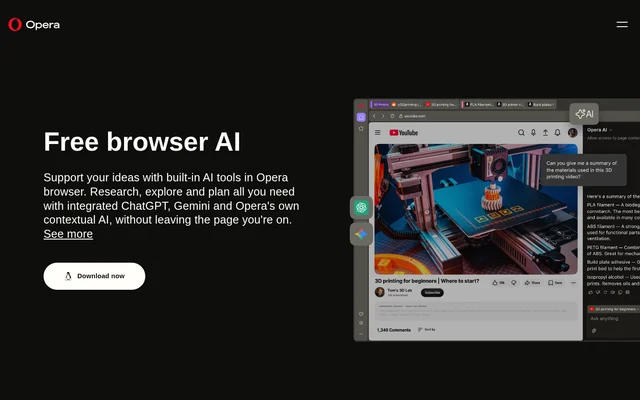
Opera Browser combines tools for organizing pages, working with web content, and accessing other services while browsing. Opera AI supports chat, content creation, and tab content analysis. The sidebar also provides access to ChatGPT and Gemini, alongside communication, Google, and music services named on the page.
- Opera Browser automatically groups related tabs into Tab Islands.
- Opera Browser separates tasks and projects into Workspaces.
- Opera Browser compares up to four pages with Split Screen.
- Opera Browser extracts page highlights through Opera AI when Page Context is enabled.
- Opera Browser generates AI images from text prompts for free.
- Opera Browser blocks ads and trackers before they load.
- Opera Browser translates entire pages or selected text.
How Opera Browser works
Opera Browser organizes browsing through tabs, Workspaces, and a sidebar. Related tabs group automatically by context, while Vertical Tabs moves tabs to the side to show their titles. Split Screen keeps sources visible together. For page analysis, users enable Page Context so Opera AI can extract key points from the current page.
Opera Browser places Gmail, Calendar, Google Translate, music services, and messengers alongside the current page. Opera Sync shares open tabs, browsing history, bookmarks, and favorites between a laptop and phone. Opera Flow provides a separate way to securely send files, links, and notes between those devices without an account.
Who Opera Browser is for
Opera Browser is for people who switch between focused work, research, conversations, and personal browsing. The page describes comparing sources, keeping projects separate, controlling music while working, and returning to previous sessions. Cross-device features also support people who start browsing on a computer and continue on a phone.
- Opera Browser helps researchers compare sources and extract page highlights.
- Opera Browser helps people separate work and personal projects with Workspaces.
- Opera Browser provides sidebar access to WhatsApp, Slack, Discord, and other messengers.
- Opera Browser lets listeners control Spotify, Apple Music, and YouTube Music while browsing.
Opera Browser pricing and availability
Opera Browser is available as a free download, with the page's software listing showing a price of 0 USD. The page explicitly describes the built-in Ad Blocker, built-in VPN, and text-to-image generation as free. Downloads cover Windows, macOS, Linux, Android, and iOS; the page also provides a mobile download option for users without Google Play.
Opera Browser strengths and limitations
Opera Browser combines tab organization, AI assistance, sidebar services, and device continuity in the browser. Automatic grouping and Workspaces support different browsing contexts, while Opera Flow allows account-free transfers between a computer and phone. Some functions have explicit setup conditions: page-aware AI analysis requires Page Context, and the mobile synchronization instructions require signing in.
- Opera Browser requires Page Context to be enabled for page highlight extraction.
- Opera Browser requires sign-in to sync a browsing setup on mobile.
- Opera Browser distinguishes account-free Flow transfers from browsing synchronization.
Opera Browser FAQ
What is Opera Browser?
Opera Browser is a free web browser with built-in AI tools, automatic tab grouping, workspaces, ad blocking, and a VPN. Opera Browser also provides sidebar access to messaging, music, and Google services, plus features for continuing browsing across devices.
Is Opera Browser free?
Opera Browser is available for free, with the page's software listing showing a price of 0 USD. Opera Browser also includes an explicitly free built-in Ad Blocker, built-in VPN, and AI image generator that creates images from text prompts.
What AI tools does Opera Browser include?
Opera Browser includes Opera AI for chat, content creation, and tab content analysis, plus sidebar access to ChatGPT and Gemini. Opera Browser can extract key points from a page when Page Context is enabled and offers free AI image generation from text prompts.
Can Opera Browser sync between a computer and phone?
Opera Browser synchronizes open tabs, browsing history, bookmarks, and favorites through Opera Sync. Opera Browser also offers Opera Flow for securely sending files, links, and notes between a computer and phone without an account; mobile setup synchronization requires signing in.
Which operating systems support Opera Browser?
Opera Browser is listed for Windows, macOS, Linux, Android, and iOS. Opera Browser provides mobile downloads and an alternative download option for people without Google Play, alongside synchronization features for moving between a laptop and phone.
How does Opera Browser organize tabs?
Opera Browser automatically groups tabs by context with Tab Islands and separates tasks with Workspaces. Opera Browser also offers Vertical Tabs, keyword search across open tabs, Tab Emojis, and Tab Traces, while Split Screen compares up to four pages at once.
From the community
No reviews yet
Be the first to review this tool. What you write helps the next person choose.