What is Painboard?
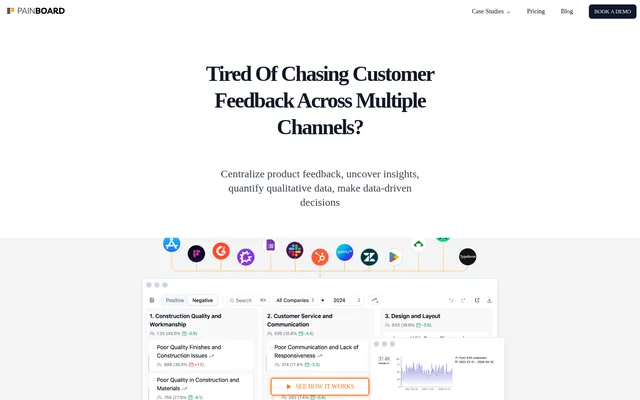
Painboard is an AI tool that helps product teams analyze qualitative customer feedback from multiple channels. Painboard turns unstructured responses into a hierarchy of themes, so teams can examine recurring issues without relying on individual comments alone. The dashboard presents findings at different levels, from overall sentiment and trends to individual customer quotes in their original context.
What Painboard can do
Painboard combines AI-generated themes with tools for measuring how often issues appear and examining their revenue impact. Teams can filter feedback, compare segments, and review the original comments behind a theme. The theme structure is editable, so teams can organize findings around the distinctions that matter to their organization.
- Painboard analyzes NPS surveys, product reviews, support tickets, and call transcripts.
- Painboard compares themes across channels, locations, and time periods.
- Painboard lets teams merge, split, move, nest, rename, or delete themes.
- Painboard highlights new themes when patterns emerge.
- Painboard lets colleagues open the same dashboard view from a shared URL.
How Painboard works
Painboard brings feedback from different sources into a shared dashboard and uses AI to build a theme hierarchy. Teams can edit that hierarchy or create new columns to fit how they organize information. Painboard remembers those changes and uses them to route new feedback to the appropriate themes. When incoming feedback forms a new pattern, Painboard can highlight it as an emerging theme rather than treating the existing hierarchy as fixed.
Who Painboard is for
Painboard is for product teams that receive enough unstructured feedback to make manual tagging time-consuming. Teams can use the dashboard to move from broad trends to specific comments when investigating an issue. Segment comparisons help teams check whether a theme is more common in a particular group, channel, location, or time period before deciding where to investigate further.
- Analyze open-ended survey responses alongside call transcripts.
- Check how often a recurring issue appears across feedback channels.
- Compare themes between customer segments or locations.
- Share a theme report or highlights summary with colleagues.
Painboard pricing and plans
Painboard provides custom pricing rather than publishing a fixed price on its pricing page. Packages depend on data volume, required integrations, and other factors. Teams can fill out a form so Painboard can follow up with the details needed for a quote, or they can book a short call to discuss their requirements.
Strengths and limitations of Painboard
Painboard links theme-level findings to original customer quotes and lets teams adjust how feedback is grouped. Those edits carry forward to new feedback, which helps keep categories aligned with the team's decisions. Pricing requires a direct inquiry, and while the page says Painboard supports integrations, it does not name specific tools.
Getting started with Painboard
Painboard offers a sample board and a product demo. The sample board provides a way to see how feedback analysis is presented, while the demo gives teams a product walkthrough option. Teams evaluating pricing can use the separate inquiry form or schedule a call to discuss their data volume and integration needs.
Painboard FAQ
What is Painboard?
Painboard is an AI customer feedback analysis tool that centralizes qualitative feedback and groups it into themes. Painboard lets teams review trends and sentiment, compare themes across segments, and examine customer quotes in their original context.
How much does Painboard cost?
Painboard uses custom pricing based on factors such as data volume and required integrations. Painboard does not publish a fixed price on its pricing page; teams can submit a form or book a short call to discuss their requirements and get a quote.
What kinds of customer feedback can Painboard analyze?
Painboard analyzes qualitative feedback from sources such as NPS surveys, product reviews, support tickets, and call transcripts. Painboard is designed to find themes and patterns in large volumes of unstructured responses collected across multiple channels.
Can teams customize themes in Painboard?
Painboard lets teams merge, split, move, nest, rename, or delete themes and create a new hierarchy. Painboard remembers those edits and uses them when categorizing new feedback, while highlighting emerging patterns as new themes.
How can teams share Painboard reports?
Painboard lets teams share a dashboard view by copying its URL. Colleagues can open the link to see the same view, whether it is a theme report, a highlights summary, or a comparison between customer segments.
From the community
No reviews yet
Be the first to review this tool. What you write helps the next person choose.