What is Palette?
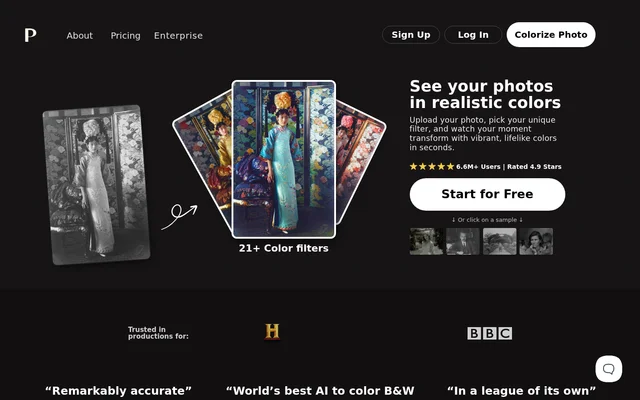
Palette is an AI photo colorizer for adding color to black-and-white photographs. Palette focuses on old photos and family images, while also showing examples involving flowers, interiors, historical scenes, and clothing. The service combines selectable color filters with text-based adjustments so users can influence the appearance of a colorized image.
Palette presents colorization as an upload, filter, and download workflow. Users can explore different treatments rather than relying on a single fixed result. Access includes free previews, a trial credit after signup, and paid credits for logo-free images at higher resolution.
What Palette can do
Palette provides color filters and editing controls for choosing and refining a photo's color treatment. The service supports multiple-image uploads and separates free preview output from credit-based, full-resolution colorizations. Subscribers also receive filter-management features intended for more involved editing workflows.
- Palette colorizes black-and-white photographs with AI.
- Palette offers over 21 color filters.
- Palette adjusts colors using clear descriptions and keywords.
- Palette accepts multiple images through drag and drop.
- Palette provides unlimited free color previews.
- Palette produces credit-based, logo-free images up to 5000x5000 pixels.
- Palette lets subscribers pin, organize, and copy filters.
How Palette works
Palette starts with the Upload image button or a drag-and-drop upload, which can include multiple images. Users then select a color filter and download the result or continue editing. To fine-tune a treatment, users click the filter's adjust icon, enter descriptions or keywords, and click Colorize.
Palette also offers sample images for exploring the service before uploading a personal photo. The page links to a video covering an initial colorization through professional workflows. Subscription editing adds automatically loading filters and controls for keeping favorite filters organized or creating copies.
Who Palette is for
Palette addresses families and people working with old photographs who want to see black-and-white images in color. Palette also supports photo editors through adjustable color treatments and subscription workflow controls. The examples on the page illustrate different photographic subjects rather than limiting the service to portraits.
- Families can colorize old family photographs.
- Photo owners can compare different filter treatments.
- Photo editors can refine colors with descriptions and keywords.
- Users can explore colorization on historical images, interiors, flowers, and clothing.
Palette strengths and limitations
Palette combines free previews, selectable filters, and keyword-based customization, giving users ways to explore and adjust a colorization before choosing a full-resolution output. Palette also offers both recurring subscriptions and one-time purchases. The main access differences concern watermarks, output resolution, advertising, and how long purchased credits remain usable.
- Palette limits free previews to 500x500 pixels and adds a logo watermark.
- Palette includes ads and promotions on the free plan.
- Palette keeps subscription credits valid only during an active subscription.
- Palette makes one-time purchase credits available for 2 years.
Palette FAQ
What is Palette?
Palette is an AI photo colorization tool that adds color to black-and-white photographs. Palette offers over 21 color filters, keyword-based color adjustments, multiple-image uploads, and downloads, with free previews and paid options for watermark-free, high-resolution images.
Is Palette free?
Palette offers unlimited free color previews with a logo watermark and a maximum resolution of 500x500 pixels. Palette also provides 1 free trial credit after signup for a logo-free, full-resolution colorization. Additional credits are available through subscriptions or one-time purchases.
How do you customize colors in Palette?
Palette lets users choose a color filter, click its adjust icon, and fine-tune colors with clear descriptions and keywords. Palette then applies the adjustments when the user clicks Colorize, allowing further customization before downloading the photo.
How do Palette credits work?
Palette uses a credit system in which each credit covers a logo-free colorization at resolutions up to 5000x5000 pixels. Palette subscription credits refresh monthly or yearly and remain valid during an active subscription, while one-time purchase credits are available for 2 years.
Can Palette upload multiple photos at once?
Palette supports uploading multiple images through drag and drop. Palette's stated workflow then involves choosing a color filter and downloading the colorized photo or continuing to adjust its colors with descriptions and keywords.
From the community
No reviews yet
Be the first to review this tool. What you write helps the next person choose.