What is PaletteMaker?
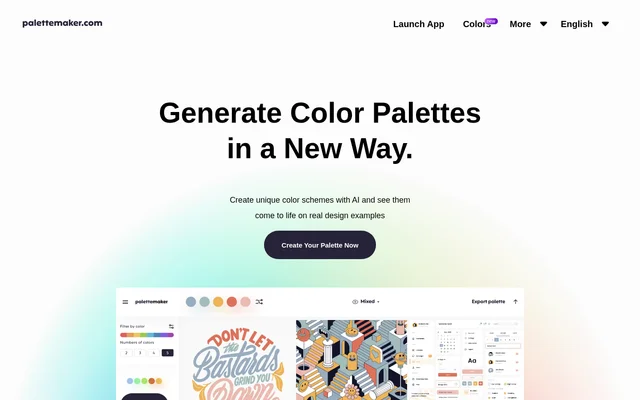
PaletteMaker is an AI color palette generator that shows how color schemes look in pre-made design examples. Created by professional designers, the web app is intended for creative professionals and people interested in color, including those without a design background. Users can see a scheme in context on logos, user interfaces, patterns, posters, or illustrations instead of evaluating swatches alone.
What PaletteMaker can do
PaletteMaker combines palette generation, editing, and design previews. Users can narrow the available schemes by tone or number of colors, then refine a selected palette and see how the changes look on a design example. Once a palette is ready, users can export it in a format suited to their project.
- PaletteMaker generates color schemes with AI.
- PaletteMaker filters schemes by color tone and palette size.
- PaletteMaker previews palettes on pre-made designs.
- PaletteMaker randomizes, edits, and removes palette colors.
- PaletteMaker exports palettes in Procreate, Adobe ASE, image, and code formats.
How PaletteMaker works
PaletteMaker displays browsable color schemes in a left panel. Selecting a scheme applies it to the main palette. The main palette appears at the top of the interface on desktop and at the bottom on mobile devices. From there, users can randomize colors to explore variations, change a single color while keeping the others, or remove a color cell.
Who PaletteMaker is for
PaletteMaker is designed for creative professionals, non-designers, and anyone interested in color combinations. A designer can use the examples to compare palettes across different kinds of work. Someone without a design background can use the same examples to see how a group of colors looks on a layout without first making a design.
- Compare color combinations on logos.
- Preview a scheme on a user interface.
- Explore palettes for patterns and posters.
- See how a palette looks on an illustration.
PaletteMaker pricing and access
PaletteMaker is a free web app. The product page says all current features are free and will remain free, including palette generation, editing, previews, and exports. Users can open the web app through the Launch App link on the product site.
PaletteMaker strengths and limitations
PaletteMaker lets users evaluate colors in context rather than relying only on swatches. That makes it possible to compare the same scheme on layouts as different as a logo and a user interface. Palette sizes are limited to 2, 3, 4, or 5 colors. The generated palettes omit black and white, which the site describes as colors often used for backgrounds, text, or elements surrounding a design.
Getting started with PaletteMaker
PaletteMaker provides a quick guide for users who want to create a palette by selecting colors individually. Another starting point is to browse the available schemes and choose one to apply to the main palette. From there, a user can try it on a pre-made example, adjust any colors that do not work for that design, and export the result.
PaletteMaker FAQ
What is PaletteMaker?
PaletteMaker is a web app that generates AI color palettes and shows how they look on pre-made designs. It offers examples for logos, user interfaces, patterns, posters, and illustrations, so users can evaluate colors together in a design rather than only as swatches.
Is PaletteMaker free?
PaletteMaker is free to use. The product page states that all current features will remain free, including AI palette generation, design previews, color editing, and exports. The app can be opened through the Launch App link on the product site.
Who is PaletteMaker for?
PaletteMaker is for creative professionals, non-designers, and anyone interested in color. Its pre-made design examples let users explore how a palette looks on a logo, interface, poster, pattern, or illustration without first having to make one of those designs.
How many colors can a PaletteMaker palette have?
PaletteMaker supports palettes with 2, 3, 4, or 5 colors. Users can filter available schemes by the number of colors they want, then change individual colors, randomize the colors, or remove a color cell from the selected palette.
What formats can PaletteMaker export?
PaletteMaker exports palettes in Procreate, Adobe ASE, image, and code formats. Users can select a scheme, preview it on pre-made designs, and refine individual colors in the web app before exporting the palette.
From the community
No reviews yet
Be the first to review this tool. What you write helps the next person choose.