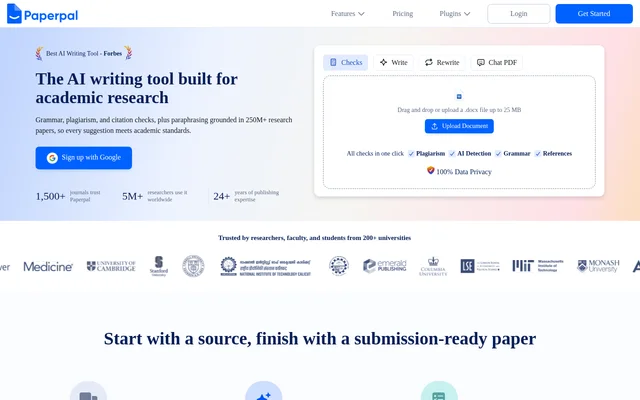
What is Paperpal?
Paperpal is an AI writing and research tool built for academic work, including literature reviews, student papers, theses, and journal manuscripts. Paperpal serves researchers, faculty, and students by bringing research discovery, writing assistance, and document checks into a shared workspace. The website also lists solutions for universities and publishers.
Paperpal connects writing suggestions with uploaded sources and a searchable collection of research articles. Paperpal covers both language tasks, such as grammar correction and paraphrasing, and research tasks, such as extracting findings from PDFs and generating citations. This combination supports work from source collection through manuscript preparation.
What Paperpal can do
Paperpal provides tools for researching, drafting, revising, and checking academic documents. Paperpal describes suggestions grounded in research sources and academic language editing trained on scholarly edits. The listed capabilities address source discovery, citation formatting, sentence clarity, similarity checking, and preparation for journal submission.
- Paperpal searches 250M+ research articles and returns cited findings.
- Paperpal extracts insights from PDFs and answers questions about uploaded sources.
- Paperpal generates citations in 10,000+ styles, including APA, MLA, and Vancouver.
- Paperpal suggests academic grammar and tone changes.
- Paperpal restructures sentences and reduces word count while preserving meaning.
- Paperpal checks similarity against 99B+ sources.
- Paperpal provides 30+ pre-submission checks for journal language and formatting standards.
How Paperpal works
Paperpal starts with sources: users upload references and PDFs, ask questions, and collect cited findings while developing a literature review. Paperpal also accepts guidelines, reviewer notes, and outlines as context for drafting suggestions. Users can then revise language, add citations, and check a document before submission.
Paperpal is available on the web and through an MS Word add-in. Paperpal also lists Chrome and Microsoft Edge extensions supporting Google Docs and Overleaf. These options provide writing support within existing document workflows. The website offers Google sign-up alongside login and account-starting options.
Who Paperpal is for
Paperpal is aimed at researchers, faculty, and students working on academic writing and research. Paperpal also offers institutional access for teams, with access management and shared libraries. The stated use cases span coursework and literature reviews through research proposals, theses, and manuscripts prepared for academic journals.
- Paperpal helps students revise essays, final-year projects, and literature reviews.
- Paperpal helps researchers find articles and extract findings from PDFs.
- Paperpal helps academic authors refine manuscript language and citations.
- Paperpal supports faculty reviewing writing and providing language feedback.
- Paperpal offers institutions shared libraries and access management.
Paperpal pricing and access
Paperpal offers free access through the website and refers to paid subscriptions in its pricing questions. The supplied page does not specify subscription prices or the feature allowances attached to each access option. Paperpal therefore has both free and paid access, without a detailed plan comparison in the supplied text.
Paperpal offers institution-wide pricing for enterprise and institutional teams. Paperpal asks organizations to contact the company to start a free trial and discusses shared libraries and simplified access management for those users. Individual users can access Paperpal through the web or its listed writing-tool integrations.
Paperpal strengths and privacy
Paperpal combines research discovery, source-based writing assistance, citations, and manuscript checks rather than presenting grammar editing alone. Paperpal also supports several established writing environments. For document privacy, Paperpal states that files are visible only to the user, work is never used to train AI, and users can delete files at any time.
Paperpal FAQ
What is Paperpal?
Paperpal is an AI academic writing tool for researchers, faculty, and students. Paperpal combines research search, PDF questions, source-grounded drafting, grammar suggestions, paraphrasing, citation generation, plagiarism checks, and manuscript submission checks.
Is Paperpal free?
Paperpal offers free access and also refers to paid subscriptions. Paperpal does not list subscription prices or detailed free-plan allowances in the supplied text. Institutional teams can contact Paperpal for institution-wide pricing and a free trial.
Does Paperpal work with Word, Google Docs, and Overleaf?
Paperpal supports MS Word through an add-in and lists Chrome and Microsoft Edge extensions supporting Google Docs and Overleaf. Paperpal is also available on the web, allowing users to choose between browser-based access and supported writing environments.
Can Paperpal find research papers and generate citations?
Paperpal provides access to 250M+ research articles, extracts insights from uploaded PDFs, and returns cited findings. Paperpal also generates citations in 10,000+ styles, including APA, MLA, and Vancouver, to support literature reviews and academic manuscripts.
Does Paperpal check plagiarism?
Paperpal offers a plagiarism checker that checks similarity against 99B+ sources. Paperpal presents this check as a way to review theses and papers before an institution's plagiarism review, alongside separate grammar, reference, and submission-readiness tools.
Does Paperpal use uploaded documents to train AI?
Paperpal states that user work is never used to train AI. Paperpal also states that files stay private and visible only to the user, that files can be deleted at any time, and that user data is not retained.
From the community
No reviews yet
Be the first to review this tool. What you write helps the next person choose.