What is PDF Document Translator?
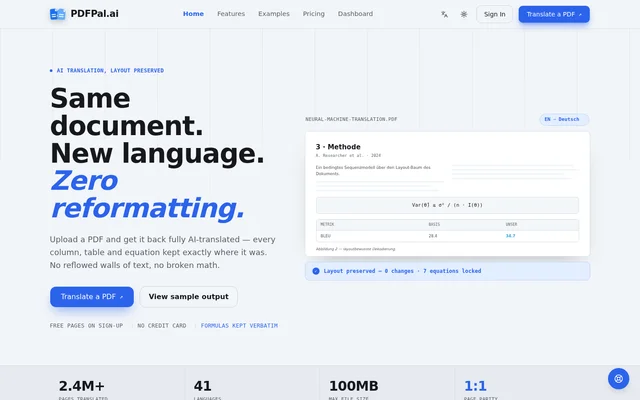
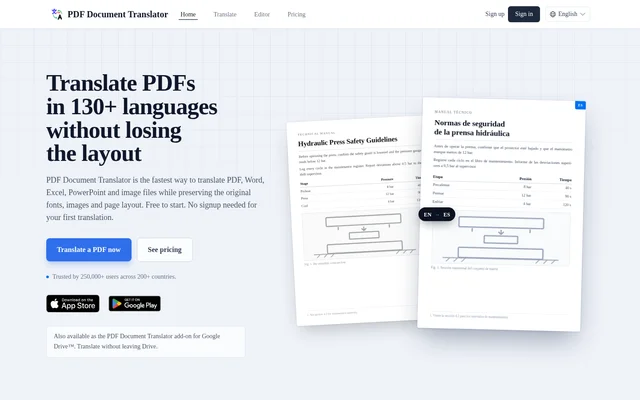
PDF Document Translator is a document translation tool from Innova Apps that translates PDFs, Microsoft Office documents and images into 130+ languages. PDF Document Translator is designed for document workflows involving contracts, research papers, business reports and technical manuals. The service focuses on retaining the source document’s formatting rather than returning translated text alone.
PDF Document Translator supports native PDFs as well as scanned documents that require text recognition. The website describes preservation of original fonts, images, tables, columns and page layout. Access begins with a free trial, and continued translation is available through purchased credits or a subscription.
What PDF Document Translator can do
PDF Document Translator combines translation, optical character recognition and document-formatting preservation with online PDF utilities. Google and Microsoft neural machine translation provide the translation engines, supported by automatic source-language detection and context-aware phrasing. Supported input formats include PDF, DOCX, XLSX, PPTX, JPG, JPEG, PNG and HEIC.
- PDF Document Translator translates documents into 130+ languages.
- PDF Document Translator preserves fonts, images, tables, columns and page layout.
- PDF Document Translator recognises and translates text in scanned PDFs and photographs.
- PDF Document Translator translates Word, Excel and PowerPoint files.
- PDF Document Translator edits PDF text and converts PDFs to and from JPG and PNG.
- PDF Document Translator supports scanning to PDF, splitting PDFs and merging PDFs.
How PDF Document Translator works
PDF Document Translator uses an upload-and-translate workflow: users upload a document, choose the target language and select Translate. The source language can be detected automatically. For scanned PDFs and images, OCR recognises the text before translation and page-layout reconstruction. Scanned pages can become searchable translated PDFs.
PDF Document Translator also provides a Google Drive add-on. Users open the add-on from the Drive side panel, select one or more files and translate without downloading them. The service states that files travel over encrypted connections, remain stored only as long as needed to deliver the translation and are never used to train models.
Who PDF Document Translator is for
PDF Document Translator addresses legal, academic, business and technical translation tasks where document structure matters. The listed examples include contracts, NDAs, court filings, journal articles, theses, annual reports, proposals and product manuals. These workflows involve details such as clause numbering, citations, figure captions, charts and diagrams that the service says are preserved.
- PDF Document Translator translates legal PDFs while retaining clause numbering, footnotes and headers.
- PDF Document Translator translates academic papers with citations, captions and two-column layouts.
- PDF Document Translator translates reports, RFPs and pitch decks while retaining charts and tables.
- PDF Document Translator translates manuals and technical specifications with diagrams and numbered steps.
PDF Document Translator strengths and limitations
PDF Document Translator combines support for Office files, scanned documents and native PDFs with layout preservation and direct Google Drive access. These capabilities support translation tasks that would otherwise involve separate text-recognition or file-handling steps. The stated privacy measures include encrypted transfers, short-lived storage and exclusion of uploaded documents from model training.
- PDF Document Translator provides 2 page credits in the free trial.
- PDF Document Translator restricts free trial uploads to 40 MB.
- PDF Document Translator requires purchased credits or a subscription after the free credits are used.
PDF Document Translator FAQ
What is PDF Document Translator?
PDF Document Translator is a document translation tool from Innova Apps that supports PDFs, Word, Excel, PowerPoint and images. PDF Document Translator translates into 130+ languages while preserving original fonts, images, tables, columns and page layout.
Can PDF Document Translator translate scanned PDFs and images?
PDF Document Translator uses OCR to recognise text in scanned PDFs and image files, including JPG, PNG and HEIC. PDF Document Translator then translates the recognised text while reconstructing the page layout and can produce searchable translated PDFs.
Does PDF Document Translator preserve PDF formatting?
PDF Document Translator preserves formatting, fonts, images, columns, tables and page layout during translation. The website also describes preservation of document-specific elements such as legal clause numbering, academic citations, figure captions and technical diagrams.
Can PDF Document Translator translate files directly from Google Drive?
PDF Document Translator provides a Google Drive add-on for translating files without downloading them. Users open the add-on from the Google Drive side panel, select one or more files and translate the selected documents.
What are PDF Document Translator's file-size limits?
PDF Document Translator allows free trial files up to 40 MB. Paid subscribers can translate documents of any size, and the website states that subscriber translations have no page cap, character cap or daily quota.
From the community
No reviews yet
Be the first to review this tool. What you write helps the next person choose.