What is PDF Parser?
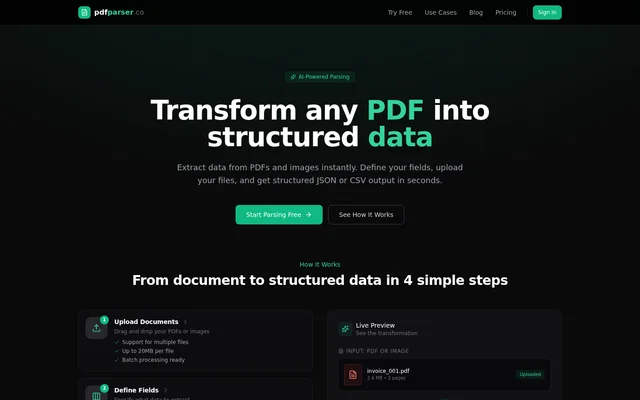
PDF Parser is a web-based AI document parsing tool that extracts specified information from PDFs and images into structured JSON or CSV. PDF Parser serves individuals, developers, growing teams, and organizations handling document data. Common source documents include invoices, receipts, bank statements, contracts, resumes, insurance claims, medical records, and HR documents.
PDF Parser uses GPT-4-class vision models for context-aware extraction from structured forms and unstructured text layouts. Users define the information to extract instead of configuring templates or rules. The resulting data can be downloaded for spreadsheets or used in databases and API workflows.
What PDF Parser can do
PDF Parser combines custom field definitions with document uploads and structured export. Supported inputs include PDFs, JPEGs, PNGs, WebP, TIFF, BMP, and GIF files. Field definitions can include names, descriptions, and string, number, date, or boolean data types, allowing users to specify the information needed from each document.
- PDF Parser extracts user-defined fields from PDFs and images.
- PDF Parser exports structured JSON or CSV files.
- PDF Parser supports batch uploads and parallel document processing.
- PDF Parser provides a documented REST API for workflow integration.
- PDF Parser includes JSON Schema validation and webhook notifications on Pro.
- PDF Parser offers custom integrations on Business.
How PDF Parser works
PDF Parser follows an upload, field definition, extraction, and export workflow. Users drag and drop documents into the web interface, specify the fields to extract, and download the processed results. The web interface requires no technical skills, while developers can use REST API documentation and copy-paste examples to integrate extraction into existing workflows.
PDF Parser processes documents through OpenAI's API and uses HTTPS encryption for file transfers. Uploaded documents are not stored after processing is complete. According to the page, OpenAI does not use customer data for model training under its data usage policy. Each uploaded file is limited to 20 MB.
Who PDF Parser is for
PDF Parser addresses document extraction needs ranging from individual projects to high-volume organizational processing. The Starter plan is positioned for individuals and small projects, Pro for growing teams and businesses, and Business for organizations with larger parsing needs. Browser-based extraction supports nontechnical users, while API access supports developers connecting document data to other systems.
- PDF Parser extracts invoice numbers, dates, totals, and vendors from invoices.
- PDF Parser converts receipts and bank statements into structured data.
- PDF Parser extracts selected fields from contracts and insurance claims.
- PDF Parser processes resumes, HR documents, and medical records.
- PDF Parser prepares CSV output for Excel and Google Sheets.
PDF Parser pricing and plans
PDF Parser offers a free trial with 20 pages and no credit card required. Starter costs $9 per month for 100 pages, Pro costs $29 per month for 500 pages, and Business costs $99 per month for 2,500 pages. All paid plans include API access, renew monthly, and can be cancelled from the dashboard.
PDF Parser differentiates paid plans through processing priority, API limits, and support. Pro includes higher API rate limits, priority email and chat support, JSON Schema validation, and webhooks. Business includes unlimited API access, a dedicated support channel, custom integrations, an SLA guarantee, and invoice billing. Custom enterprise plans are available by contacting the service.
PDF Parser strengths and limitations
PDF Parser supports template-free extraction, custom output fields, batch processing, and both browser and API workflows. These capabilities suit document-to-data tasks without requiring manual extraction rules. Accuracy is not guaranteed across all inputs: the page states that results depend on document quality and that clean, machine-generated PDFs produce the best output.
- PDF Parser limits uploaded files to 20 MB.
- PDF Parser states that unused Starter pages expire monthly.
- PDF Parser does not offer refunds.
- PDF Parser reserves higher API rate limits and priority processing for higher paid tiers.
PDF Parser FAQ
What is PDF Parser?
PDF Parser is a web-based AI document extraction tool that converts PDFs and images into structured JSON or CSV. PDF Parser extracts fields defined by the user from documents such as invoices, receipts, bank statements, contracts, and resumes without requiring templates or rules.
Is PDF Parser free?
PDF Parser offers a free trial with 20 pages and no credit card required. Paid monthly plans include Starter at $9 for 100 pages, Pro at $29 for 500 pages, and Business at $99 for 2,500 pages. All paid plans include API access and can be cancelled anytime.
What file types and output formats does PDF Parser support?
PDF Parser supports PDFs, JPEGs, PNGs, WebP, TIFF, BMP, and GIF files, with a maximum file size of 20 MB. PDF Parser returns structured JSON or CSV output and supports custom field names and string, number, date, and boolean data types.
Does PDF Parser have an API?
PDF Parser provides a REST API with documentation and copy-paste integration examples. All paid plans include API access. Pro provides higher rate limits and webhook notifications, while Business includes unlimited API access and custom integrations.
Does PDF Parser store uploaded documents?
PDF Parser does not store uploaded documents after processing is complete and uses HTTPS encryption for file transfers. PDF Parser processes documents through OpenAI's API, which the page states does not use customer data for model training under OpenAI's data usage policy.
How accurate is PDF Parser?
PDF Parser uses GPT-4-class vision models for context-aware extraction, but results depend on document quality. PDF Parser states that clean, machine-generated PDFs yield the best output and offers a free trial with 20 pages for evaluating extraction results before purchasing a plan.
From the community
No reviews yet
Be the first to review this tool. What you write helps the next person choose.