What is PDFgen?
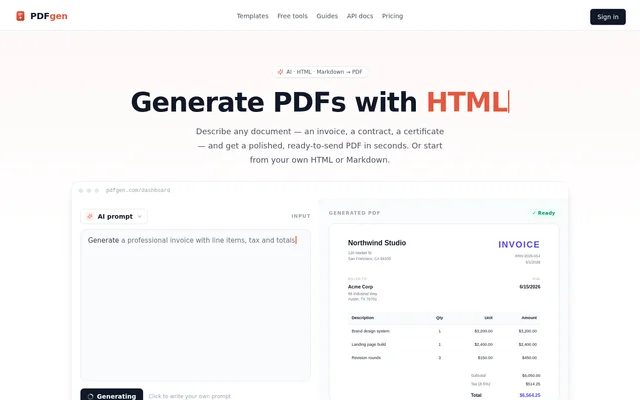
PDFgen is a web-based PDF generator and document rendering API for people creating individual documents and developers automating recurring output. The web app can design a document from a description, convert existing HTML or Markdown, or use a ready-made template as a starting point. The REST API handles generation from saved templates or raw HTML without requiring developers to run their own rendering infrastructure.
What PDFgen can do
PDFgen supports both document design and data-driven rendering. A document can be edited by clicking its text or asking the AI editor for changes, then saved for reuse. Handlebars fields, loops, and conditionals allow a template to handle changing values and repeating content such as invoice line items.
- PDFgen can design a template from a prompt or an uploaded sample PDF.
- PDFgen converts HTML or Markdown into PDFs.
- PDFgen supports page formats including A4, US Letter, and Legal.
- PDFgen can encrypt PDFs with a password and control print and copy permissions.
- PDFgen can return a PDF file or a short-lived signed URL through its API.
How PDFgen works
PDFgen starts the web app workflow with a description of the desired document, a sample to copy, or an existing template. After editing the draft, users can download a print-ready PDF or save the design as a template. In an integration, a REST API request can send a template ID and the data to fill it, or supply raw HTML instead.
PDFgen lists integrations with Zapier, Make, n8n, and Airtable for workflows that generate PDFs from other tools. Zapier can use an app trigger to start PDF generation, while Make can add a PDF step through its built-in HTTP module. PDFgen also lists a generate_pdf tool for use with AI agents.
Who PDFgen is for
PDFgen serves people who need to create a document in the browser and developers who need software to produce PDFs from changing data. Its template library covers finance, events, HR, education, and legal documents. A user can adapt a template for a single download, while an integration can reuse the same layout with different records.
- Finance workflows can generate invoices, payment receipts, and quotes.
- Event workflows can produce tickets, name badges, and ID cards.
- HR and education workflows can prepare completion certificates, offer letters, and report cards.
- Business workflows can generate packing slips, purchase orders, and work orders.
Strengths and limitations of PDFgen
PDFgen combines an interactive editor with an API, so a layout created in the web app can be reused with new data. The API handles rendering and offers a choice between a file and a short-lived link. The main trade-offs are that automation requires a higher plan than individual web use, and document length affects how many credits a generation consumes.
- PDFgen adds a watermark to Free downloads.
- PDFgen limits Free accounts to 5 templates and a single user.
- PDFgen does not include REST API access on Personal.
- PDFgen charges more than one credit for PDFs longer than 5 pages.
PDFgen FAQ
What is PDFgen?
PDFgen is an AI PDF generator that creates documents from text prompts, HTML, Markdown, or templates. The web app lets users edit document text directly or request AI changes, and the REST API generates PDFs from saved templates with data or from raw HTML.
Is PDFgen free?
PDFgen offers a Free plan with 30 credits per month, up to 5 templates, and watermarked downloads, with no credit card required. Personal costs $9 per month for watermark-free downloads in the web app, and REST API access starts with Starter.
Does PDFgen have a REST API?
PDFgen provides a REST API on Starter and Business that accepts a saved template ID with input data or raw HTML. The API can return a PDF file or a short-lived signed URL, and Business supports delivery to a customer's own AWS S3 bucket.
Can PDFgen convert HTML or Markdown to PDF?
PDFgen converts both HTML and Markdown into PDF documents in the web app. For automated rendering, the REST API accepts raw HTML as an alternative to sending a saved template ID and data.
How do PDFgen credits work?
PDFgen charges one credit for a PDF of up to 5 pages and two credits for a PDF of 6 to 10 pages. Only successful generations are charged, and the monthly credit allowance depends on the plan.
What documents can you create with PDFgen?
PDFgen can create documents such as invoices, receipts, event tickets, certificates, contracts, and resumes. Its library includes templates for these and other document types, and users can also describe a document in a prompt or upload a sample PDF to replicate.
From the community
No reviews yet
Be the first to review this tool. What you write helps the next person choose.