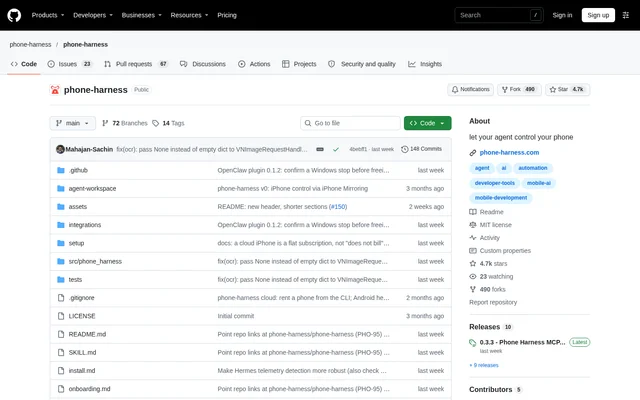
What is phone-harness?
phone-harness is an open-source phone-control project that enables Claude Code, Codex, and other agents to interact with real mobile devices. phone-harness provides helpers for reading screens and sending actions such as taps, scrolling, and typing. The repository distributes the project under the MIT license and states that phone-harness is free.
phone-harness supports local iPhones through a Mac's iPhone Mirroring window and Android phones through adb on macOS, Linux, or Windows. Phone Harness Cloud supplies hosted Android phones and dedicated real iPhones. These options let agent users work with a phone on their desk or a remotely hosted device.
What phone-harness can do
phone-harness exposes shared helpers for phone interaction, so a script written for one supported phone can run on the others. The documented example opens Notes, selects New Note, types text, and reads screen text. Cloud sessions use the same helpers as local devices, with different underlying connection methods.
- phone-harness opens apps and selects controls by text.
- phone-harness sends taps, swipes, and typed text.
- phone-harness reads screen text and captures screenshots.
- phone-harness starts temporary or saved cloud Android sessions.
- phone-harness provides a browser live view of cloud phones.
- phone-harness connects MCP clients to cloud Android phones and iPhones.
How phone-harness works
phone-harness installation begins with a setup prompt sent to a coding agent. The prompt requests installation or an upgrade through uv using Python 3.12, skill registration, and guided onboarding. The agent asks which phone to use and identifies steps requiring user participation. The phone-harness doctor command checks the resulting setup.
phone-harness captures the iPhone Mirroring window, uses Apple's Vision OCR to read text, and sends input events for local iPhone actions. Android control uses adb for screenshots and input, plus the accessibility tree for text. Cloud Android uses adb, while cloud iPhone operations run over HTTPS. Hermes Agent and OpenClaw plugins are also documented.
Who phone-harness is for
phone-harness serves developers and agent users who want coding agents to interact with mobile apps. The repository demonstrates creating a note and gives an agent task involving a Waymo ride request. Hosted phones address situations where no phone is available locally or more than one device is needed.
- Developers can incorporate phone actions into agent-driven scripts.
- Agent users can read app screens and enter text through shared helpers.
- Cloud users can retain apps and logins on saved Android phones.
- MCP client users can connect agents to hosted phones.
phone-harness pricing and access
phone-harness is free, and the repository includes an MIT license. The maintainer states that sponsorship supports continued maintenance. Users obtain the CLI through the documented agent-guided installation process. Phone Harness Cloud requires an account, but the supplied product text does not list cloud subscription plans, usage charges, or a free cloud allowance.
phone-harness strengths and limitations
phone-harness combines shared phone-control helpers with local and hosted device options. Local phone operation does not require a jailbreak, Xcode, or software installed on the phone. However, device preparation and permissions remain necessary, and connecting the phone is explicitly the user's responsibility. Screen interpretation also has limits that affect which workflows agents can complete.
- Local iPhones require macOS 15+, iOS 18+, mirroring, and permissions.
- Unlocking an iPhone pauses mirroring, and PIN-locked Android phones need user intervention.
- Unlabeled controls need screenshots and a vision-capable model.
- Multi-touch, camera, and Face ID flows are not supported.
- DRM video renders black.
- MCP support currently covers cloud phones only.
phone-harness FAQ
What is phone-harness?
phone-harness is a free, MIT-licensed open-source project that lets AI agents control real phones. phone-harness supports opening apps, tapping, scrolling, typing, and reading screen text on supported local and cloud iPhones and Android phones.
Is phone-harness free?
phone-harness is free and distributed under the MIT license, with sponsorship supporting maintenance. Phone Harness Cloud requires an account, but the supplied product text does not state cloud pricing or whether cloud access includes a free allowance.
What does phone-harness need to control an iPhone?
phone-harness requires macOS 15+, iPhone Mirroring paired with an iOS 18+ iPhone, and Accessibility and Screen Recording permissions for local iPhone control. phone-harness also supports dedicated cloud iPhones over HTTPS from any operating system through Phone Harness Cloud.
Does phone-harness support MCP and agent integrations?
phone-harness provides an MCP endpoint at https://mcp.phone-harness.com/mcp for cloud Android phones and iPhones only. phone-harness also documents plugins for Hermes Agent and OpenClaw, alongside CLI setup for coding agents including Claude Code, Codex, and Grok Bot.
What are the limitations of phone-harness?
phone-harness does not support multi-touch, camera, or Face ID flows, and DRM video renders black. OCR reads text rather than icons, so unlabeled controls require screenshots and a vision-capable model. Unlocking a local iPhone pauses mirroring, and PIN-locked Android phones require user intervention.
From the community
No reviews yet
Be the first to review this tool. What you write helps the next person choose.