What is ProSpend?
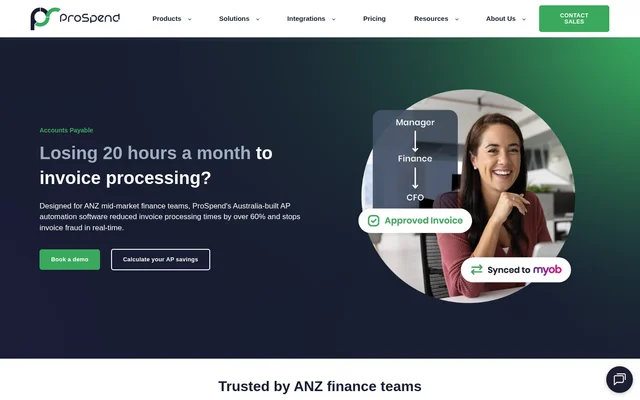
ProSpend is Australian-built accounts payable software designed for mid-market finance teams in Australia and New Zealand. ProSpend replaces manual invoice entry, coding, and approval chasing with a workflow that prepares approved invoices for posting to an existing ERP. Finance teams can use the accounts payable module on its own or combine it with tools for purchase orders, expenses, cards, travel, and budgets.
What ProSpend can do
ProSpend gives finance teams a place to review invoice data, resolve exceptions, and see where each invoice is in the approval process. The workflow combines automated checks with human review. For example, teams can use optional OCR Assist to correct extracted fields directly in ProSpend, with changes recorded in the invoice history.
- ProSpend extracts invoice header and line-item details.
- ProSpend matches invoices to purchase orders and flags mismatches.
- ProSpend checks invoice numbers and supplier IDs for potential duplicates.
- ProSpend applies coding rules and routes invoices to the appropriate approvers.
- ProSpend syncs supplier records with connected ERP systems.
- ProSpend records activity in an audit trail.
How ProSpend works
ProSpend accepts invoices by email, upload, drag-and-drop, or eInvoice. Optical character recognition extracts supplier details, line items, and GST amounts, with human verification as part of invoice capture. Approval rules can use roles, departments, dollar thresholds, or entities, and approvers receive notifications on web or mobile.
ProSpend connects directly with systems including Xero, MYOB, NetSuite, Business Central, and Acumatica. Once an invoice is approved, ProSpend exports it with the appropriate tax codes, entities, and dimensions. The integration maps to the organisation's existing chart of accounts, so finance teams do not need to re-enter invoice data or change their coding structure.
Who ProSpend is for
ProSpend is designed for mid-market finance teams in Australia and New Zealand, including shared services teams that process invoices for multiple legal entities. Smaller teams can also use ProSpend to reduce repetitive invoice entry and approval follow-up. For councils, not-for-profits, and government-funded entities, routing, reminders, and exception handling can help finance teams identify invoices at risk of missing payment deadlines.
- Process invoices centrally while keeping entity records separate.
- Route invoices by department, role, or spending threshold.
- Review stalled approvals before supplier payments become overdue.
- Apply line-level GST coding and retain an audit trail.
ProSpend pricing and plans
ProSpend is priced as a monthly subscription tailored to invoice volume, the number of entities, selected modules, and support needs. The online pricing calculator also asks whether ERP integration and purchase orders are required. The calculator provides an estimate rather than a binding price, and the sales team provides detailed quotes based on the organisation's requirements.
ProSpend strengths and limitations
ProSpend supports centralised invoice processing while keeping coding, approval routing, and ledger mapping separate by entity. Finance teams can keep their existing chart of accounts, and Australian-based support is available after implementation. Setup time varies with the number of entities, approval workflow complexity, purchase order adoption, and ERP integration requirements.
- In-app correction of extracted fields uses optional OCR Assist.
- Implementation timing depends on the organisation's setup.
- Calculator estimates are nonbinding and subject to change.
ProSpend FAQ
What is ProSpend used for?
ProSpend is used to automate accounts payable tasks such as capturing supplier invoices, matching them to purchase orders, applying coding rules, and routing approvals. ProSpend can export approved invoices to a connected ERP and maintain an audit trail of invoice activity.
How much does ProSpend cost?
ProSpend uses tailored monthly subscription pricing based on invoice volume, entities, modules, and support needs. ProSpend offers an online calculator for a nonbinding estimate and provides detailed quotes through its sales team.
Which accounting and ERP systems does ProSpend integrate with?
ProSpend integrates directly with Xero, MYOB, NetSuite, Business Central, and Acumatica. ProSpend maps to the organisation's existing chart of accounts and exports approved invoices with the appropriate tax codes, entities, and dimensions.
Can ProSpend detect duplicate invoices?
ProSpend flags potential duplicate invoices before they are processed by comparing invoice numbers and supplier IDs. ProSpend can send alerts directly to accounts payable staff or an approver and also checks for supplier irregularities and data anomalies before approval.
Can ProSpend handle accounts payable for multiple entities?
ProSpend supports multiple entities through entity-specific coding, approval routing, and ledger mapping. ProSpend keeps entity records separate while allowing shared services teams to process invoices for those entities in one system.
From the community
No reviews yet
Be the first to review this tool. What you write helps the next person choose.