What is QoQo?
QoQo is an AI assistant for UX design that helps organize information during early research and discovery. QoQo serves design agencies, internal teams, startups and individual designers who need a starting point for exploring users and design problems. Powered by OpenAI, QoQo draws on public knowledge to generate material from user input rather than conducting context-specific user research.
QoQo was created by UX designers turned product managers and a developer, with team members based in Malaysia, France and Egypt. The website describes QoQo as a companion for the early design process and identifies a Figma plugin as the access method for its beta version.
What QoQo can do
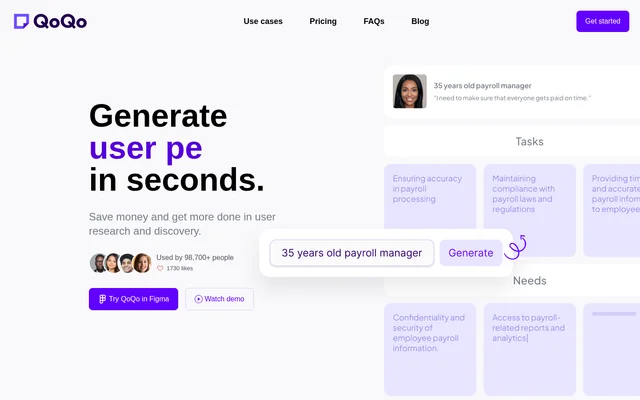
QoQo supports several UX discovery tasks, from exploring user characteristics to preparing design briefs and written interface content. Persona generation is described in detail: user input produces cards covering goals, needs, motivations, frustrations and tasks. The feature list also includes mapping, chat and research preparation tools.
- QoQo generates persona cards from user input.
- QoQo supports journey mapping and information architecture.
- QoQo includes affinity mapping.
- QoQo helps identify challenges, risks and key elements for design briefs.
- QoQo provides UX copywriting, a chat assistant and document chat.
- QoQo includes user interview and discovery questionnaire tools.
- QoQo offers history, clipboard copying and sticky-note output.
How QoQo works in Figma
QoQo is accessible as a Figma plugin in its beta version. Users provide input to generate persona cards or explore elements of a design brief. The website recommends adding descriptive context to prompts, such as country, gender and age, when addressing bias. Generated material can be copied to the clipboard or made into a sticky note, and history is included in the listed features.
Who QoQo is for
QoQo targets design agencies, organizations, startups and individual designers. For agencies, the stated uses include gathering public-knowledge insights and collaborating with clients with small budgets. For internal teams and startups, QoQo supports discovery before an MVP or design draft. For individual designers, QoQo provides assistance with idea generation and meaningful design content rather than dummy text.
- QoQo helps agencies generate ideas during UX discovery.
- QoQo supports teams that lack internal UX experts.
- QoQo helps individual designers develop personas and design content.
QoQo strengths and research limitations
QoQo combines several early-stage UX tasks with access inside Figma, covering persona generation, mapping, design briefs and copywriting. QoQo also states that research information is not shared or used for training without explicit consent, and that user data is not reviewed or analyzed to improve the system. These capabilities sit alongside an explicit recommendation to use QoQo with original user research.
- QoQo does not replace research with actual users.
- QoQo may lack specific contextual knowledge when qualitative publications are unavailable.
- QoQo acknowledges bias in its underlying internet-derived knowledge.
QoQo FAQ
What is QoQo?
QoQo is an AI assistant for UX design powered by OpenAI. QoQo helps organize early-stage discovery by generating persona cards from user input and identifying challenges, risks and key elements for design briefs.
Does QoQo replace user research?
QoQo does not replace user research and should be used alongside original research. QoQo draws on internet-derived knowledge but may not understand a specific context, particularly when relevant qualitative publications are unavailable.
Does QoQo work in Figma?
QoQo is accessible as a Figma plugin in its beta version. QoQo generates UX discovery material from user input and lists history, copying to the clipboard and making output into a sticky note among its features.
Who is QoQo for?
QoQo is intended for design agencies, internal teams, organizations, startups and individual designers. QoQo supports early discovery, idea generation and design content, including use cases involving limited budgets or a lack of internal UX experts.
Does QoQo use research information for training?
QoQo states that research information is not shared or used for training without explicit consent. QoQo also states that user data is not reviewed or analyzed to improve its system.
From the community
No reviews yet
Be the first to review this tool. What you write helps the next person choose.