What is Read AI?
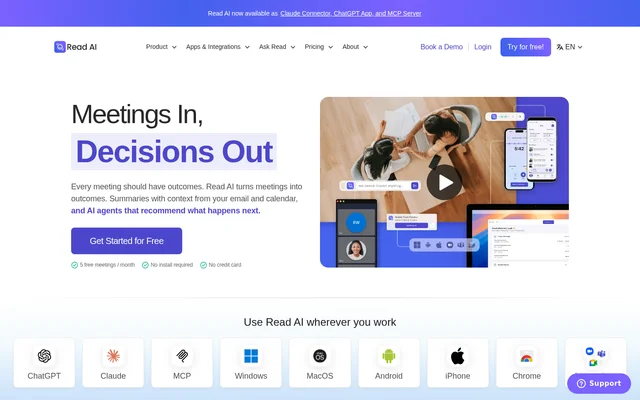
Read AI is an AI meeting assistant that records workplace conversations and turns them into summaries, transcripts, and follow-up information. Read AI serves individuals, small teams, and larger organizations that need to document meetings and retrieve decisions later. Beyond meeting records, Read AI uses context from email, calendars, past meetings, and CRM systems to prepare meeting information and support follow-through.
Read AI also includes Ask Read, an AI search capability that connects meetings, emails, messages, and other workplace information. Read AI can answer questions about decisions, ownership, and unresolved work with citations. Shared information becomes searchable team context, extending the use of a meeting report beyond the original conversation.
What Read AI can do
Read AI combines meeting capture, searchable records, coaching, and workflow connections. Read AI generates meeting reports containing summaries, topics, action items, key questions, and transcripts. Additional capabilities depend on the plan, including playback, recording uploads, and premium integrations. Read AI also offers real-time transcription, summaries, and meeting metrics through an in-meeting dashboard.
- Read AI creates meeting transcripts separated by speaker.
- Read AI answers questions across meetings, emails, and messages.
- Read AI routes action items to connected work tools.
- Read AI captures in-person meetings through mobile apps.
- Read AI provides coaching metrics such as talking speed and filler words.
- Read AI generates reports from uploaded audio and video on paid plans.
How Read AI works
Read AI can join Google Meet, Zoom, and Microsoft Teams meetings to take notes automatically. Read AI draws on connected calendar, email, past meeting, and CRM information to prepare context before a meeting, then produces personalized recaps and action items afterward. Meeting participants are informed when Read AI is present, and users can search the resulting information through Ask Read.
Read AI offers Windows and MacOS apps for recording and transcription, plus Android and iOS apps for capturing conversations away from a computer. Read AI's Chrome extension brings insights into Gmail, provides scheduling insights in Google Calendar, and lets users add the assistant to meetings. Read AI also lists a Claude Connector, ChatGPT App, MCP Server, and API.
Who Read AI is for
Read AI addresses different needs through plans for individuals, small teams, and larger organizations. Read AI's individual features support meeting documentation and personal coaching, while team features include shared workspaces and report distribution rules. Read AI's larger-organization offering adds security and administrative controls, including SAML, SCIM, domain capture, and custom data retention.
- Read AI helps individuals retain meeting summaries and searchable transcripts.
- Read AI helps teams find decisions, owners, and open action items.
- Read AI supports mobile capture of in-person meetings and live events.
- Read AI gives organizations controls over report sharing and meeting attendance.
Read AI pricing and plans
Read AI offers a Free plan with 5 meeting transcripts per month, meeting summaries, unlimited enterprise search, basic integrations, and apps. Read AI does not require a credit card for the Free plan. Pro adds unlimited meeting transcripts, premium integrations, and file upload allowances. Paid plans include unlimited meeting reports, unlimited storage, and workspace access.
Read AI's Enterprise plan adds audio and video playback, video highlights, and priority support. Read AI's Enterprise+ plan requires 5+ licenses and adds HIPAA compliance, SAML and SCIM, custom data retention, workspace onboarding, and EU and CA hosting. Read AI lists annual and monthly billing options, with annual billing discounted.
Read AI strengths and limitations
Read AI's strengths include support across major meeting services, connected search across workplace content, and access through desktop, mobile, and browser tools. Read AI states that customer data is not used for training by default and lists SOC 2 Type 2 certification and GDPR compliance. Read AI's limits depend on the subscription, particularly for recording duration, uploads, playback, and organizational controls.
- Read AI limits Free plan meeting recordings to 1 hour.
- Read AI excludes recording uploads from the Free plan.
- Read AI restricts audio and video playback to Enterprise and Enterprise+.
- Read AI requires 5+ licenses for Enterprise+.
Read AI FAQ
What is Read AI?
Read AI is an AI meeting assistant that generates summaries, transcripts, action items, topics, and key questions. Read AI also connects meetings, emails, and messages through Ask Read so users can retrieve workplace information and answers with citations.
Is Read AI free?
Read AI offers a $0 Free plan with 5 meeting transcripts per month and no credit card requirement. Read AI's Free plan includes meeting summaries, unlimited enterprise search, basic integrations, personalized meeting coaching, and desktop and mobile apps.
Which meeting platforms does Read AI support?
Read AI supports Google Meet, Microsoft Teams, and Zoom for automatic meeting notes. Read AI also offers Windows and MacOS apps for recording from a computer and Android and iOS apps for capturing in-person meetings and live events.
Does Read AI have integrations or an API?
Read AI lists an API, MCP Server, Claude Connector, and ChatGPT App, alongside integrations with workplace tools. Read AI's paid premium integrations include Notion, Salesforce, HubSpot, Jira, Confluence, Zapier, and webhooks.
Can Read AI record and play back meetings?
Read AI can record and transcribe meetings, but audio and video playback requires Enterprise or Enterprise+. Read AI's paid plans also support uploaded audio and video recordings that generate meeting reports containing summaries, topics, action items, key questions, and transcripts.
From the community
No reviews yet
Be the first to review this tool. What you write helps the next person choose.