What is Record Once?
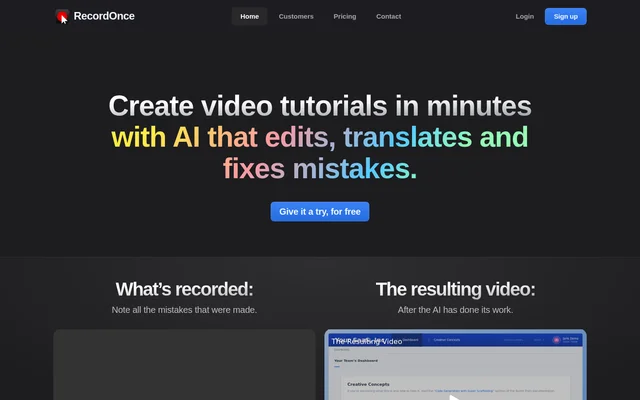
Record Once is an AI video tutorial tool for teams that demonstrate web applications. Record Once combines recording, editing, hosting, and publishing, with automatic text guides for readers who prefer written instructions. The software is intended to let team members create tutorials without learning conventional video editing.
Record Once differs from a pixel-based screen recorder by capturing the web application's HTML, CSS, and responses to user interactions. The resulting playback uses animated HTML and CSS controlled by AI. This recording method supports changes to captured content, including edits to steps and translation of text within the recorded application.
What Record Once can do
Record Once automates several parts of tutorial production, from cleaning up a demonstration to generating narration and written instructions. Record Once also provides manual finishing controls for arranging steps and adding supporting material. Translation capabilities cover both spoken narration and the text displayed within the recorded web application.
- Record Once removes recording mistakes, corrected typos, filler words, and loading delays.
- Record Once generates AI voice-overs or records a user's voice or camera.
- Record Once creates automatic text guides with screenshots.
- Record Once reorders, hides, or removes recorded steps.
- Record Once adds videos, slides, images, background music, and calls to action.
- Record Once translates voice-overs and recorded application text.
- Record Once replaces parts of existing tutorials and updates embedded versions.
How Record Once works
Record Once uses a built-in browser to record a web application demonstration. Record Once captures the underlying HTML and CSS alongside interactions such as button clicks, typed text, and corrected typos. After recording, the AI edits the demonstration and removes mistakes, leaving the creator to make finishing changes.
Record Once provides drag-and-drop editing for rearranging steps and inserting additional media. Record Once publishes without a separate rendering or uploading wait, according to the product page, and includes hosting and sharing. The software supports Windows, Mac, and Linux, while existing embedded tutorials can receive changes through the update workflow.
Who Record Once is for
Record Once is aimed at teams creating product demonstrations and web app tutorials, including teams whose members lack video editing skills. Record Once also supports ongoing tutorial maintenance through partial updates and synchronized embeds. Centralized branding and consistent formatting address teams that delegate tutorial creation across different contributors.
- Product teams can demonstrate web application workflows.
- Teams can pair video instructions with screenshot-based text guides.
- Teams can localize narration and recorded application screens.
- Teams can revise tutorials as their products change.
Record Once pricing and plans
Record Once offers Free Forever with unlimited recording and publication of 3 videos. Startup costs $49 per month and allows 10 published videos. Professional costs $99 per month, allows 25 published videos, and lists video file exports. Startup and Professional offer additional publishing capacity at $25 per 10 published videos per month.
Record Once lists Business with custom pricing and annual billing. Business features include video translation, watermark removal, data masking, custom AI voices, centralized branding, SSO, custom analytics, a custom SLA, custom integrations, and custom limits. The pricing page offers free access to get started and a contact route for Business.
Record Once strengths and limitations
Record Once combines automated cleanup, screenshot-based guides, included hosting, and updates to existing embedded tutorials in one workflow. Record Once's HTML-and-CSS recording method supports editing captured web app content rather than only manipulating video frames. Access to publishing capacity and several advanced capabilities depends on the selected plan.
- Record Once limits Free Forever publication to 3 videos.
- Record Once charges extra for additional Startup and Professional publishing capacity.
- Record Once lists video file exports under Professional.
- Record Once lists translation and watermark removal under custom-priced Business.
Record Once FAQ
What is Record Once?
Record Once is an AI video tutorial tool that captures web app demonstrations through a built-in browser. Record Once records HTML, CSS, and interactions, then uses AI to edit mistakes and supports voice-overs, screenshot-based text guides, hosting, and publishing.
Is Record Once free?
Record Once offers a Free Forever plan with unlimited recording and publication of 3 videos. Record Once also offers Startup at $49 per month, Professional at $99 per month, and a custom-priced Business plan with annual billing.
How does Record Once remove recording mistakes?
Record Once captures web app interactions, including typed text and corrected typos, so the AI can adjust playback. Record Once automatically skips filler words and loading delays, hides corrected typos, and lets users hide or remove individual steps.
Can Record Once translate video tutorials?
Record Once translates AI voice-overs and text inside the recorded web application. Record Once also lists custom AI training to match translated screens to the application's translations. Video translation appears among the features of the custom-priced Business plan.
Which operating systems does Record Once support?
Record Once supports Windows, Mac, and Linux. Record Once uses a built-in browser to capture web applications and includes tools for creating, hosting, sharing, and publishing tutorials, alongside automatic text guides with screenshots.
Can Record Once update videos that are already embedded?
Record Once can update existing embedded videos when a creator makes a change and publishes the update. Record Once also supports replacing parts of existing tutorials, allowing teams to revise demonstrations without recreating the entire original recording.
From the community
No reviews yet
Be the first to review this tool. What you write helps the next person choose.