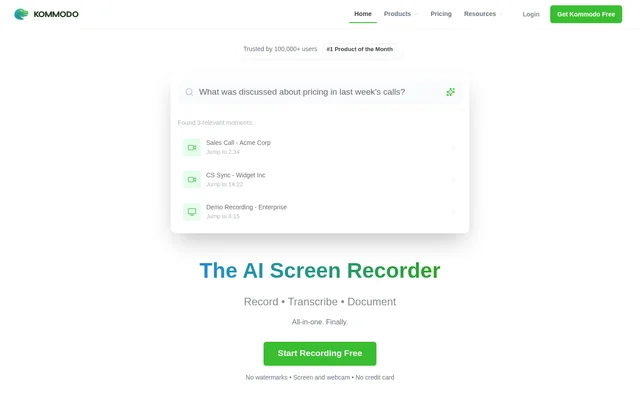
What is Kommodo?
Kommodo is an AI-powered screen recorder and SOP generator for teams that create training videos, documentation, and guides. Kommodo brings screen recording, transcription, and documentation into a shared workflow, with additional tools for meeting capture and video editing. The website identifies presentations, education, sales enablement, and customer success as supported uses.
Kommodo also treats recordings as searchable reference material. An AI assistant extracts information from videos and guides and returns answers with direct links to the source. Meeting recordings can live alongside other work videos, allowing teams to keep captured calls and instructional content within the same library.
What Kommodo can do
Kommodo combines content capture with tools for turning recordings into reusable material. The listed capabilities cover screen and webcam recording, transcription, automatic SOP generation, and editing. Kommodo also provides meeting summaries and library-wide search, so recorded information can support both documentation work and later questions about the material.
- Kommodo records screens and webcams without watermarks.
- Kommodo generates transcriptions, meeting summaries, and weekly recaps.
- Kommodo turns recordings into SOPs and documentation.
- Kommodo searches across the recording library.
- Kommodo answers questions with direct links to source material.
- Kommodo supports video editing, annotation, rerecording, and overdubbing.
- Kommodo offers team collaboration and custom branding options.
How Kommodo works
Kommodo offers browser-based recording and editing, with additional options listed for macOS, Windows, Chrome, iOS, and Android. The website describes CaptureFusion technology as enabling users to edit, rerecord, or overdub parts of a video. Recorded content can then become guides, documentation, or material for the AI assistant to search.
Kommodo can sync with Google Calendar to record meetings and keep those recordings with other work videos. After a call, Kommodo generates summaries and weekly recaps containing insights and action items. The website says users can share these outputs in Slack or Jira, without describing a specific integration setup.
Who Kommodo is for
Kommodo is aimed at teams using video to explain work, document processes, and preserve information from meetings. The website explicitly names presentations, education, sales enablement, and customer success. The combination of recording, editing, and generated documentation supports creating both watchable explanations and written reference material from captured work.
- Kommodo supports presentations built from screen recordings.
- Kommodo supports education and training video creation.
- Kommodo helps sales teams capture demos and sales enablement material.
- Kommodo supports customer success documentation and guides.
- Kommodo turns recorded workflows into SOPs for team reference.
Pros and cons
What works
- Kommodo combines recording, documentation, and AI library search.
- Kommodo offers free recording without watermarks or a credit card.
- Kommodo links AI answers directly to source material.
- Kommodo provides browser, desktop, extension, and mobile options.
What to watch
- Kommodo free recordings remain accessible to users and viewers for only 60 days.
- Kommodo requires an upgrade to retain access to older recordings.
Kommodo FAQ
What is Kommodo?
Kommodo is an AI-powered screen recorder and SOP generator for creating training videos, documentation, and guides. Kommodo combines screen and webcam recording with transcription, video editing, meeting summaries, and an AI assistant that searches videos and guides.
Can Kommodo record meetings and generate notes?
Kommodo can sync with Google Calendar to record meetings and store the recordings alongside other work videos. Kommodo generates meeting summaries and weekly recaps with insights and action items that users can share in Slack or Jira.
Can Kommodo answer questions about recorded videos?
Kommodo includes an AI assistant that extracts information and insights from a library of videos and guides. Kommodo provides answers with direct links to source material and supports searching across recordings to find relevant information.
Which platforms does Kommodo support?
Kommodo lists web access, macOS and Windows apps, a Chrome extension, and iOS and Android apps. Kommodo also describes browser-based screen recording and video editing, including the ability to edit, rerecord, or overdub parts of a video.
From the community
No reviews yet
Be the first to review this tool. What you write helps the next person choose.