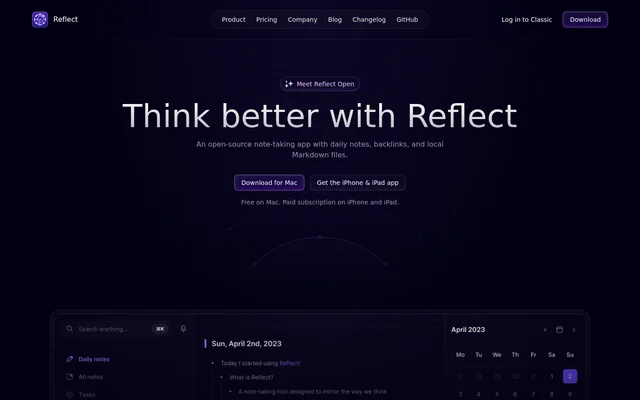
What is Reflect?
Reflect is an open-source note-taking app that combines local Markdown files, daily notes, and backlinks. Reflect is designed for capturing ideas and connecting information that can be referenced later. Reflect supports reading and writing on Mac, iPhone, and iPad, and comes from an indie team distributed across the globe.
Reflect keeps notes in a folder chosen by the user rather than describing storage only in terms of an online account. Reflect also offers optional AI assistance alongside its note-taking features. The source code is available on GitHub, while the website provides downloads for Mac and access to the iPhone and iPad app.
What Reflect can do
Reflect combines everyday note capture with tools for retrieving and reusing information. Reflect connects notes through backlinks, supports searching past notes and ideas, and captures material from the web. Reflect's optional AI adds questions answered from notes, text summaries, writing improvements, and reusable custom prompts.
- Reflect starts daily note-taking with today's note.
- Reflect connects related notes through backlinks.
- Reflect captures links, text, and screenshots through its Chrome extension on Mac.
- Reflect saves source links alongside web clips.
- Reflect records audio memos and supports transcription through a transcription provider.
- Reflect returns AI answers linked to source notes.
- Reflect extracts key takeaways and action items from meeting notes.
- Reflect saves custom AI prompts.
How Reflect works
Reflect stores notes as local Markdown files in a folder the user chooses. Reflect offers iCloud Drive or Git for syncing notes across supported devices. Reflect's iOS app supports capturing ideas online or offline, while the Chrome extension on Mac captures research material and preserves the original source link.
Reflect enables optional AI when the user connects an API key. Reflect sends requests directly to the user's provider, which bills AI usage separately. Reflect excludes notes marked private from AI note access. Reflect also lets users ask questions about their notes and receive answers with links back to the source notes.
Who Reflect is for
Reflect serves people who want to collect personal ideas, reading material, research, and meeting notes in a connected collection. Reflect's daily notes support ongoing capture, while backlinks help associate related thoughts. Reflect's web clipping and source links support research and reading, and its AI tools help turn meeting notes into takeaways and action items.
- Reflect supports daily idea capture and recording to-dos.
- Reflect preserves research clips with their source links.
- Reflect connects related reading notes through backlinks.
- Reflect summarizes meeting notes into key takeaways and action items.
Reflect pricing and plans
Reflect is free on Mac, with no subscription required. Reflect requires a paid subscription for the iPhone and iPad app, and the website directs users to the App Store for local pricing. Reflect's optional AI requires the user's own API key, with provider charges billed separately from app access.
Reflect strengths and limitations
Reflect combines local file storage, open-source code, and a choice of sync methods with linked notes and optional AI. Reflect provides source-linked AI answers and excludes private notes from AI note access. Reflect's access costs depend on the device and whether the user enables AI through an external provider.
- Reflect requires a paid subscription for iPhone and iPad access.
- Reflect requires an API key and separate provider billing for optional AI.
- Reflect lists apps for Mac, iPhone, and iPad, but does not list Windows or Android apps.
Reflect FAQ
What is Reflect?
Reflect is an open-source note-taking app with daily notes, backlinks, and local Markdown files. Reflect supports Mac, iPhone, and iPad and offers optional AI for answering questions from notes, summarizing text, and improving writing.
Is Reflect free?
Reflect is free on Mac without a subscription, while the iPhone and iPad app requires a paid subscription. Reflect lists local mobile pricing through the App Store. Optional AI requires the user's own API key and separate provider charges.
How does Reflect use AI?
Reflect uses optional AI to answer questions with links to source notes, summarize text, extract meeting takeaways, and improve writing. Reflect requires the user's own API key, sends requests directly to the provider, and excludes notes marked private from AI note access.
Where does Reflect store notes?
Reflect stores notes as local Markdown files in a folder chosen by the user. Reflect supports syncing through iCloud Drive or Git and allows reading and writing on Mac, iPhone, and iPad.
Can Reflect save web research?
Reflect captures links, text, and screenshots through a Chrome extension on Mac. Reflect saves the source link alongside web clips, allowing research and reading material to retain its original context within the user's notes.
Can Reflect transcribe voice notes?
Reflect supports transcribing voice notes through the user's transcription provider and also records audio memos. Reflect lists voice-note transcription among its AI capabilities, alongside source-linked answers, meeting takeaways, writing improvements, and custom prompts.
From the community
No reviews yet
Be the first to review this tool. What you write helps the next person choose.