What is Regex.ai?
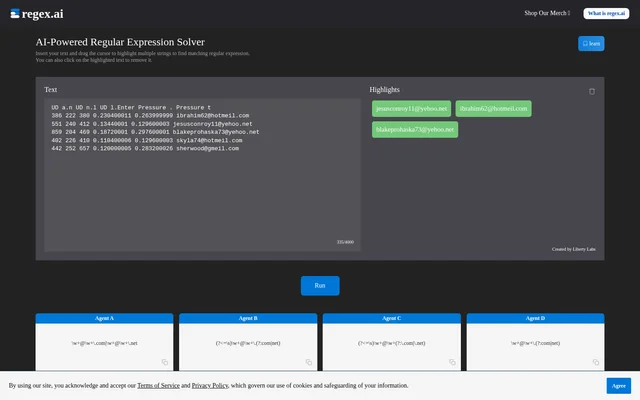
Regex.ai is an AI-powered regular expression solver that uses highlighted strings as examples for finding a matching pattern. Created by Liberty Labs, Regex.ai presents a text input, a Highlights area and agent-labelled results. The central task is to insert text and identify the strings that the expression should match, rather than begin by entering a regular expression.
Regex.ai shows an email-address example on the supplied page. The highlighted strings appear in the Highlights area, while the result panels show regular expressions and matching addresses. This places the selected examples, proposed patterns and displayed matches within the same text-matching workflow.
What Regex.ai can do
Regex.ai turns selections within supplied text into input for a regular expression search. The page combines direct text highlighting with result panels labelled Agent A, Agent B, Agent C and Agent D. Each panel displays an expression followed by matching strings, giving users concrete output to inspect alongside the examples they selected.
- Regex.ai accepts inserted text as the source for matching.
- Regex.ai lets users highlight multiple strings by dragging the cursor.
- Regex.ai removes a selection when the highlighted text is clicked.
- Regex.ai displays agent-labelled regular expressions and lists of matching strings.
- Regex.ai provides a view all control beneath each displayed result list.
How Regex.ai works
Regex.ai starts with text supplied in the input area. Users drag the cursor across strings to mark examples, and the selected strings appear under Highlights. Clicking highlighted text removes that selection. The page provides a Run control, followed by result areas containing the expressions and the strings shown as matches.
Regex.ai demonstrates different expression structures across the agent results. The supplied expressions include alternatives for email domain endings, grouped alternatives and lookbehind syntax in some results. The visible lists are not identical across all agents, so the displayed matches provide useful context when inspecting the corresponding expression.
Who Regex.ai is for
Regex.ai is relevant to people who have example strings in a passage of text and need a regular expression to match them. The page centres on selecting examples and inspecting results, with email addresses providing the concrete demonstration. The supported use cases concern finding patterns in text and reviewing which strings appear in the resulting match lists.
- Regex.ai supports creating patterns from multiple highlighted examples.
- Regex.ai demonstrates matching email addresses within supplied text.
- Regex.ai supports inspecting candidate expressions alongside their listed matches.
Regex.ai strengths and result inspection
Regex.ai combines editable example selections with visible regular expression output. The ability to remove highlights supports adjusting the selected examples, while the agent-labelled panels expose more than a single proposed expression. Regex.ai also shows matching strings beneath each pattern and includes view all controls. These interface elements make both the generated syntax and the displayed matching text available for inspection.
Regex.ai FAQ
What is Regex.ai?
Regex.ai is an AI-powered regular expression solver created by Liberty Labs. Regex.ai finds matching regular expressions from strings that users highlight within supplied text and displays agent-labelled expressions alongside matching strings.
How do you generate a regular expression with Regex.ai?
Regex.ai lets users insert text, drag the cursor to highlight multiple strings and use the Run control. Regex.ai displays result panels containing regular expressions and matching strings, with view all controls beneath the lists.
Can you remove highlighted examples in Regex.ai?
Regex.ai allows users to remove an example by clicking the highlighted text. Regex.ai also supports highlighting multiple strings by dragging the cursor, so the selected examples can be adjusted within the input text.
Can Regex.ai match email addresses?
Regex.ai demonstrates email-address matching on the supplied page. Regex.ai shows selected email addresses, expressions covering com and net domain endings, and matching address lists beneath the agent-labelled results.
Does Regex.ai show multiple regular expression results?
Regex.ai displays results under Agent A, Agent B, Agent C and Agent D. Regex.ai shows a regular expression and matching strings for each agent, with different expression structures visible in the supplied example.
From the community
No reviews yet
Be the first to review this tool. What you write helps the next person choose.