What is Runway Gen-4?
Runway Gen-4 is an online AI image generator and editor offered on FamilyPro for creating visuals from text descriptions and uploaded images. Runway Gen-4 supports marketing, advertising, social media content, illustration, and design references. The page presents the tool as available without sign-up and states that generated images have no watermarks.
Runway Gen-4 is described on the page as using the same model trained by the official Runway team. The listing focuses on image creation and editing, including realistic imagery and composition guided by visual references. Although the page also discusses broader model differences, the demonstrated workflow is for generating images.
What Runway Gen-4 can do
Runway Gen-4 combines text prompts with optional visual references to guide image content, style, and composition. The page describes support for realistic images, consistent characters or objects across generations, and a range of resolutions. Examples cover both creating new visuals from ideas and transforming existing photographs or drawings into different visual forms.
- Runway Gen-4 generates images directly from text descriptions.
- Runway Gen-4 uses up to 3 uploaded images as references.
- Runway Gen-4 blends photos for social posts, product shots, and banners.
- Runway Gen-4 converts photos into hand-drawn sketches.
- Runway Gen-4 transforms sketches and manuscript drawings into realistic images.
- Runway Gen-4 supports character and object consistency across image generations.
How Runway Gen-4 works
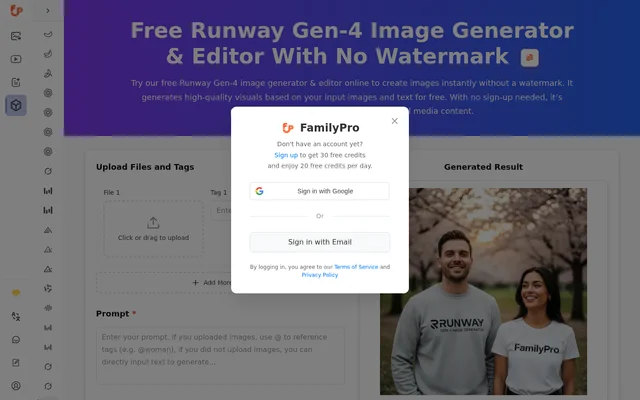
Runway Gen-4 offers a text-only workflow and a reference-image workflow in the browser. For text-to-image generation, the page recommends describing a subject, an action, and a style. For image-to-image generation, users upload reference files through the upload area and use Add More to include additional images within the stated upload limit.
Runway Gen-4 allows users to tag uploaded images and reference those tags in the prompt with the @ symbol. The page describes tags as representing image attributes. After entering the desired output in the prompt, users select Generate, and the resulting image appears in the output area on the page.
Who Runway Gen-4 is for
Runway Gen-4 is presented for people creating marketing assets, social media content, illustrations, and design materials. The examples include content creators seeking blog images and marketers exploring visual ideas. Other stated applications include teaching materials, product mockups, avatars, and sequential storytelling that benefits from consistent characters or objects across generated images.
- Marketers can create advertising visuals, product shots, and banners.
- Content creators can generate blog images and social posts.
- Designers can turn drawings into realistic references or product mockups.
- Educators can create teaching materials from sketches.
- Illustrators can produce avatars, story illustrations, and concept art.
Runway Gen-4 pricing and access
Runway Gen-4 has free access without sign-up, and the page advertises 20 free credits per day. The generation interface also displays 0 credits per use. FamilyPro offers a paid purchase option described as unlocking unlimited AI image generation, but the supplied page text does not provide a purchase price or detailed plan terms.
Runway Gen-4 strengths and limitations
Runway Gen-4 combines watermark-free output, no-sign-up access, and support for both text and image prompts. Reference-image tagging provides a way to specify which uploaded material should influence a result. The main stated constraints concern the number of reference images and the distinction between free access and the paid offer for unlimited generation.
- Runway Gen-4 accepts up to 3 reference images.
- Runway Gen-4 advertises unlimited image generation through a paid purchase.
- Runway Gen-4 displays daily free credits without detailed credit-consumption terms in the supplied text.
Runway Gen-4 FAQ
What is Runway Gen-4?
Runway Gen-4 is an online AI image generator and editor available through FamilyPro. Runway Gen-4 creates images from text descriptions and uploaded references, with applications including marketing visuals, social posts, illustrations, and product mockups.
Is Runway Gen-4 free?
Runway Gen-4 offers free access without sign-up, and the page advertises 20 free credits per day. FamilyPro also offers a paid purchase option described as unlocking unlimited AI image generation, without stating a purchase price in the supplied text.
Does Runway Gen-4 add watermarks?
Runway Gen-4 generates images without watermarks, according to the page. The watermark-free output is described alongside use cases such as marketing visuals, social media posts, product shots, banners, illustrations, and concept art.
How do you use reference images in Runway Gen-4?
Runway Gen-4 accepts up to 3 uploaded reference images through the upload area and Add More control. Users can tag those images, reference the tags with the @ symbol in a prompt, and select Generate to display the result.
Can Runway Gen-4 generate images from text alone?
Runway Gen-4 supports text-to-image generation without an uploaded image. The page recommends writing a prompt using a subject, an action, and a style, then selecting Generate to show the image in the output area.
What can you create with Runway Gen-4?
Runway Gen-4 can create marketing visuals, story illustrations, concept art, avatars, and product mockups. The page also describes blending photos, converting photographs into hand-drawn sketches, and turning sketches or manuscript drawings into realistic images.
From the community
No reviews yet
Be the first to review this tool. What you write helps the next person choose.