What is ScoreCloud?
ScoreCloud is music notation software for turning musical performances and recordings into written scores. ScoreCloud serves musicians, students, teachers, choirs, bands, composers and arrangers through separate products for full-score work, lead-sheet creation and mobile idea capture. The product range includes ScoreCloud Studio, ScoreCloud Songwriter and ScoreCloud Express.
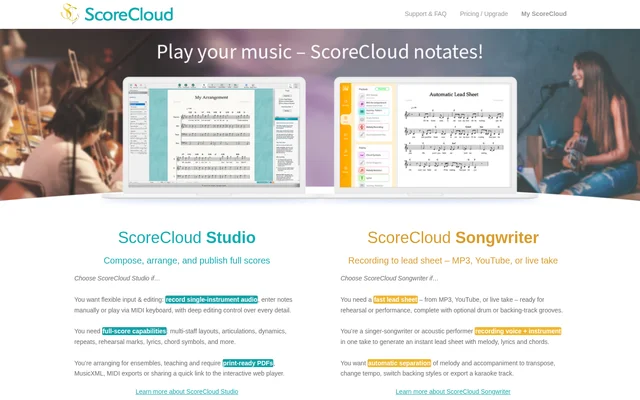
ScoreCloud Studio focuses on composing and arranging with audio, MIDI and manual input. ScoreCloud Songwriter focuses on extracting melody, lyrics and chords from recordings that include voice and instruments. ScoreCloud Express captures sung, whistled or hummed ideas on iPhone and iPad, with account syncing for later work in Studio.
What ScoreCloud can do
ScoreCloud covers notation tasks ranging from capturing a melody to preparing an ensemble score. ScoreCloud Studio provides detailed editing and full-score notation, while ScoreCloud Songwriter turns recordings into rehearsal or performance lead sheets. Output options include printable scores, music-file exports and an interactive web player.
- ScoreCloud Studio transcribes single-instrument audio and MIDI into notation.
- ScoreCloud Studio supports manual note entry and overdub recording.
- ScoreCloud Studio adds multi-staff layouts, articulations, dynamics, repeats and rehearsal marks.
- ScoreCloud Studio exports print-ready PDFs, MusicXML and MIDI.
- ScoreCloud Songwriter creates lead sheets from MP3, YouTube and live takes.
- ScoreCloud Songwriter separates melody and accompaniment for tempo changes, transposition and karaoke-track export.
- ScoreCloud Express turns sung, whistled or hummed melodies into notation.
How ScoreCloud works
ScoreCloud Studio and ScoreCloud Songwriter are available to download for Windows and Mac. In Studio, users can record single-instrument audio, play a MIDI keyboard or enter notes manually, then edit and arrange the resulting notation. Studio also supports overdubbing to develop arrangements for bands, choirs and ensembles.
ScoreCloud Songwriter accepts MP3 files, YouTube material or live recordings, including a voice and instrument recorded together. The resulting lead sheet contains melody, lyrics and chords, with optional drum or backing-track grooves. ScoreCloud Express runs on iPhone and iPad and syncs captured songs to a ScoreCloud account for expansion in Studio.
Who ScoreCloud is for
ScoreCloud serves both people creating original music and people preparing notation from existing recordings. The website identifies singer-songwriters and acoustic performers as Songwriter users, alongside guitarists, teachers and vocalists. Studio addresses composers, arrangers and teachers who need detailed notation, ensemble arrangements, printable output or shareable scores.
- ScoreCloud Songwriter helps singer-songwriters create lead sheets from combined vocal and instrumental takes.
- ScoreCloud Songwriter helps guitarists obtain chords from MP3 recordings.
- ScoreCloud Songwriter helps teachers prepare sheets for class and vocalists prepare piano sheets for auditions.
- ScoreCloud Studio supports arrangements for bands, choirs and ensembles.
ScoreCloud pricing and plans
ScoreCloud Studio can be used free for up to 10 saved songs; more songs and some advanced features require an upgrade. The listed PLUS plan costs $5.99 per month and includes unlimited songs, no print watermark and more import and export options. The SONGWRITER plan costs $11.99 per month.
ScoreCloud lists PRO at $20.99 per month, with local saving, batch MIDI analysis and all import and export formats. ScoreCloud Songwriter offers a 10 day free trial. ScoreCloud Express has an upfront fee and can then be used for up to 10 saved songs.
ScoreCloud strengths and limitations
ScoreCloud combines multiple input methods with separate workflows for full scores, lead sheets and mobile sketches. Studio provides detailed notation controls and several export formats, while Songwriter handles recordings of voice and instruments together. Express links mobile capture with later Studio editing through account syncing, but product access and saved-song allowances differ.
- ScoreCloud Studio requires an upgrade beyond 10 saved songs and for some advanced features.
- ScoreCloud Express requires an upfront fee and allows up to 10 saved songs.
- ScoreCloud Express is limited to iPhone and iPad.
ScoreCloud FAQ
What is ScoreCloud?
ScoreCloud is music notation software for musicians, students, teachers, composers and arrangers. ScoreCloud Studio creates and edits full scores, ScoreCloud Songwriter turns recordings into lead sheets, and ScoreCloud Express captures musical ideas on iPhone and iPad.
Is ScoreCloud free?
ScoreCloud offers free Studio use for up to 10 saved songs, with upgrades required for more songs and some advanced features. ScoreCloud Songwriter has a 10 day free trial, while ScoreCloud Express requires an upfront fee and supports up to 10 saved songs.
Can ScoreCloud turn recordings into sheet music?
ScoreCloud supports recording-to-notation workflows through Studio and Songwriter. ScoreCloud Studio transcribes single-instrument audio and MIDI, while ScoreCloud Songwriter creates lead sheets with melody, lyrics and chords from MP3 files, YouTube material or live voice-and-instrument recordings.
Which devices does ScoreCloud support?
ScoreCloud provides Studio and Songwriter downloads for Windows and Mac, plus the Express app for iPhone and iPad. ScoreCloud Express syncs captured songs to a ScoreCloud account so users can expand those ideas later in Studio.
What export formats does ScoreCloud support?
ScoreCloud Studio supports print-ready PDF, MusicXML and MIDI exports, along with sharing through an interactive web-player link. ScoreCloud lists more import and export options with PLUS and all import and export formats with PRO.
Can ScoreCloud separate vocals and accompaniment?
ScoreCloud Songwriter provides automatic separation of melody and accompaniment. ScoreCloud Songwriter uses this capability to support transposition, tempo changes, switching backing styles and exporting a karaoke track from recordings used to generate lead sheets.
From the community
No reviews yet
Be the first to review this tool. What you write helps the next person choose.