What is ScreenshotAI?
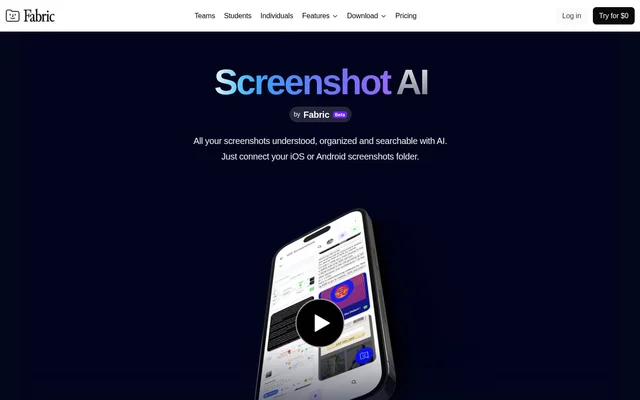
ScreenshotAI is an AI tool by Fabric that turns saved screenshots into organized, searchable information for creators, researchers and thinkers. ScreenshotAI addresses the problem of capturing useful content and then losing track of it in a screenshot collection. Automatic analysis, tagging and information extraction make those captures available for later searches and questions.
ScreenshotAI is presented as part of Fabric's broader AI workspace rather than as a separate screenshot archive alone. Fabric also supports notes, saved links, files and collaboration. This context places screenshot information alongside other material used for thoughts, projects and inspiration, with connected apps and cloud drives contributing to the wider workspace.
What ScreenshotAI can do
ScreenshotAI processes the content and context of screenshots so users can retrieve more than an image file. ScreenshotAI extracts text, creates smart notes and supports searches based on the information inside a capture. The page also describes asking questions about screenshots and turning captured material into summaries and actionable insights.
- ScreenshotAI synchronizes screenshots automatically after a folder is connected.
- ScreenshotAI analyzes and tags screenshot content.
- ScreenshotAI creates a smart note for each new screenshot.
- ScreenshotAI extracts text from captured images.
- ScreenshotAI finds screenshots by their content, ideas and text.
- ScreenshotAI answers questions and summarizes captured information.
How ScreenshotAI works
ScreenshotAI starts with a connection to a screenshots folder. The product page mentions iOS and Android, while the repeated setup instructions specifically describe connecting an iOS screenshots folder. After connection, new screenshots are synchronized and analyzed automatically. Each new capture produces a smart note containing information from the screenshot and extracted text.
ScreenshotAI then lets users explore the collection, search for information or ask questions about what they saved. For web captures, the Fabric browser extension adds source context by remembering the URL where a screenshot was taken. The saved address provides a way to jump back to the original page.
Who ScreenshotAI is for
ScreenshotAI is aimed at creators, researchers and thinkers who use screenshots to save content. ScreenshotAI supports revisiting captured ideas and information without relying only on remembering the image itself. The stated search and summary features suit workflows where screenshots hold material that needs to be found, understood or reused later.
- ScreenshotAI helps researchers find information inside saved screenshots.
- ScreenshotAI helps creators revisit captured ideas and inspiration.
- ScreenshotAI helps users summarize screenshot content.
- ScreenshotAI helps users trace web captures back to their source.
ScreenshotAI pricing and plans
ScreenshotAI is promoted with free access to Fabric, while the supplied pricing page describes Fabric subscriptions rather than separate ScreenshotAI plans. Fabric Plus is listed at $8/mo billed yearly at $96/yr, Pro at $18/mo billed yearly at $216/yr, and Max at $54/mo billed yearly at $648/yr.
ScreenshotAI access should be distinguished from the wider Fabric plan details: the supplied text does not specify a separate screenshot allowance for each subscription. Fabric plans vary in storage and AI usage, and additional AI usage can be purchased through account settings. Fabric accepts major credit cards, allows cancellation at any time and states that refunds are unavailable.
ScreenshotAI strengths and limitations
ScreenshotAI combines automatic organization with several ways to retrieve captured information: text extraction, content-based search, questions and summaries. ScreenshotAI also retains web source URLs when used with the Fabric browser extension. The main practical dependencies are connecting the screenshot collection and using the extension for source tracking; the wider Fabric subscriptions also carry storage and AI usage allowances.
- ScreenshotAI needs a connected screenshots folder for automatic synchronization.
- ScreenshotAI source URL retention depends on the Fabric browser extension.
- ScreenshotAI setup instructions emphasize iOS despite also mentioning Android.
- Fabric subscriptions are subject to a no-refund policy.
ScreenshotAI FAQ
What is ScreenshotAI?
ScreenshotAI is an AI screenshot organization and search tool by Fabric. ScreenshotAI automatically syncs and analyzes screenshots, tags their contents, extracts useful information and makes captured material searchable for creators, researchers and thinkers.
Is ScreenshotAI free?
ScreenshotAI is promoted through a free-access offer for Fabric. The supplied Fabric pricing page also lists paid Plus, Pro and Max subscriptions, but does not specify separate ScreenshotAI pricing or screenshot-specific allowances for each plan.
How does ScreenshotAI organize screenshots?
ScreenshotAI connects to a screenshots folder and automatically synchronizes and analyzes new captures. ScreenshotAI tags content, extracts useful information and text, and creates a smart note for each new screenshot so the saved material can be searched.
Can ScreenshotAI answer questions about screenshots?
ScreenshotAI lets users ask questions about information contained in screenshots. ScreenshotAI can also read and summarize captured information, while search retrieves screenshots using the content, ideas and text inside the images.
Does ScreenshotAI work with iOS and Android?
ScreenshotAI mentions connecting an iOS or Android screenshots folder on the product page. ScreenshotAI's detailed connection instructions repeatedly describe iOS, so the supplied text gives more explicit setup information for iOS than for Android.
Can ScreenshotAI remember where a screenshot came from?
ScreenshotAI supports source URL retention through the Fabric browser extension. Screenshots captured with the extension remember the URL of the web page where they were taken, allowing users to return directly to the original source.
From the community
No reviews yet
Be the first to review this tool. What you write helps the next person choose.