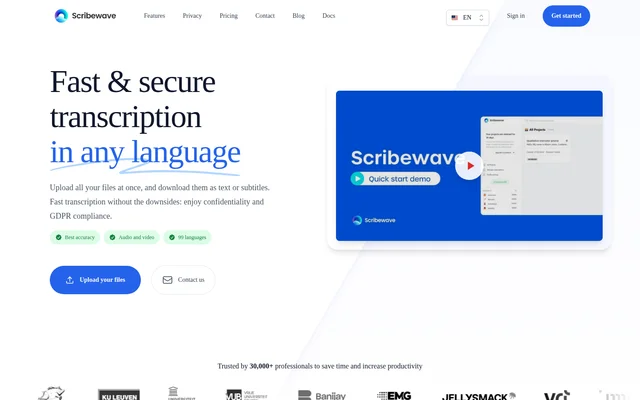
What is Scribewave?
Scribewave is a web-based AI transcription service for converting recorded audio and video into editable text, subtitles and translations. Made in Belgium, Scribewave is intended for researchers, journalists, video makers and teams working with sensitive recordings. Language support covers 99 languages and dialects, including English, Dutch, French, German and Spanish.
Scribewave combines automatic speech recognition with tools for reviewing recordings and preparing deliverables. Beyond transcription, Scribewave includes an AI assistant that answers questions about transcript content and produces summaries, chapters and meeting notes. Answers include references to exact timecodes so users can return to the relevant recording.
What Scribewave can do
Scribewave supports a workflow that extends from recording upload to edited transcripts, translated text and subtitle delivery. Scribewave also provides tools for handling specialist vocabulary, identifying speakers and reducing background noise before transcription. These capabilities support both transcript preparation and the conversion of recordings into other content formats.
- Scribewave transcribes common audio and video formats, including MP3, WAV, M4A and MP4.
- Scribewave identifies speakers and allows users to edit speaker names and labels.
- Scribewave supports custom vocabularies for names, jargon and preferred spellings.
- Scribewave reduces background noise before transcription.
- Scribewave exports transcripts and subtitles in formats including DOCX, plain text, SRT and VTT.
- Scribewave creates videos from audio with waveforms, subtitles, logos and colors.
- Scribewave saves reusable prompts and allows editing and downloading of AI-generated results.
How Scribewave works
Scribewave follows an upload, transcribe, edit and export workflow. Users upload audio or video files, and the speech-to-text algorithm generates a transcript. The browser-based editor plays the recording while highlighting the paragraph being spoken. Users can edit text as a document or in a timeline, and clicking a word jumps playback to that moment.
Scribewave lets users export transcripts to Microsoft Word or Google Docs and download subtitle files or videos with burned-in subtitles. The built-in AI assistant accepts questions about transcripts, including very large files. Users can review timecoded answers, edit generated summaries or reports, and save frequently used prompts for later work.
Who Scribewave is for
Scribewave addresses recording-based work across research, journalism, content production and education. The website describes qualitative interview processing, journalistic transcription and the creation of language study materials. Scribewave also supports teams that need consistent terminology in transcripts and video makers preparing subtitles or turning audio recordings into visual content.
- Scribewave helps researchers transcribe qualitative interviews for analysis.
- Scribewave helps journalists prepare and edit interview transcripts.
- Scribewave helps educators turn multilingual recordings into study materials.
- Scribewave helps content creators produce subtitles and audio-based social videos.
Scribewave pricing and plans
Scribewave offers a free first transcript without requiring a credit card. Pay-as-you-go transcription costs €9 per hour, including VAT, with no monthly fees. Purchased transcription hours have no expiration. Creative costs €15 per month, including VAT, and includes 5 hours every month. Professional costs €40 per month, including VAT, and includes 20 hours every month.
Scribewave lists enhanced accuracy and ongoing file retention for Creative and Professional, with a priority queue on Professional. Both subscriptions can be canceled at any time. Pay-as-you-go and Creative list uploads up to 200MB, while Professional lists uploads up to 1GB. Scribewave also offers Enterprise Solutions tailored to organizational needs.
Scribewave strengths and limitations
Scribewave combines multilingual transcription, synchronized editing, flexible exports and timecoded AI responses in a browser-based service. Scribewave states that data is stored on European servers, backed up daily and available for permanent deletion. Scribewave also states GDPR compliance and distinguishes this from the GDPR, HIPAA and SOC 2 Type II compliance of its partners.
- Scribewave requires payment for continued transcription beyond the free trial.
- Scribewave applies different upload limits across its listed plans.
- Scribewave describes remembering speaker names from voice characteristics as a feature still being developed.
Scribewave FAQ
What is Scribewave?
Scribewave is a browser-based AI transcription service that converts audio and video into editable transcripts, subtitles and translations in 99 languages. Scribewave includes speaker recognition, a time-synced editor and an AI assistant for questions, summaries and meeting notes.
Is Scribewave free?
Scribewave offers a free first transcript with no credit card required, followed by paid usage. Pay-as-you-go transcription costs €9 per hour including VAT. Creative costs €15 per month and Professional costs €40 per month, both including VAT.
Can Scribewave identify different speakers?
Scribewave detects different speakers using voice characteristics and marks speakers with different labels and colors in the transcript. Users can edit speaker names and add or remove speakers. Remembering speaker names based on voice characteristics is described as a feature under development.
What file formats does Scribewave support?
Scribewave accepts common audio and video formats, including MP3, WAV, FLAC, OGG, M4A, MP4, MOV, AVI and WMV. Scribewave exports transcripts as DOCX and plain text, and subtitles as SRT, VTT or burned-in video.
Can Scribewave summarize transcripts?
Scribewave includes an AI assistant that answers transcript questions, generates summaries, organizes content into chapters and creates meeting notes. Answers include exact timecode references. Users can save reusable prompts, edit AI-generated results and download those results in various formats.
Where does Scribewave store data?
Scribewave states that user data is stored on European servers, backed up daily and available for permanent deletion. Scribewave states GDPR compliance and says its partners are GDPR, HIPAA and SOC 2 Type II compliant.
From the community
No reviews yet
Be the first to review this tool. What you write helps the next person choose.