What is Shuffle?
Shuffle is an AI visual website editor that combines framework-specific editing tools, reusable interface components, and chat-based assistance. Shuffle serves solo projects and collaborative teams, with editors for Tailwind CSS, Bootstrap, Material-UI, Bulma, and Next.js. The supplied pages also describe tools for website redesign, mobile app screen design, email design, and theme creation.
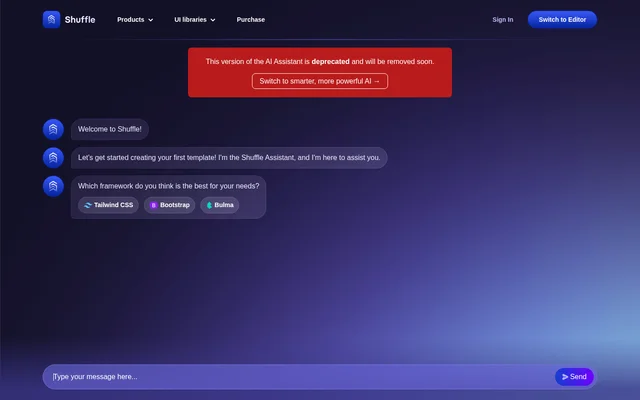
Shuffle's supplied chat page carries an important availability notice: that version of the AI Assistant is deprecated and will be removed soon. Shuffle links from that notice to a newer AI experience. The same page describes current editing capabilities, including an AI Agent, Grid View, and design regeneration through Multi-AI Designer.
What Shuffle can do
Shuffle supports website design through visual controls, chat instructions, and reusable design resources. Shuffle's AI Agent can make several kinds of changes across a page from a chat request, while Grid View exposes the project's pages together. The component catalog and framework editors provide additional starting points for building interfaces.
- Shuffle adds sections and edits copy or styles through its AI Agent.
- Shuffle moves or removes page blocks from chat instructions.
- Shuffle displays project pages side by side in Grid View.
- Shuffle regenerates designs with requested assets, logos, or other adjustments.
- Shuffle exports React code in JSX or TSX.
- Shuffle lists 13,400+ UI components and 80+ front-end UI libraries.
How Shuffle works
Shuffle lets users describe desired page changes in chat, after which the AI Agent adds sections, updates text and styles, or rearranges blocks. Shuffle's Grid View switches the editor to a canvas where pages can be arranged freely and viewed at different zoom levels. Users can also add new pages and request design regeneration without starting from scratch.
- Shuffle provides an extension for VSC and Cursor.
- Shuffle lists a Design CLI for building or redesigning websites in the terminal.
- Shuffle offers a Next.js editor with JSX or TSX code export.
Who Shuffle is for
Shuffle addresses both individual website projects and collaborative teams through its stated license options. Shuffle's framework editors and React export are relevant to front-end development workflows, while visual page editing and component browsing support interface design work. The listed supporting tools also cover website redesign, newsletters, and mobile app screens for Figma.
- Shuffle supports solo website projects with its Single License option.
- Shuffle supports collaborative teams through its For Teams option.
- Shuffle provides AI email design for creating newsletters.
- Shuffle provides mobile app design for iOS and Android screens in Figma.
Shuffle pricing and plans
Shuffle lists Single License for solo projects and For Teams for collaborative teams. Shuffle also presents a license selection prompt, but the supplied pricing page does not show subscription amounts, billing intervals, or a detailed comparison of plan entitlements. The available text therefore supports identifying license options, but not quoting a specific purchase price.
Shuffle strengths and limitations
Shuffle brings visual page editing, conversational changes, framework-specific tools, and a reusable component catalog into the same product offering. Shuffle's shared canvas provides a way to review multiple project pages together, and its React export supports a code-oriented workflow. The main caveats in the supplied material concern the deprecated chat experience and missing pricing details.
- Shuffle's AI Assistant version at the supplied chat URL is scheduled for removal.
- Shuffle directs users of the deprecated assistant to a newer AI experience.
- Shuffle's supplied pricing page does not disclose license prices.
Shuffle FAQ
What is Shuffle?
Shuffle is an AI visual website editor with framework-specific editors, reusable UI components, and chat-based assistance. Shuffle supports page content and style changes, multi-page canvas viewing, and React code export.
How is Shuffle priced?
Shuffle lists Single License for solo projects and For Teams for collaborative teams. Shuffle's supplied pages include a license selection prompt but do not display prices, billing intervals, or a detailed plan comparison.
What can Shuffle's AI Agent do?
Shuffle can add new sections, edit copy and styles, move blocks, and remove blocks across a page through its AI Agent. Shuffle accepts these instructions in chat without requiring users to switch editing modes.
Which frameworks does Shuffle support?
Shuffle lists editors for Tailwind CSS, Bootstrap, Material-UI, Bulma, and Next.js. Shuffle's Next.js editor supports exporting code in JSX or TSX for React, and the supplied pricing page also lists Astro, WordPress, and Shopify builders.
Is the Shuffle chat assistant still available?
Shuffle marks the AI Assistant version at the supplied chat URL as deprecated and says it will be removed soon. Shuffle provides a link from that notice to a newer AI experience.
Does Shuffle work with code editors or the terminal?
Shuffle lists an extension for VSC and Cursor and a Design CLI for building or redesigning websites in the terminal. Shuffle's supplied pages do not explain installation steps or detailed extension configuration.
From the community
No reviews yet
Be the first to review this tool. What you write helps the next person choose.