What is Smart Blur?
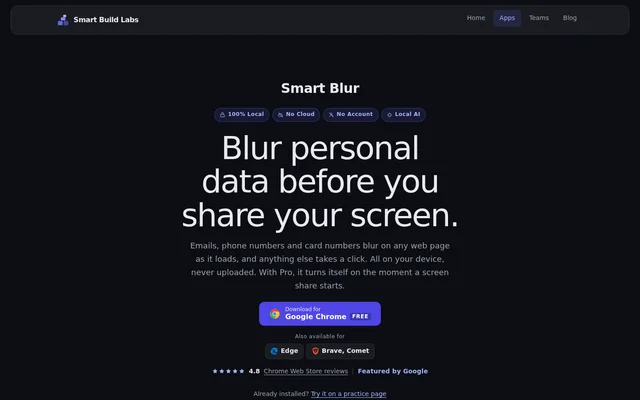
Smart Blur is a privacy and productivity browser extension from Smart Build Labs that hides sensitive parts of web pages before other people see them. Smart Blur is intended for screen sharing and situations where someone might glance at a screen. Available browsers include Google Chrome, Microsoft Edge, Brave and Comet.
Smart Blur processes information locally in the browser rather than sending data to a server. Neither the free version nor Pro requires an account. Protection applies to the web page itself, allowing users to hide information in browser tools such as Gmail, Salesforce, HubSpot, Notion, Slack and Google Sheets.
What Smart Blur can do
Smart Blur combines automatic detection with manual controls for information that needs to stay off a shared screen. The free version covers pattern matching, custom keywords and selected page areas. Pro extends those controls with local AI, screen-share detection, saved page settings and screenshots that retain the applied blur.
- Smart Blur automatically hides emails, phone numbers, card numbers and IDs.
- Smart Blur matches user-defined keywords across a page.
- Smart Blur covers clicked elements or manually drawn regions.
- Smart Blur Pro identifies names and addresses in plain sentences.
- Smart Blur Pro activates protection when browser screen sharing starts.
- Smart Blur Pro saves blurs per page and imports or exports settings.
- Smart Blur Pro captures screenshots with blur baked into the image.
How Smart Blur works
Smart Blur is installed as a browser extension, with a Chrome Web Store download and availability for Edge, Brave and Comet. Users can let patterns hide matching data as pages load, add keywords or manually select content. An available practice page lets existing users try the controls before sharing real information.
Smart Blur Pro uses Share Shield to activate protection when sharing starts from a browser-based meeting tool. The page names testing with Google Meet, Zoom Web and Microsoft Teams. Local AI uses WebGPU and runs offline after a one-time model download, keeping name and address detection inside the browser.
Who Smart Blur is for
Smart Blur serves people who present browser content containing personal or business information, including customer records and support tickets. Smart Blur also offers Team controls for organisations that need consistent protection across employees. The website describes uses involving payroll, billing, tax screens, patient identifiers and identity numbers.
- Smart Blur hides customer contact details during browser demonstrations.
- Smart Blur conceals names and addresses in support tickets.
- Smart Blur helps keep account numbers and identifiers off shared screens.
- Smart Blur creates screenshots with sensitive content already blurred.
- Smart Blur Team applies shared keyword and pattern lists across seats.
Smart Blur pricing and plans
Smart Blur offers a free plan at $0 forever, including manual blurring, patterns and custom keywords. Pro costs $14.99 per year or $49.99 for a lifetime purchase. Pro unlocks inside the extension without an account and includes a 14-day money-back guarantee. Prices are stated in USD.
Smart Blur Team is available by quote for 3 or more people, with per-seat yearly billing. Team includes Pro features on every seat, IT installation, locked settings, automatic screen-share protection and shared keyword and pattern lists. Administrators can add, remove or move seats, and the plan includes priority support with a named contact.
Smart Blur strengths and limitations
Smart Blur combines local processing, account-free access and free manual controls with optional automated protection. Smart Blur can protect browser content regardless of the meeting service because the blur changes the page itself. However, automatic activation depends on the browser detecting the start of sharing, and advanced capabilities require a paid plan.
- Smart Blur requires manual activation when screen sharing starts through a desktop application.
- Smart Blur cannot reach content inside native desktop applications.
- Smart Blur Local AI requires WebGPU and an initial model download.
- Smart Blur reserves AI detection, saved blurs and blurred screenshots for Pro.
Smart Blur FAQ
What is Smart Blur?
Smart Blur is a privacy and productivity browser extension that hides sensitive parts of web pages during screen sharing or public viewing. Smart Blur combines automatic pattern detection, keyword matching and manual blurring, with processing kept locally in the browser.
Is Smart Blur free?
Smart Blur has a free plan with no account requirement or time limit. Free features include pattern detection, custom keywords and manual blurring. Pro costs $14.99 per year or $49.99 for lifetime access, and Team plans are available by quote.
Does Smart Blur upload personal data?
Smart Blur processes data locally in the browser and does not send data to a server. Smart Blur does not require an account, including for Pro, and its Local AI detects names and addresses without uploading page content.
Which screen-sharing apps does Smart Blur support?
Smart Blur protects browser pages regardless of the sharing service because the blur is applied to the page itself. Smart Blur Pro automatically activates during browser-based sharing and has been tested with Google Meet, Zoom Web and Microsoft Teams. Sharing started through desktop apps requires manual activation.
Does Smart Blur Local AI work offline?
Smart Blur Local AI works offline after a one-time model download. Smart Blur runs this Pro feature entirely in the browser using WebGPU to find names and addresses in plain sentences, without uploading the text.
Which browsers support Smart Blur?
Smart Blur is available for Google Chrome, Microsoft Edge, Brave and Comet. Smart Blur provides a Chrome Web Store download, and users can try the extension's controls on a practice page linked from the website.
From the community
No reviews yet
Be the first to review this tool. What you write helps the next person choose.