What is Stacks?
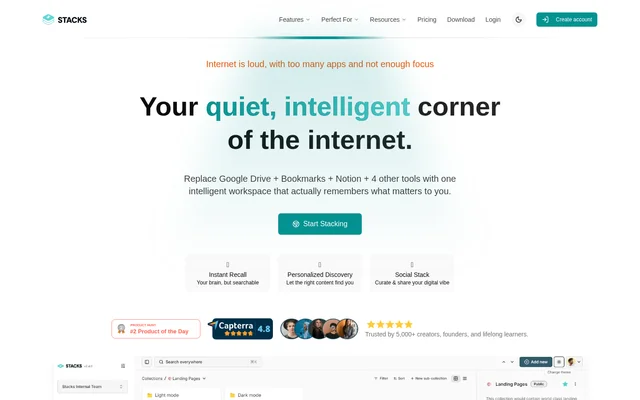
Stacks is an AI-powered knowledge management workspace that brings saved web content, notes and files into a shared information hub. Stacks is designed for students, researchers, creators, builders and lifelong learners, as well as teams managing resources together. The product focuses on preserving the context behind saved material and making related information easier to retrieve.
Stacks presents its workspace as an alternative to keeping content scattered across separate bookmark, note-taking and file-management tools. Stacks names Google Drive, Notion, Pocket, Raindrop and Instapaper among the tools it aims to replace. Those references describe replacement use cases, rather than confirmed integrations with those products.
What Stacks can do
Stacks combines content capture, search, organization and sharing within personal and team workspaces. Stacks emphasizes saving information with context, so a collection can reflect why a resource matters rather than simply storing its address. The listed capabilities cover private knowledge libraries, collaborative research and public collections for creators and curators.
- Stacks captures notes, bookmarks, links and files.
- Stacks searches saved content using natural language.
- Stacks reveals connections between saved ideas across topics.
- Stacks supports real-time collaboration in shared workspaces.
- Stacks lets users control visibility at different levels.
- Stacks supports cross-platform sync.
- Stacks provides content analytics on its paid plans.
How Stacks works
Stacks provides an extension-based workflow for saving inspiration and finding resources while browsing. Stacks is listed for web browsers, Chrome and Safari extensions, iOS and Android. Users collect content into workspaces, add notes or context, and search their saved material without having to reconstruct where a resource was originally found.
Stacks describes a Memory Agent that retrieves saved content from a user's history alongside relevant insights from a community or followed creators. Stacks also describes a Discovery Agent that builds a toolkit or suggested next steps from consumed content, such as marketing videos or tool research. A separate B2B personalization integration layer is marked as coming soon.
Who Stacks is for
Stacks targets people who gather information across the web and want to turn those saves into usable knowledge. Stacks explicitly addresses students and researchers organizing insights, creators and builders connecting research with content, and lifelong learners developing a personal knowledge system. Team workspaces and creator plans extend those uses to collaborative resource management and audience-facing collections.
- Stacks helps students collect and organize material for a thesis.
- Stacks helps researchers connect insights across saved sources.
- Stacks helps teams maintain and share resource collections.
- Stacks helps creators publish curated collections for an audience.
- Stacks helps lifelong learners build personal knowledge libraries.
Stacks strengths and limitations
Stacks brings multiple content types, contextual search and sharing controls into a single knowledge workflow. Stacks supports both individual organization and collaboration, with browser and mobile access covering different ways of collecting information. The source also leaves some purchase details unresolved, particularly the scope of the free offer, while specifying storage allowances and a future integration capability.
- Stacks does not explain the limits of its structured-data free offer.
- Stacks provides plan-specific storage allowances.
- Stacks marks the B2B personalization integration layer as coming soon.
Stacks FAQ
What is Stacks?
Stacks is an AI-powered knowledge management workspace for saving, organizing, searching and sharing bookmarks, notes, links and files. Stacks combines personal knowledge collections with team collaboration and public sharing for students, researchers, creators, builders and lifelong learners.
Does Stacks work on mobile devices?
Stacks lists iOS and Android support, with links to the App Store and Play Store. Stacks also lists web browser access, Chrome and Safari extensions, and cross-platform sync in its structured product information.
Can Stacks collections be shared with other people?
Stacks supports public and private collections, visibility controls and real-time team collaboration. Stacks lists shared workspaces and roles and permissions in Be Collaborative, while Be Creative includes public collections, premium collections and a branded search experience.
How does Stacks use AI to find saved content?
Stacks offers natural language search and AI-powered content organization to retrieve saved material and reveal related ideas. Stacks describes a Memory Agent that draws on saved history and relevant community insights, plus a Discovery Agent that builds toolkits or next steps from consumed content.
From the community
No reviews yet
Be the first to review this tool. What you write helps the next person choose.