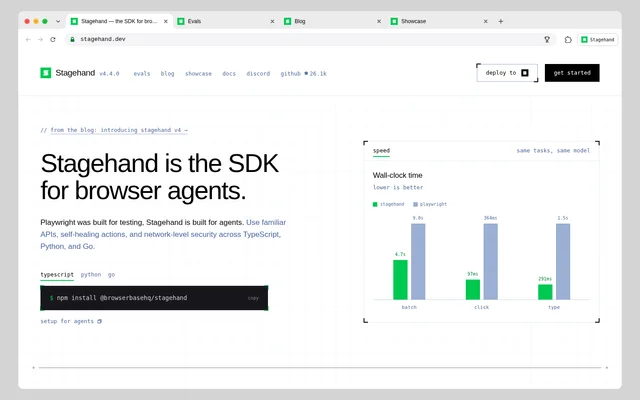
What is Stagehand?
Stagehand is a browser automation SDK from Browserbase for developers who want AI agents to navigate and interact with websites. It combines familiar browser controls with natural-language commands, so developers can specify an exact operation in code or describe what the agent should do on the page. Stagehand provides browser drivers for TypeScript, Python, and Go.
What Stagehand can do
Stagehand lets agents work with web pages through direct browser commands and higher-level operations. The Playwright-style API covers tasks such as navigating to a URL or taking a screenshot. The Act, Observe, and Extract primitives cover tasks described in natural language, and Extract can return data in a schema defined by the developer.
- Stagehand can click elements, navigate to URLs, and take screenshots.
- Stagehand can refresh how an action runs after a page changes.
- Stagehand can batch browser commands.
- Stagehand supports WebMCP and clipboard access.
- Stagehand can locate elements inside nested iframes.
How Stagehand works in the browser
Stagehand runs as an extension alongside the browser to reduce round-trip latency when an agent sends commands to a page. It trims the accessibility tree to give the agent a smaller view of the page, rather than passing along the full tree. The SDK also supports out-of-process iframes and closed Shadow DOM, which can contain elements an agent needs to interact with.
Who Stagehand is for
Stagehand is designed for developers building agents that need to read or act on web pages. The Hacker News quickstart shows how to collect story titles and point totals as structured data. Developers building production workflows can also use domain restrictions to control where an agent can browse and OpenTelemetry tracing to see what it does.
- Developers can extract page data into a defined schema.
- Developers can automate actions from natural-language instructions.
- Developers can restrict which domains a browser agent can visit.
Stagehand strengths and limitations
Stagehand combines a Playwright-style API with actions that can recover when a website changes. The familiar methods give developers direct control when they know which operation to run, while self-healing actions can refresh how an instruction is executed when the page changes. The local quickstart is code-based: it shows developers installing the SDK, launching a browser, and initializing Stagehand before running an extraction.
Getting started with Stagehand
Stagehand shows a local TypeScript workflow that starts with installing the package using npm. The example launches a local browser, creates a Stagehand instance, gets the active page, and navigates to Hacker News. It then calls Extract with a Zod schema for story titles and point counts, logs the returned records, and closes the Stagehand instance and browser.
Stagehand FAQ
What is Stagehand?
Stagehand is a browser automation SDK from Browserbase for building agents that interact with websites. Stagehand combines Playwright-style methods such as navigation, clicks, locators, and screenshots with natural-language actions, page observation, and structured data extraction.
Which programming languages does Stagehand support?
Stagehand supports TypeScript, Python, and Go. The Stagehand website provides quickstart tabs for all three languages, and the displayed TypeScript example shows how to launch a local browser and extract structured records from a web page.
Can Stagehand extract structured data from a website?
Stagehand can extract structured data from a website using a natural-language instruction and a developer-defined schema. The Stagehand quickstart demonstrates this by visiting Hacker News and returning a list of stories with a title and point count for each.
How does Stagehand handle changes to a website?
Stagehand uses self-healing browser actions to detect when a site changes and refresh how an action is performed. The Stagehand page illustrates this with a selector that changes and describes Act, Observe, and Extract as natural-language primitives for automating pages.
From the community
No reviews yet
Be the first to review this tool. What you write helps the next person choose.