What is STUDIO?
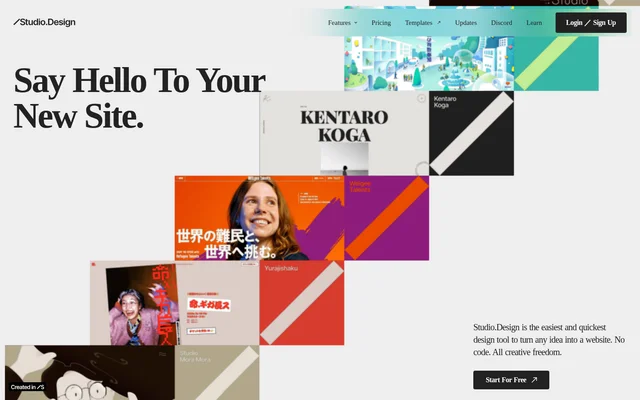
STUDIO is a no-code website design and publishing tool for people creating portfolios, business websites, and content-driven sites. STUDIO brings visual layout editing, a collaborative CMS, forms, and publishing into the same service. The website features designers and an agency as users, while the pricing page identifies portfolios, startups, scale-ups, and teams as intended audiences.
STUDIO allows users to move from a design to a live website without managing code or server setup. The editor supports detailed visual adjustments and dynamic animations, while free and paid templates offer another starting point. Access begins with a free site plan, with paid plans available for custom domains and additional features.
What STUDIO can do
STUDIO covers website design, content updates, visitor forms, and search optimization. The editor provides layout and animation controls, while the CMS centralizes collaborative content creation. STUDIO also accepts existing design and animation files, allowing users to bring Figma designs and Lottie animations into their website work rather than relying only on templates.
- STUDIO supports pixel-level layout adjustments and dynamic animations.
- STUDIO enables real-time collaborative CMS editing and content publishing.
- STUDIO creates forms with customizable animations and colors.
- STUDIO provides content-specific SEO controls and automatically generated sitemaps.
- STUDIO imports Lottie files for website animations.
- STUDIO imports Figma designs and automatically generates breakpoints.
How STUDIO works
STUDIO users can begin with the visual editor, a customizable template, or an existing Figma design. Imported Figma designs receive automatically generated breakpoints. Users can then adjust layouts, add animations and forms, and manage content through the CMS. STUDIO publishes designs as live websites with a click and handles the coding and server setup involved in publishing.
STUDIO provides workspace options for managing projects, members, and payments together. The free workspace supports unlimited members and up to 3 projects. The paid Team workspace adds unlimited projects, guest invitations, and custom permissions. Workspace subscriptions are separate from site plans, so project publishing requirements and team administration are priced independently.
Who STUDIO is for
STUDIO addresses designers and agencies working on visual websites, alongside people building portfolios and businesses publishing company sites. The named site plans distinguish portfolios, startups, and scale-ups. Teams managing multiple projects can use workspace features, while content collaborators can edit centrally in real time and publish updates when needed.
- STUDIO supports portfolio website creation through the Personal plan.
- STUDIO supports startup and scale-up websites through Business and Business Plus plans.
- STUDIO helps collaborators manage blog posts and collections through the CMS.
- STUDIO lets designers turn existing Figma work into published websites.
STUDIO strengths and limitations
STUDIO combines visual website creation with collaborative content management and publishing, reducing the need to handle coding and server setup. Figma imports, Lottie support, and customizable templates provide several ways to develop a site. The main trade-offs concern plan-specific limits, separate workspace billing, and purchase policies rather than a single unrestricted feature set.
- STUDIO requires a paid plan to publish on a custom domain.
- STUDIO does not show over-limit form responses in the dashboard or email notifications until an upgrade.
- STUDIO unpublishes CMS items or features that exceed a downgraded plan's limits.
- STUDIO does not provide refunds after purchase.
- STUDIO chat support excludes third-party services and design advice.
STUDIO FAQ
What is STUDIO?
STUDIO is a no-code website design and publishing tool with a visual editor, collaborative CMS, forms, and SEO controls. STUDIO supports Figma design imports and Lottie animations, and publishes live websites without requiring users to handle coding or server setup.
Is STUDIO free?
STUDIO offers a free site plan with design tools, publishing to studio.site, and a displayed STUDIO badge. Paid site plans add custom domains and other capabilities. STUDIO also offers a free workspace, while paid workspace subscriptions are billed separately from site plans.
Can STUDIO import Figma designs?
STUDIO can import existing Figma designs, automatically generate breakpoints, and publish the resulting designs as live websites. STUDIO also supports importing Lottie files to add animations to website designs.
Who is STUDIO for?
STUDIO serves designers, agencies, portfolio owners, startups, scale-ups, and teams creating websites. STUDIO offers portfolio-focused Personal plans, Business plans for startups, Business Plus plans for scale-ups, and workspace options for teams managing multiple projects.
What happens when STUDIO form responses exceed the plan limit?
STUDIO does not display responses beyond the plan's form response limit in the dashboard or email notifications. Upgrading the plan provides access to those responses, starting with the oldest responses.
Does STUDIO offer refunds?
STUDIO does not offer refunds after a plan purchase. STUDIO allows users to downgrade before the renewal date, but CMS items or features exceeding the lower plan's limits will be unpublished when the downgrade takes effect.
From the community
No reviews yet
Be the first to review this tool. What you write helps the next person choose.