What is Thiggle?
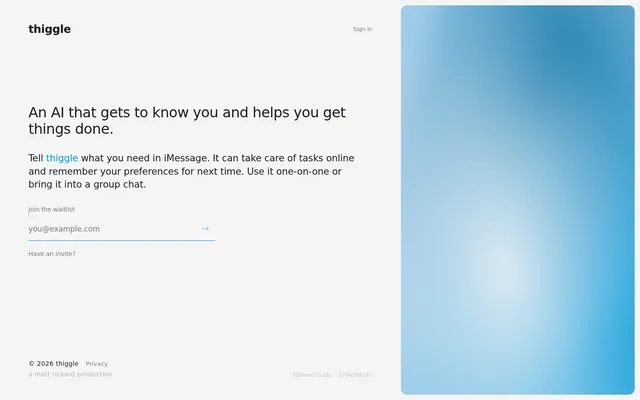
Thiggle is an AI assistant that helps people get things done through iMessage. Users tell Thiggle what they need, and Thiggle can take care of tasks online. The page also describes Thiggle as an assistant that gets to know the user and remembers preferences for next time. The product is presented around conversational requests rather than a list of specific task types, with support for both individual use and participation in group chats.
What Thiggle can do
Thiggle combines online task assistance with preference memory and a messaging interface. The stated capabilities cover how users make requests, how Thiggle can help, and the conversational settings in which Thiggle can participate. The page does not identify particular websites, task categories, or supported services, so the concrete scope of its online actions is not specified beyond the general ability to take care of tasks online.
- Thiggle accepts requests through iMessage.
- Thiggle can take care of tasks online.
- Thiggle remembers preferences for next time.
- Thiggle supports one-on-one conversations.
- Thiggle can be brought into a group chat.
How Thiggle works in iMessage
Thiggle uses iMessage as the place where users explain what they need. The described workflow starts with a message requesting assistance, followed by Thiggle taking care of an online task. Remembered preferences are intended to carry forward to the next interaction. Users can keep the conversation one-on-one or bring Thiggle into a group chat. The page does not explain the mechanics of completing tasks, configuring preference memory, or adding Thiggle to a conversation.
Who Thiggle is for
Thiggle is for people who want to ask an AI assistant for help through iMessage. The page supports both personal conversations and group chat use, rather than identifying a particular profession or industry. Its stated use cases center on requesting online tasks and having preferences remembered for later. For people considering shared use, the explicit group chat capability means Thiggle is not described solely as an assistant for private, individual exchanges.
- Thiggle supports people requesting online task assistance in a personal conversation.
- Thiggle supports users who want preferences remembered for future requests.
- Thiggle supports people bringing AI assistance into a group chat.
Getting started with Thiggle
Thiggle presents a waitlist as the access path for interested users and includes a separate prompt for people who already have an invite. These are the access options stated on the page; an immediate public signup process is not described. The intended interaction takes place in iMessage, where users tell Thiggle what they need. The page does not provide pricing, plan details, installation instructions, or further steps for using an invitation.
Pros and cons
What works
- Thiggle supports both individual conversations and group chats.
- Thiggle remembers preferences for subsequent requests.
What to watch
- The page presents access through a waitlist or an existing invite.
- The described messaging interface is limited to iMessage.
Thiggle FAQ
What is Thiggle?
Thiggle is an AI assistant that users contact through iMessage for help with online tasks. Thiggle remembers preferences for future requests and supports both one-on-one conversations and group chats.
What can you use Thiggle for?
Thiggle can be used to request assistance with tasks online through iMessage. Thiggle also remembers preferences for next time, although the page does not name specific tasks or supported online services.
Does Thiggle work in group chats?
Thiggle supports group chats as well as one-on-one conversations in iMessage. Users can bring Thiggle into a group conversation rather than interacting with the assistant only in a private exchange.
How do you get access to Thiggle?
Thiggle offers a waitlist and a separate prompt for people who already have an invite. The page presents these access routes without describing pricing, subscription plans, or further invitation steps.
From the community
No reviews yet
Be the first to review this tool. What you write helps the next person choose.