What is ThinkDiffusion?
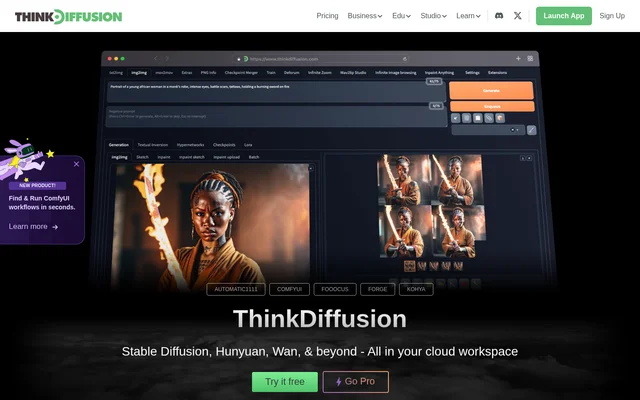
ThinkDiffusion is a cloud workspace for running open-source generative AI applications without installing and managing those applications locally. ThinkDiffusion brings together Automatic1111, ComfyUI, Fooocus, Forge and Kohya for image creation, workflow development and model training. The service also presents Stable Diffusion, Hunyuan and Wan as part of its cloud offering.
ThinkDiffusion serves individuals as well as brands, agencies and educational institutions. Dedicated machines and persistent storage provide a place to keep creative assets and application settings. The website also describes a full-service AI art studio, business services and education resources alongside the cloud workspace.
What ThinkDiffusion can do
ThinkDiffusion provides a choice of applications for different creative workflows. Automatic1111 gives access to Stable Diffusion features, while ComfyUI uses a flowchart-based interface to manage workflows. Fooocus focuses on simpler art generation, Forge includes Flux support and IP Adapter masks, and Kohya supports training and fine-tuning.
- ThinkDiffusion runs multiple machines simultaneously.
- ThinkDiffusion supports Automatic1111 extensions and ComfyUI custom nodes.
- ThinkDiffusion accepts models, checkpoints, safetensors, LoRAs, embeddings and textual inversions.
- ThinkDiffusion supports uploads from Civitai, Hugging Face and local computers.
- ThinkDiffusion supports training custom models, LoRAs and textual inversions.
- ThinkDiffusion retains files, models, extensions and settings in a persistent workspace.
How ThinkDiffusion works
ThinkDiffusion starts with account creation, followed by choosing a setup from multiple hardware speeds. The website describes a one-click launch process and access from different devices, including phones. Each machine is dedicated to a single user, and the workspace is private rather than publicly shared.
ThinkDiffusion lets users add their own resources through URL uploads or drag-and-drop uploads. Models and extensions remain in the persistent workspace alongside files and settings. Users can install models, extensions and custom nodes even without a subscription, and can launch additional machines to run workflows simultaneously.
Who ThinkDiffusion is for
ThinkDiffusion addresses creative work by individuals, brands and agencies, as well as teaching and experimentation in schools and universities. The website describes fashion-design workshops with the Fashion Institute of Technology and examples involving animated music videos and commercial visuals. The application selection covers both simpler image generation and advanced node-based workflows.
- ThinkDiffusion supports artists creating images with Fooocus or Automatic1111.
- ThinkDiffusion supports advanced students managing node-based workflows in ComfyUI.
- ThinkDiffusion supports educators introducing AI art into creative learning.
- ThinkDiffusion supports fashion designers exploring AI-assisted design.
- ThinkDiffusion supports creators working on animation and video projects.
ThinkDiffusion pricing and plans
ThinkDiffusion offers a free trial period when users create an account. The website also presents a Pro option, a pricing page and team plans, but the supplied page does not state prices, billing intervals or trial duration. Setup options include multiple hardware speeds, and model, extension and custom-node installation is described as available without a subscription.
ThinkDiffusion strengths and limitations
ThinkDiffusion combines dedicated GPUs, private workspaces and persistent files with access to several open-source applications. ThinkDiffusion removes the need for local installation and heavy-duty hardware while allowing custom models and extensions. Personal storage is available up to 200GB, so storage is not unlimited. Free access is described as a trial period; an ongoing free tier is not stated.
ThinkDiffusion FAQ
What is ThinkDiffusion?
ThinkDiffusion is a cloud workspace for open-source generative AI applications, including Automatic1111, ComfyUI, Fooocus, Forge and Kohya. ThinkDiffusion provides dedicated machines, persistent storage and custom model support for AI art, video workflows and model training without local installation.
Is ThinkDiffusion free?
ThinkDiffusion offers a free trial period with account creation and also presents a Pro option and team plans. ThinkDiffusion does not list prices or the trial duration in the supplied page, and the page does not describe an ongoing free tier.
Can ThinkDiffusion run ComfyUI custom nodes and custom models?
ThinkDiffusion supports ComfyUI custom nodes, Automatic1111 extensions and custom model uploads. ThinkDiffusion accepts resources from Civitai, Hugging Face or a local computer, with URL and drag-and-drop upload options. Model, extension and custom-node installation is available even without a subscription.
Does ThinkDiffusion save files and settings between sessions?
ThinkDiffusion provides a persistent workspace that retains files, models, extensions and settings. ThinkDiffusion offers dedicated personal storage up to 200GB and describes each workspace as private, with nothing shared publicly and each machine dedicated to a single user.
Who is ThinkDiffusion for?
ThinkDiffusion serves individuals, brands, agencies, students and educators working with generative AI. ThinkDiffusion presents use cases in fashion design, AI art education, animated music videos and commercial visuals, with applications ranging from simpler image generation to advanced node-based workflows.
Can ThinkDiffusion train models and LoRAs?
ThinkDiffusion provides Kohya for training and fine-tuning custom models, LoRAs and textual inversions. ThinkDiffusion also provides model-training learning resources focused on creating custom styles and characters that users can share or keep for their own use.
From the community
No reviews yet
Be the first to review this tool. What you write helps the next person choose.