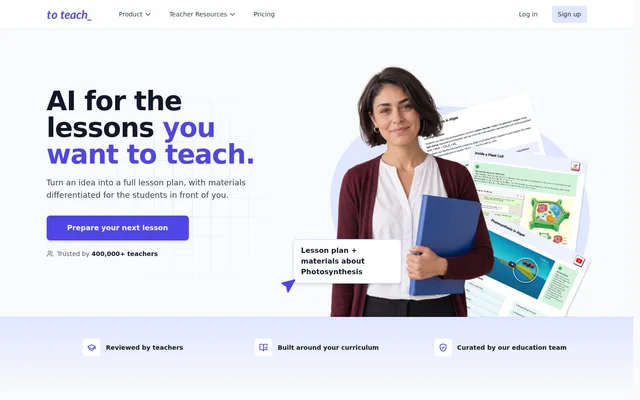
What is to-teach?
to-teach is AI-supported teaching software for preparing lesson plans and classroom materials. Teachers can generate structured lessons around a topic, subject and grade level, then develop worksheets, presentations and interactive activities from the plan. The web application supports adapting materials to the students being taught rather than using the same language and difficulty for every class.
to-teach also provides resources curated and created by an education team. Teachers can start with these resources or bring their own texts, documents and links. Curriculum uploads can guide lesson suggestions, while editing tools let teachers decide which content fits their learning objectives before using the materials.
What to-teach can do
to-teach combines lesson planning with tools for creating and adapting classroom content. Teachers can move from a lesson outline to supporting materials, revise the resulting exercises and choose printable or interactive formats. The stated capabilities cover both creating new resources from a topic and transforming existing resources into classroom activities.
- to-teach generates lesson plans with learning objectives and a sequence of activities.
- to-teach turns existing resources and YouTube videos into worksheets.
- to-teach creates quizzes, presentations and interactive videos.
- to-teach adjusts language and difficulty for different learner levels.
- to-teach supports gap-fill, multiple-choice and true-or-false questions.
- to-teach exports content as PDF, H5P or DOCX.
How to-teach works
to-teach begins with information about the topic, subject and students. Teachers review and adjust the generated lesson plan, then create materials for the planned activities or use their own resources as a starting point. Teachers can revise exercises and adapt texts before deciding how students will receive the materials.
to-teach lets teachers print worksheets or share interactive activities digitally. Content can also be sent directly to fobizz, Canva and Google Classroom. Created materials remain saved in the teacher account for further work. Students do not need a to-teach account to use printed worksheets or open shared interactive exercises.
Who to-teach is for
to-teach serves teachers preparing classroom lessons and differentiated materials. The workflow supports specifying a subject and grade level, adapting content for different learners and combining paper-based work with digital activities. School plans provide individual teacher accounts under a school licence, while students and trainee teachers can apply for a discount on paid subscriptions.
- to-teach helps teachers prepare lessons with objectives and supporting activities.
- to-teach helps teachers adapt texts and exercises for different learner levels.
- to-teach supports creating worksheets around classroom video resources.
- to-teach supports schools seeking individual teacher accounts under a shared licence.
to-teach pricing and plans
to-teach offers Free, Starter and Pro plans, with monthly or yearly subscription options. The Free plan includes up to 5 exercises, 3 worksheets and 2 lesson plans per month. Starter and Pro increase creation allowances and include premium worksheets, answer keys, all gamification options and lesson plans with materials.
to-teach offers school licences through tailored quotations. Students and trainee teachers can apply for a 30% discount on Starter and Pro before subscribing. Monthly and yearly subscriptions can be cancelled through the account; paid access continues until the current billing period ends, and the subscription does not renew.
to-teach strengths and limitations
to-teach brings lesson planning, material creation, differentiation and distribution into a connected workflow. Support for existing resources, curriculum uploads and several export formats gives teachers different starting points and output options. Teachers retain responsibility for reviewing the generated content: the website explicitly warns that AI can make mistakes and recommends checking facts, answer keys and suitability.
- to-teach applies monthly creation limits to Free, Starter and Pro accounts.
- to-teach places premium worksheets and answer keys in paid plans.
- to-teach requires teacher review before generated materials are used in class.
to-teach FAQ
What is to-teach?
to-teach is web-based AI teaching software for creating lesson plans, worksheets, exercises, presentations and differentiated classroom materials. Teachers can specify a subject, topic and grade level, use existing resources, and adjust generated content before printing or sharing activities.
Is to-teach free?
to-teach offers a free account with up to 5 exercises, 3 worksheets and 2 lesson plans per month. Paid Starter and Pro subscriptions provide higher allowances and additional features, while school licences are available through tailored quotations.
Can to-teach use existing materials and a curriculum?
to-teach can use teachers’ own texts, documents and links as starting points for teaching materials. Teachers can also upload a curriculum when creating a lesson plan to guide suggestions, then review and adjust the resulting content for their class.
What export formats and integrations does to-teach support?
to-teach exports teaching content as PDF, H5P or DOCX and can send content directly to fobizz, Canva and Google Classroom. Teachers can also print worksheets or share interactive activities digitally, depending on how students will use the materials.
Do students need a to-teach account?
to-teach does not require students to have accounts to use printed worksheets or open shared interactive exercises. Teachers create and manage the materials through their own teacher accounts, where created resources are saved for later editing.
Can teachers edit materials generated by to-teach?
to-teach lets teachers edit lesson plans and worksheets, revise exercises, and adjust language or difficulty. Teachers should check facts, answer keys and suitability before classroom use because the website explicitly states that AI can make mistakes.
From the community
No reviews yet
Be the first to review this tool. What you write helps the next person choose.