What is Tomat.AI?
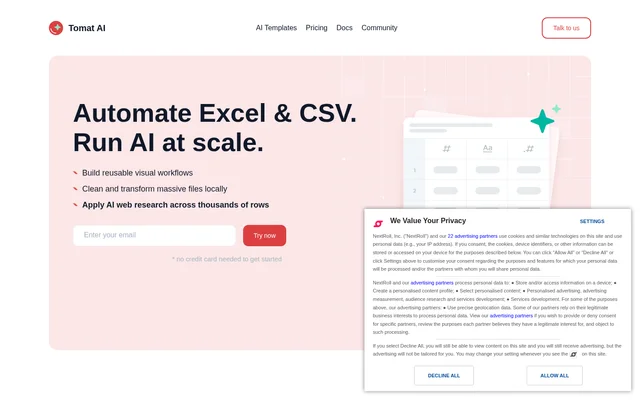
Tomat.AI is a desktop tool for preparing spreadsheet data and automating repeatable tasks through visual workflows. Tomat.AI is designed for people who know Excel but do not want to write formulas or code to clean and restructure files. The application supports Excel and CSV files, works on Windows and macOS, and combines local data transformation with optional AI processing.
Tomat.AI treats data preparation as a sequence of reusable steps rather than a collection of spreadsheet formulas. Users can build pipelines that bring tables together, change their structure, and generate reports. AI features extend those workflows with row-level enrichment, extraction, and web research, while local file handling avoids the need to upload large source files to cloud storage.
What Tomat.AI can do
Tomat.AI combines visual table transformations with AI tasks that operate across rows. Users can inspect results as they add steps, test prompts before applying them more broadly, and chain prompts for multi-step tasks. The website also describes an AI Table step for transformations expressed in natural language, alongside row-oriented AI features.
- Tomat.AI filters, sorts, and groups rows through visual steps.
- Tomat.AI merges or stacks tables and creates pivots.
- Tomat.AI branches workflows to create data segments.
- Tomat.AI applies AI prompts for enrichment, extraction, translation, analysis, and cleanup.
- Tomat.AI enables web research through the Web Search option.
- Tomat.AI displays data quality information, unique values, distributions, and statistics.
- Tomat.AI adds charts to workflows and exports reports as PDF.
How Tomat.AI works
Tomat.AI starts with a desktop installation and a new workflow. Users add a Source node to load a CSV or Excel file, then add visual transformation steps or an AI step. The homepage calls the row-processing step Use AI, while the pricing page calls it AI Column. Users enter a prompt and can enable Web Search when research is needed.
Tomat.AI processes row-level AI requests using only the columns mentioned in the prompt. That mode cannot access other columns or apply multi-row logic. Local file processing and AI processing have different data boundaries: the application works locally, but the official OpenAI API receives the data users ask AI to improve or enrich.
Who Tomat.AI is for
Tomat.AI is aimed at spreadsheet users who need repeatable cleanup, enrichment, and reporting without specialist technical knowledge. The website states that knowing Excel is enough to begin. Relevant tasks include preparing files from multiple sources, applying the same prompt across a table, and turning transformed datasets into charts or PDF reports.
- Tomat.AI helps Excel users automate recurring file cleanup.
- Tomat.AI supports bulk research and enrichment across table rows.
- Tomat.AI supports verification, summarization, and sentiment analysis tasks.
- Tomat.AI helps users combine tables and prepare recurring reports.
Tomat.AI pricing and plans
Tomat.AI offers a free 7 days trial and 30,000 trial AI credits. The Solo plan is listed at $7 per month, with additional AI credits purchased through the Account page in the application. Team pricing requires contacting the company. Credit consumption depends on the number of rows, the data sent to AI, and response length; web search uses additional tokens.
Tomat.AI strengths and limitations
Tomat.AI brings file preparation, AI enrichment, and reporting into reusable visual workflows. Local processing is useful for users who do not want to upload source files simply to explore or transform them. Prompt previews and selected-column AI access provide control over AI inputs, although AI requests still involve an external service and usage-based credits.
- Tomat.AI lists desktop support for Windows and macOS only.
- Tomat.AI requires paid credits for continued AI use after the trial.
- Tomat.AI row-level AI cannot perform multi-row logic.
- Tomat.AI requires contact to access additional data sources beyond the listed connectors.
Tomat.AI FAQ
What is Tomat.AI?
Tomat.AI is a desktop data preparation and automation tool for Excel and CSV users. Tomat.AI builds reusable visual workflows for cleaning, merging, pivoting, and restructuring tables, with AI features for enrichment, extraction, analysis, and web research.
Is Tomat.AI free?
Tomat.AI offers a free 7 days trial with 30,000 AI credits, rather than a stated ongoing free plan. The Solo plan costs $7 per month, and continued AI usage requires additional purchased credits. Team pricing is available by contacting the company.
Does Tomat.AI keep data local?
Tomat.AI processes files locally, but AI processing sends selected data through the official OpenAI API. The website says only data users ask AI to improve or enrich is sent, and private data is not sent to the cloud without permission.
What operating systems and data sources does Tomat.AI support?
Tomat.AI supports Windows and macOS, reads CSV and Excel files, and provides PostgreSQL and Snowflake connectors. The website also offers access to over 450 additional data sources through direct contact.
Can Tomat.AI research the web for spreadsheet rows?
Tomat.AI supports web research through the Web Search option in its AI node. Users enter a prompt and apply the task across rows. Row-level AI sees only columns mentioned in the prompt, and web search consumes additional tokens.
Do you need coding skills to use Tomat.AI?
Tomat.AI does not require formulas, code, or special technical knowledge for its visual workflows. The website states that knowing Excel is enough. Users add drag-and-drop steps to filter, sort, group, merge, pivot, and restructure data.
From the community
No reviews yet
Be the first to review this tool. What you write helps the next person choose.