What is TubeMagic?
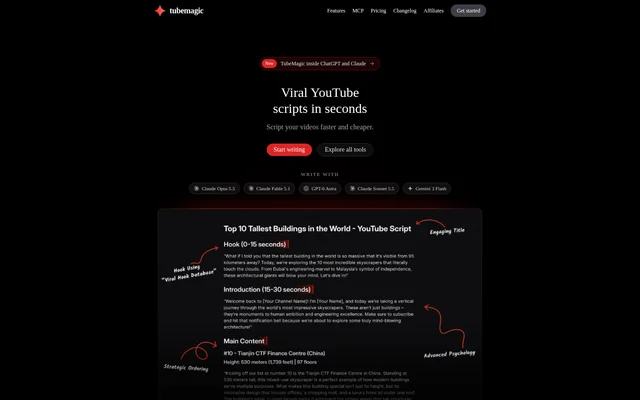
TubeMagic is an AI toolkit for YouTube creators that brings video research, script writing, thumbnail generation, and search optimization into a connected workflow. TubeMagic supports work from choosing a topic to preparing titles, descriptions, and tags. Beyond individual video production, TubeMagic includes channel analytics, niche research, and an ideas manager for tracking content through scripting, recording, and editing.
What TubeMagic can do
TubeMagic combines research tools with content generation and revision features. Video Research assigns an outlier score based on a video’s views divided by its channel average, while Niche Explorer provides niche scores and estimated RPM. The Script Writer uses configurable frameworks covering opening hooks, content structure, pacing, emotional progression, and outros.
- TubeMagic filters research results by upload date and video length.
- TubeMagic generates scripts using videos, articles, or PDFs as context.
- TubeMagic supplies an opening hook and alternative hooks for each finished script.
- TubeMagic rewrites a selected paragraph according to instructions.
- TubeMagic generates thumbnails with optional face and channel references.
- TubeMagic creates video titles, descriptions, tags, and community posts.
- TubeMagic saves video ideas from YouTube links or notes.
How TubeMagic works
TubeMagic lets creators choose a writing model, set the script length, and add inspiration material before generating a script. Script frameworks are enabled by default, and creators can switch individual frameworks off. After generation, creators can replace the opening with an alternative hook or request a change to a specific paragraph. Thumbnail projects also support follow-up requests for changes.
TubeMagic MCP connects a TubeMagic account to ChatGPT, Claude, Cursor, VS Code, Windsurf, or another MCP client. Creators can request research, scripts, titles, and thumbnails from the connected chat. TubeMagic saves scripts, thumbnails, and ideas to the account. TubeMagic Chat can also look up videos from a connected channel to answer questions about channel performance.
Who TubeMagic is for
TubeMagic serves YouTube creators producing Shorts and long-form videos, including creators managing multiple channels. TubeMagic supports both content preparation and analysis of existing uploads. Creators can connect up to 10 channels and sort their videos by views or outlier score, while the ideas manager tracks production stages from scripted to recorded and edited.
- TubeMagic helps creators research videos outperforming their channel average.
- TubeMagic supports drafting scripts from reference material.
- TubeMagic helps creators prepare thumbnails and video metadata.
- TubeMagic supports comparing uploads across connected channels.
- TubeMagic organizes video ideas and production progress.
TubeMagic pricing and plans
TubeMagic offers paid plans, and every plan includes a 30-day money-back guarantee. TubeMagic states that free trials are currently paused because of spam. Standard writing models are included, while premium models use credits. Payments are processed by Paddle, and TubeMagic states that payment details are not stored. The supplied page text does not list subscription prices or plan-specific allowances.
TubeMagic strengths and limitations
TubeMagic combines topic discovery, script drafting, visual asset generation, and metadata preparation rather than focusing only on writing. Paragraph-level rewrites and selectable hooks provide specific revision controls, while MCP access makes the tools available within supported AI clients. TubeMagic also sets explicit limits on script length and reference material, and premium model usage requires credits.
- TubeMagic currently has no free trial.
- TubeMagic accepts up to three inspiration sources per script.
- TubeMagic limits reference videos to 30 minutes and PDFs to 30 pages.
- TubeMagic supports long-form scripts up to 3,000 words.
- TubeMagic charges premium model usage against credits.
TubeMagic FAQ
What is TubeMagic?
TubeMagic is an AI toolkit for YouTube creators that includes video research, script writing, thumbnail generation, and video optimization tools. TubeMagic also provides keyword research, niche exploration, connected-channel analytics, and an ideas manager for tracking video production.
Is TubeMagic free?
TubeMagic offers paid plans and currently does not offer free trials. TubeMagic states that every plan includes a 30-day money-back guarantee. Standard models are included, while premium models use credits.
Can TubeMagic write scripts from YouTube videos or PDFs?
TubeMagic can use YouTube videos, articles, or PDFs as context to write an original script. TubeMagic accepts up to three inspiration sources, with reference videos limited to 30 minutes and PDFs limited to 30 pages.
Does TubeMagic work with ChatGPT and Claude?
TubeMagic connects to ChatGPT and Claude through TubeMagic MCP, which also supports Cursor, VS Code, Windsurf, and other MCP clients. TubeMagic lets creators request research, titles, scripts, and thumbnails in chat, with scripts, thumbnails, and ideas saved to their account.
Can TubeMagic analyze multiple YouTube channels?
TubeMagic supports connecting up to 10 YouTube channels and sorting their videos by views or outlier score. TubeMagic Chat can look up videos from a connected channel to answer questions, including which recent uploads exceeded the channel average.
How long can TubeMagic scripts be?
TubeMagic supports Shorts scripts from 100 words and long-form scripts up to 3,000 words, described on the page as about 20 minutes of video. TubeMagic also provides alternative opening hooks and lets creators rewrite individual paragraphs.
From the community
No reviews yet
Be the first to review this tool. What you write helps the next person choose.