What is Twig?
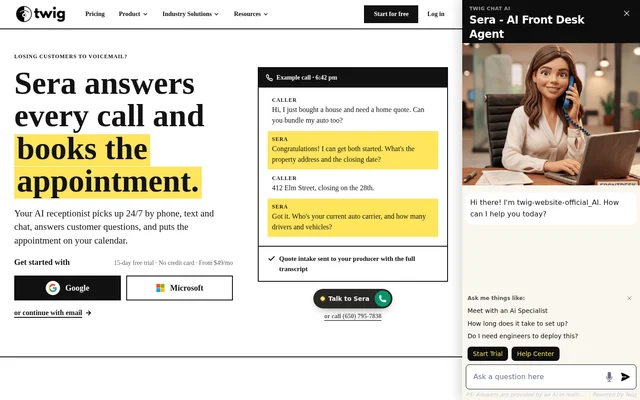
Twig is an AI receptionist for businesses handling customer inquiries by phone, text and website chat. The website markets the receptionist as Sera and describes around-the-clock answering, caller qualification and appointment scheduling. Twig serves small businesses and front-desk teams, with examples covering insurance, dental care, mortgage lending and B2B SaaS sales.
Twig handles initial conversations and routes relevant information to the business's team. The published scenarios show different outcomes for different inquiries: a completed insurance intake, a confirmed dental appointment, a meeting with a loan officer or a qualified sales appointment. These examples describe front-desk and intake tasks rather than replacing professional insurance or mortgage advice.
What Twig can do
Twig combines answering, qualification and follow-up across customer communication channels. Business content supplies answers to questions, while intake conversations gather information that staff need before responding. Appointment booking, missed-call text-back, live transfers and multilingual conversations are explicitly included on Growth and higher plans, so those capabilities should not be assumed to be part of Starter.
- Twig answers calls, texts and web chats 24/7.
- Twig collects caller details and qualifying information.
- Twig answers website visitors using business content.
- Twig books appointments into a team's calendar.
- Twig sends missed-call text-backs on Growth and higher plans.
- Twig hands conversations to staff with the full context.
How Twig works
Twig setup starts with providing a business website and forwarding the business's phone line. The website says most businesses are live in under 30 minutes. Trial setup includes a phone number, knowledge base and booking integration. Registration options shown on the page include Google, Microsoft and email.
Twig uses the configured information to answer questions and carry out intake or scheduling workflows. When an answer is unavailable, Twig collects the details rather than guessing and hands the full conversation to the team. The SaaS example also shows a qualified lead booked on an account executive's calendar and logged to a CRM, without naming a specific CRM provider.
Who Twig is for
Twig targets businesses that receive customer inquiries during busy periods or outside normal opening hours. Starter is described for small businesses getting started, Growth for automating front-desk workflows, and Scale for high-volume or multi-location teams. Industry scenarios demonstrate how intake questions and follow-up actions differ according to the business.
- Twig collects home and auto insurance quote information for a producer.
- Twig books dental visits and texts new-patient forms.
- Twig qualifies mortgage purchase inquiries and schedules loan officers.
- Twig answers SaaS pricing-page questions and schedules sales meetings.
Twig pricing and plans
Twig offers Starter at $49 per month, Growth at $499 per month and Scale at $1,499 per month. Every plan begins with a 15-day free trial that includes voice and requires no credit card. Starter includes 500 AI chats monthly and voice minutes, although the page does not specify Starter's voice allowance.
Twig Growth includes 2,000 AI chats and 300 voice minutes monthly, while Scale includes 10,000 chats and 2,000 voice minutes. The pricing FAQ lists overages at $100 per 1,000 additional chats and $1 per voice minute. Scale is recommended for multi-location businesses or those needing a dedicated customer success manager and custom integrations.
Twig strengths and limitations
Twig combines continuous answering across phone, text and chat with industry-specific intake examples and contextual handoffs to staff. The trial includes voice, allowing businesses to assess phone handling before paying. Important boundaries remain: advanced front-desk functions require higher plans, usage can generate overage charges, and the insurance and mortgage examples explicitly exclude certain regulated decisions or quotations.
- Twig reserves booking, missed-call text-back, live transfers and multilingual conversations for Growth and higher plans.
- Twig bills additional usage beyond monthly plan allowances.
- Twig does not quote insurance premiums or bind insurance coverage.
- Twig does not quote mortgage rates or terms.
Twig FAQ
What is Twig?
Twig is an AI receptionist, marketed on the website as Sera, that answers calls, texts and web chats 24/7. Twig qualifies inquiries, collects customer details and books appointments with business teams, with examples for insurance, dental, mortgage and SaaS businesses.
Is Twig free?
Twig is a paid service with plans starting at $49 per month. Every plan includes a 15-day free trial with voice included and no credit card required. The website also states that customers can cancel anytime and that no contract is required.
How do you set up Twig?
Twig setup involves providing a business website and forwarding the business phone line. The website says most businesses are live in under 30 minutes. Trial setup includes a phone number, knowledge base and booking integration.
Does Twig include appointment booking on every plan?
Twig includes appointment booking on Growth and higher plans, alongside missed-call text-back, live transfers and multilingual conversations. Starter provides phone-line and website coverage with a monthly chat allowance and included voice minutes, but the page reserves those automation features for higher plans.
What happens when Twig cannot answer a question?
Twig collects the relevant details and hands the inquiry to the business's team with the full conversation instead of guessing. This preserves the context for staff who need to answer the question or continue the customer's request.
What happens if Twig usage exceeds the monthly allowance?
Twig bills overages at $100 per 1,000 additional chats and $1 per voice minute, according to the pricing FAQ. The website says businesses consistently exceeding their tier may find an upgrade cheaper and will be contacted to discuss that decision.
From the community
No reviews yet
Be the first to review this tool. What you write helps the next person choose.