What is Vectorizer.AI?
Vectorizer.AI is an online image vectorizer that converts pixel-based artwork into editable geometric shapes. Vectorizer.AI serves design, print, web, CAD and CNC workflows, including logo restoration, illustration conversion and scanned line art. The browser-based service combines deep learning networks with classical algorithms to reconstruct shapes rather than simply outline blocks of pixels.
Vectorizer.AI accepts PNG, JPG, GIF, BMP and WebP images and exports SVG, EPS, DXF and PDF vectors. Cleaned-up PNG output is also available. The service was originally designed for logos and rasterized vector artwork, but the page also describes support for scans, photographs of drawings and photographs.
What Vectorizer.AI can do
Vectorizer.AI fits whole geometric shapes alongside lines, arcs and Bezier curves. The Vector Graph keeps neighboring shapes aligned along shared boundaries, while corner modeling and curve adjustments refine the result. Automatic processing produces an initial vectorization without user input, and editing controls allow users to change selected aspects before export.
- Vectorizer.AI fits circles, ellipses, rounded rectangles and stars.
- Vectorizer.AI detects and models mirror and rotational symmetry.
- Vectorizer.AI lets users sharpen or round modeled corners.
- Vectorizer.AI removes backgrounds and allows individual shapes to be retained or removed.
- Vectorizer.AI recolors, merges or removes individual regions.
- Vectorizer.AI adjusts palette size and supports partial transparency.
- Vectorizer.AI exports cutting and engraving outlines as thin strokes.
How Vectorizer.AI works
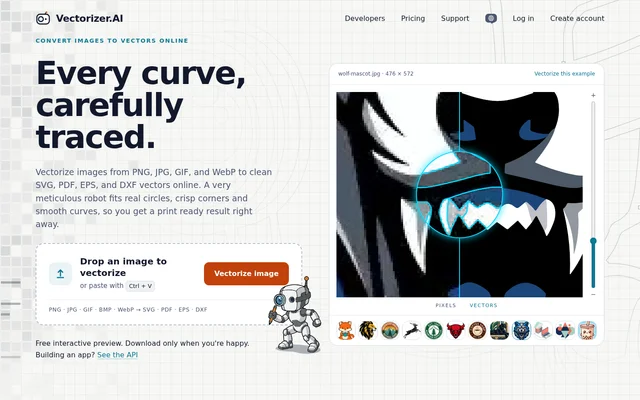
Vectorizer.AI starts with an image uploaded through drag and drop, paste or file selection. Processing runs through the browser workflow without software installation. The free interactive preview lets users zoom into the vector result, compare the result with the original and adjust the palette before deciding whether to download.
Vectorizer.AI offers export presets for editing, cutting and engraving, along with format-specific controls for drawing and grouping shapes. SVG is the default output format. Developers can use the REST API for volume processing, with official SDKs, a command-line client and an OpenAPI specification available for application and pipeline workflows.
Who Vectorizer.AI is for
Vectorizer.AI supports people preparing artwork for design, print and fabrication, as well as developers automating image conversion. The page names workflows involving logos, AI-generated art, sketches, vinyl cutting, screen printing, laser engraving and CNC. DXF options let users limit exported curve types to those supported by their machine software.
- Designers can rebuild pixelated logos and old scans as scalable master artwork.
- Illustrators can convert images from Midjourney, DALL·E, Stable Diffusion or Flux into editable vectors.
- Cricut and vinyl users can prepare multi-color SVG cut files.
- Laser and CNC users can export DXF or SVG for software such as LightBurn.
- Developers can vectorize images at volume through the REST API.
Vectorizer.AI pricing and access
Vectorizer.AI provides free uploads and interactive previews for as many images as users want to inspect. Downloading converted results requires a subscription, with an exception for the example images, which can be downloaded free. Users can therefore examine a result before paying for download access, rather than purchasing an unseen conversion.
Vectorizer.AI strengths and limitations
Vectorizer.AI combines automatic vectorization with controls for palettes, corners, backgrounds and individual regions. Multiple export formats and cutting presets support different downstream tasks, while the interactive preview makes the conversion inspectable before purchase. Input limits still apply, and the pre-crop feature lets users focus the available resolution on the portion of an image they need.
- Vectorizer.AI requires a subscription to download results other than example images.
- Vectorizer.AI limits image resolution to 3 megapixels.
- Vectorizer.AI limits image file size to 30 megabytes.
Vectorizer.AI FAQ
What is Vectorizer.AI?
Vectorizer.AI is an online AI image vectorizer that converts raster images into editable geometric shapes. Vectorizer.AI supports logo restoration, illustration conversion, scanned line art and preparation of vector files for print, web, cutting and engraving workflows.
Is Vectorizer.AI free?
Vectorizer.AI offers free uploads and interactive previews for as many images as users want. Downloading converted results requires a subscription, except for the example images, which can be downloaded for free.
Which file formats does Vectorizer.AI support?
Vectorizer.AI accepts PNG, JPG, GIF, BMP and WebP images. Vectorizer.AI exports SVG, EPS, DXF and PDF vector files, plus cleaned-up PNG images, and supports full and partial transparency in input images.
Can Vectorizer.AI make files for Cricut, laser cutters and CNC?
Vectorizer.AI can export SVG and DXF files for cutting and engraving workflows. The Cutting & engraving preset draws outlines as thin strokes, and DXF export options let users select curve types supported by their machine software.
Does Vectorizer.AI have an API?
Vectorizer.AI provides a REST API for vectorizing images at volume in applications and pipelines. Vectorizer.AI also offers official SDKs, a command-line client and an OpenAPI specification for developers.
What are the image size limits for Vectorizer.AI?
Vectorizer.AI accepts images up to 3 megapixels and files up to 30 megabytes. Vectorizer.AI also provides pre-cropping, and only the cropped area counts against the resolution limit.
From the community
No reviews yet
Be the first to review this tool. What you write helps the next person choose.