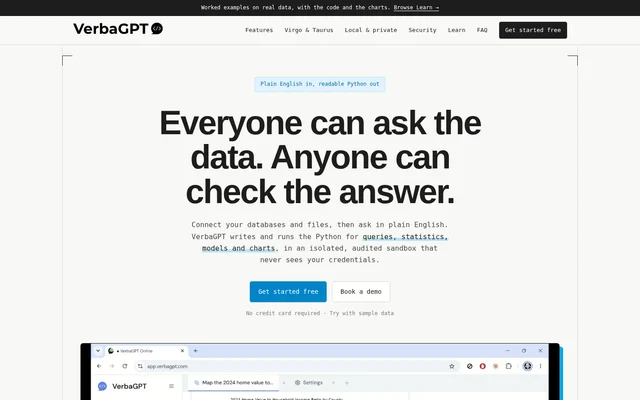
What is VerbaGPT?
VerbaGPT is an AI data analytics tool that turns questions about databases and files into Python, runs the code, and shows users what ran. VerbaGPT is designed for organizations that want more people to answer their own data questions while giving analysts a way to check the work. The generated Python can be read, edited, and rerun rather than treated as a black-box answer.
What VerbaGPT can do
VerbaGPT uses Python for more than generating database queries. The code can clean data, calculate statistics, build models, and produce charts. VerbaGPT also maintains workspace context through Data Notes, which document sources down to individual columns and values. Corrections can become reusable rules, and repeated errors can trigger draft changes for review.
- VerbaGPT connects to PostgreSQL, MySQL, SQL Server, and Snowflake.
- VerbaGPT can analyze uploaded files on their own or alongside live database connections.
- VerbaGPT lets teams share reusable prompts through Prompt Libraries.
- VerbaGPT lets administrators control database access by role and export audit logs as CSV.
How VerbaGPT works
VerbaGPT runs in the browser through Virgo. Users connect a database or upload files, ask a question in plain English, and get an answer with the Python that produced it. Generated code runs in an isolated process without platform credentials or access to other users’ files. Users can choose different models for schema reasoning, code generation, and code review.
VerbaGPT offers Taurus as an optional desktop app for deeper modeling, read-only access to databases on a private network, and Private Inference. Private Inference can route code generation and review to Ollama, LM Studio, or another OpenAI-compatible engine. When the local model connection drops, VerbaGPT reports the issue rather than silently switching to a cloud model.
Who VerbaGPT is for
VerbaGPT is intended for data-rich organizations that want nontechnical staff to work with data directly and for firms that want to package their expertise for clients. Analysts can document the meaning of fields and share prompts for recurring questions. Firms can also share access to a scoped dataset without requiring clients to hold a seat.
- Business users can ask which regions saw the biggest change in costs.
- Analysts can investigate data and review the Python behind a model or chart.
- Client-facing teams can share dataset access by link and set per-client usage caps.
VerbaGPT pricing and plans
VerbaGPT offers a free tier and lists Pro and Team plans in the app, where users manage subscriptions and upgrades. The free signup does not require a credit card, and sample data is available for testing. Organizations that want to operate VerbaGPT on their own infrastructure can arrange an annual license that includes updates and fixes, with no per-question fees from VerbaGPT.
Strengths and limitations
VerbaGPT makes analyses easier to check by showing the code behind each answer and letting teams reuse approved corrections. Deployment affects what stays local: connecting to a private-network database from the browser keeps credentials on the user’s computer, but query results pass through VerbaGPT. For a fully closed environment, the site recommends self-hosted Virgo with locally operated models.
- Private Inference covers code generation and review, but schema selection still uses VerbaGPT’s providers.
- Taurus analysis with Claude sends the user’s question and printed results to Claude.
- Self-hosted customers are responsible for uptime and backups.
VerbaGPT FAQ
What is VerbaGPT?
VerbaGPT is an AI analytics tool that writes and runs Python to answer plain-English questions about databases and files. VerbaGPT produces queries, statistics, models, and charts and shows the code behind each answer so users can inspect or rerun the analysis.
Is VerbaGPT free?
VerbaGPT offers a free tier that does not require a credit card. VerbaGPT lists Pro and Team plans in the app, where subscriptions and upgrades are managed. Organizations can also arrange a separate annual license for self-hosting.
What databases and files does VerbaGPT support?
VerbaGPT connects to PostgreSQL, MySQL, SQL Server, and Snowflake and accepts CSV, Excel, JSON, PDF, and Word files. VerbaGPT can also import files from Google Drive and combine uploaded files with live database connections in one conversation.
Do you need to install Taurus to use VerbaGPT?
VerbaGPT does not require Taurus for cloud databases or uploaded files in the Virgo browser app. VerbaGPT requires Taurus to access databases on a private network from the web app or to run the models for code generation and review locally through Private Inference.
Can VerbaGPT be self-hosted?
VerbaGPT can be self-hosted by arrangement under an annual software license. VerbaGPT runs on the organization’s infrastructure with PostgreSQL and connects to configured model endpoints. The self-hosted deployment has no telemetry or usage reporting, and the organization manages uptime and backups.
From the community
No reviews yet
Be the first to review this tool. What you write helps the next person choose.