What is Vidu AI?
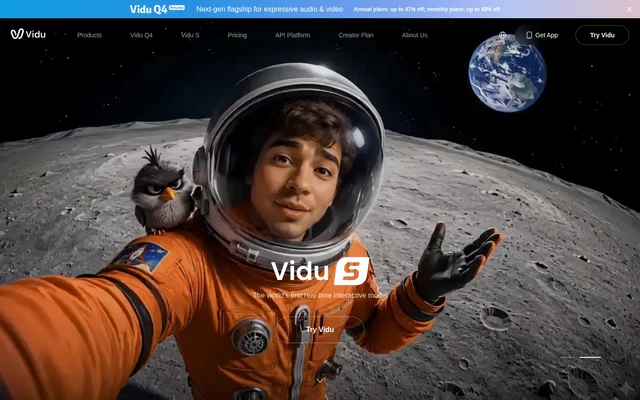
Vidu AI is a browser-based AI video generator for independent creators, production teams and businesses. Vidu AI transforms text and images into videos through Text to Video, Image to Video and Reference to Video modes. The service supports animation, different artistic styles and output resolutions up to 1080p, with applications ranging from social media clips to cinematic content and commercial advertising.
Vidu AI also presents a broader creation toolkit that includes image generation, templates, a collaborative creation app and an agent. The website describes individual plans for independent work and enterprise plans for team collaboration. Free generation credits give users access to video creation without an initial charge.
What Vidu AI can do
Vidu AI provides several ways to move from an idea or existing visual material to generated video. The main creation modes differ by input: a text prompt, a static image or a collection of references. Reference storage and frame controls offer additional ways to guide character, object and scene generation.
- Vidu AI generates videos from text prompts.
- Vidu AI animates static images and supports first and last frame selection.
- Vidu AI combines multiple reference images into a video based on a prompt.
- Vidu AI accepts different angles of a character or object to support consistency.
- Vidu AI saves characters, props and scenes through My References.
- Vidu AI supports video outputs up to 1080p.
How Vidu AI works
Vidu AI uses the selected creation mode to determine the starting material. Image to Video begins with a static image and can use specified first and last frames. Reference to Video accepts three or more images of objects, characters or scenes, then combines their elements according to a prompt. My References stores visual elements for reuse in later work.
Vidu AI is available through a web browser, and the website also links to an app and an API platform. The page names Vidu CLI in a creator testimonial, but does not provide installation instructions. Vidu Agent is described as collaborating with users from a sentence toward a complete work.
Who Vidu AI is for
Vidu AI serves independent creators and teams working on social media content, animation, professional video production and advertising. The website specifically describes film studios and animation teams using the service for animation and cinematic content. Business use cases focus on making product imagery and advertising material into generated video.
- Vidu AI helps social media creators produce generated clips.
- Vidu AI supports animation teams creating character-based stories.
- Vidu AI animates product images for marketing videos.
- Vidu AI uses visual references to change advertising backgrounds.
Vidu AI pricing and plans
Vidu AI gives all users a set amount of free credits for video generation. The website also describes individual plans for independent creation and enterprise plans for team collaboration. Credits are used for video generation, but the supplied pricing page remains at a loading message and does not show plan prices or complete allowances.
Vidu AI strengths and limitations
Vidu AI combines multiple input modes with reusable visual references and frame controls. These capabilities support workflows that need recurring characters, objects or scenes rather than unrelated generated clips. Free credits provide a way to access generation, while the available pricing information leaves the cost of ongoing production unclear.
- Vidu AI limits no-cost generation to an allocated amount of free credits.
- Vidu AI does not display plan prices in the supplied pricing page.
- Vidu AI names an API platform without providing API setup details in the supplied text.
Vidu AI FAQ
What is Vidu AI?
Vidu AI is a browser-based AI video generator that transforms text, static images and visual references into videos. Vidu AI supports Text to Video, Image to Video and Reference to Video, serving independent creators, animation teams, studios and businesses.
Is Vidu AI free to use?
Vidu AI gives all users a set amount of free credits to generate videos at no cost. Vidu AI also offers individual and enterprise plans, but the supplied pricing page does not display plan prices or the size of the free credit allocation.
What is the difference between Vidu AI Image to Video and Reference to Video?
Vidu AI Image to Video animates a static image and allows users to set first and last frames. Vidu AI Reference to Video combines three or more reference images according to a prompt, including different angles of characters or objects to support consistency.
Can Vidu AI save character references for reuse?
Vidu AI includes My References, which lets users save characters, props and scenes for reuse. Vidu AI also supports multiple reference images and different viewing angles of a character or object to help maintain consistency across generated videos.
Does Vidu AI have an API?
Vidu AI lists an API platform on its website alongside its creation tools and enterprise offerings. Vidu AI does not provide API setup instructions, endpoint details or API pricing in the supplied page text.
From the community
No reviews yet
Be the first to review this tool. What you write helps the next person choose.