What is Webcam Effects?
Webcam Effects is a browser extension for modifying webcam video during online conversations and presentations. Webcam Effects combines background controls, presentation layouts, and appearance adjustments for people using browser-based video services. The extension is intended to help users conceal their surroundings, maintain a professional appearance, and make shared content more prominent during calls.
Webcam Effects runs within the browser rather than requiring a separate video-editing workflow. The website lists Microsoft Teams, YouTube, Google Meet, and Skype as supported services. Webcam Effects also states compatibility with all Chromium-based browsers and availability across Windows, Mac, and Linux.
What Webcam Effects can do
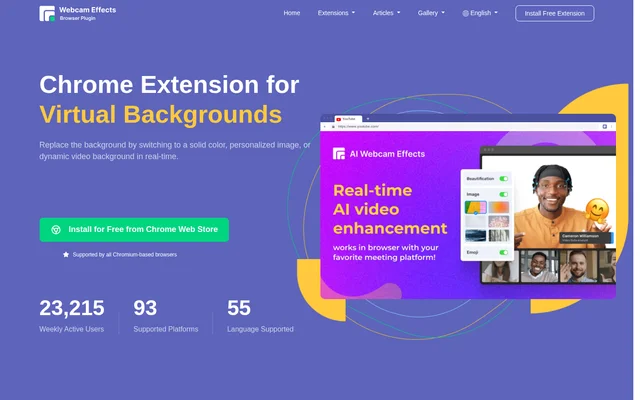
Webcam Effects provides controls for backgrounds, framing, presentation composition, and facial appearance. Background options range from an adjustable blur to replacement scenes, while layout controls let users position their face around relevant content. Webcam Effects also offers expressive visuals for conversations and automatic framing for keeping the speaker in view.
- Webcam Effects blurs webcam backgrounds with adjustable intensity.
- Webcam Effects replaces backgrounds with solid colors, custom images, or dynamic videos.
- Webcam Effects creates custom layouts for presentations and content streaming.
- Webcam Effects provides real-time auto-framing through smart zoom.
- Webcam Effects adds real-time Emoji and Giphy visuals to calls.
- Webcam Effects smooths skin and applies face beautification and gentle lighting.
How Webcam Effects works
Webcam Effects is installed from the Chrome Web Store and operates within a Chromium-based browser. The website describes installation and configuration as quick and says essential features do not require intricate settings. Users can apply webcam effects for online conversations on supported services while working on Windows, Mac, or Linux.
Webcam Effects offers different controls according to the desired video result. Background blur includes an intensity adjustment, while background replacement accepts personalized images or dynamic video. For presentations, custom layouts allow face positioning alongside streamed content. Smart zoom adds real-time auto-framing, and beautification controls change the appearance of the webcam image.
Who Webcam Effects is for
Webcam Effects is aimed at people who use webcam video for work, presentations, and conversations with friends or colleagues. The website specifically describes working from home, cafes, and public places while maintaining a professional look. Background controls address visible distractions or sensitive information, while presentation layouts support calls where shared content needs attention.
- Webcam Effects helps remote workers conceal messy or distracting surroundings.
- Webcam Effects lets presenters position their face while streaming relevant content.
- Webcam Effects gives callers image and video backgrounds for creative conversations.
- Webcam Effects adds Emoji and Giphy visuals to conversations with friends or colleagues.
Webcam Effects pricing and access
Webcam Effects is advertised as free to install from the Chrome Web Store. The page repeats free installation messaging for the browser extension and says users can obtain essential features without intricate configuration. Webcam Effects uses the browser extension installation path, with support stated for Chromium-based browsers on Windows, Mac, and Linux.
Webcam Effects strengths and limitations
Webcam Effects brings background privacy, presentation composition, and appearance adjustments into a browser-based workflow. Adjustable blur and replacement backgrounds give callers different ways to conceal their surroundings, while custom layouts address content-focused presentations. The stated browser compatibility is broad within Chromium, but the page does not extend that compatibility claim to other browser families or native meeting applications.
- Webcam Effects requires a Chromium-based browser for its extension workflow.
- Webcam Effects lists Windows, Mac, and Linux as supported operating systems.
- Webcam Effects describes browser-based use rather than a native meeting application workflow.
Webcam Effects FAQ
What is Webcam Effects?
Webcam Effects is a browser extension for enhancing webcam video with AI background blur, virtual backgrounds, presentation layouts, auto-framing, and face beautification. Webcam Effects is designed for online calls, presentations, and conversations with friends or colleagues.
Is Webcam Effects free?
Webcam Effects is advertised as free to install from the Chrome Web Store. Webcam Effects provides browser-based webcam tools, including background blur, virtual backgrounds, presentation layouts, and appearance adjustments.
Which browsers and operating systems does Webcam Effects support?
Webcam Effects supports all Chromium-based browsers, according to the website, and works on Windows, Mac, and Linux. Webcam Effects is available through the Chrome Web Store and operates directly within the browser.
Can Webcam Effects blur or replace a webcam background?
Webcam Effects can blur a webcam background with adjustable intensity or replace the background in real time. Webcam Effects supports solid-color backgrounds, personalized images, and dynamic video backgrounds for online conversations.
Which video services does Webcam Effects support?
Webcam Effects lists Microsoft Teams, YouTube, Google Meet, and Skype among supported services. Webcam Effects operates within Chromium-based browsers, so the compatibility described on the page concerns its browser extension workflow.
Can Webcam Effects help with video presentations?
Webcam Effects offers custom layouts that let presenters position their face while streaming relevant content. Webcam Effects also includes real-time auto-framing, allowing presenters to combine content-focused layouts with automatic webcam framing.
From the community
No reviews yet
Be the first to review this tool. What you write helps the next person choose.