What is 3DCellForge?
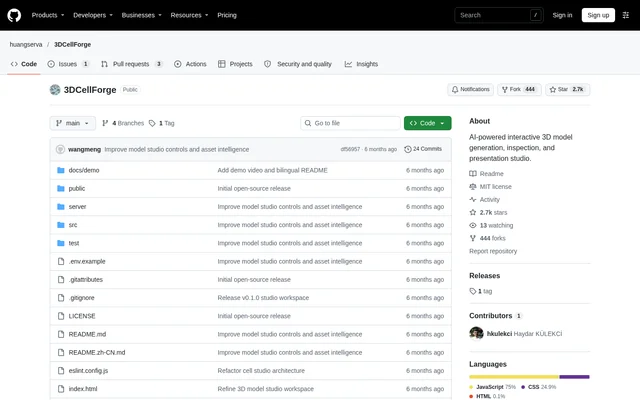
3DCellForge is an open-source prototype for generating, inspecting, and presenting interactive 3D models. Built with React and Three.js, the project accepts uploaded reference images or existing GLB files and places assets in a browser-based workspace. The repository describes a studio that combines model generation, inspection tools, and presentation controls rather than a standalone generation service.
3DCellForge serves workflows involving generated or imported assets, including model review, material inspection, and recorded demonstrations. The interface separates a model library, a central WebGL stage, and asset tools. Object-aware inspection covers categories such as vehicles, aircraft, vessels, products, artifacts, and organic specimens.
What 3DCellForge can do
3DCellForge combines interactive viewing with asset management and presentation features. Users can review model details, track generation state, compare assets, and prepare screenshots without leaving the workbench. A quality card reports generated GLB characteristics, while Demo Mode changes the viewing layout and camera behavior for presentations.
- 3DCellForge supports dragging to rotate, scrolling to zoom, and isolating structural parts.
- 3DCellForge imports local GLB and self-contained glTF files.
- 3DCellForge supports image-to-3D generation through Hyper3D, Tripo, Fal.ai, and Hunyuan3D.
- 3DCellForge reports file size, triangle count, texture count, and demo readiness.
- 3DCellForge captures screenshots and exports the current scene.
- 3DCellForge provides model comparisons, notes, logs, and saved projects.
How 3DCellForge works
3DCellForge starts locally with npm install and npm run dev, followed by opening the Vite URL shown in the terminal. Users choose a provider or local import from the Asset Source rail, monitor progress in the Generation Queue, and select the active asset from the Model Library. The Info and Inspect controls open model details.
3DCellForge enables optional generation backends through .env.local configuration and a separately started Node backend using npm run dev:api. API keys remain server-side. Generated GLBs are cached locally, while IndexedDB preserves model-library records after refresh. An optional OpenAI API key enables image classification; without that key, filename and metadata heuristics remain available.
Who 3DCellForge is for
3DCellForge fits users who need to review and demonstrate 3D assets within an interactive workbench. The documented workflows cover reference-image generation, imported-model inspection, and presentation recording. Developers can also use the included validation commands and auxiliary Khronos reference models to check layout behavior, GLB loading, and PBR materials.
- 3DCellForge helps users turn reference images into models through configured providers.
- 3DCellForge supports inspection and comparison of generated or imported assets.
- 3DCellForge prepares clean model views for screenshots and screen recordings.
- 3DCellForge supports loader and material checks with auxiliary reference models.
3DCellForge pricing and access
3DCellForge is distributed as an MIT-licensed open-source repository rather than a stated subscription product. The repository includes cached generated GLB models so demonstrations do not spend API credits on every run. Optional cloud generation requires provider configuration, while local import and a local Hunyuan3D backend offer other documented paths.
3DCellForge strengths and limitations
3DCellForge brings generation, inspection, persistent asset records, and presentation controls into the same workspace. Server-side key handling and cached model files support the documented local workflow. The project is explicitly a prototype, however, and running the application or connecting generation services requires technical setup rather than simply opening a hosted service.
- 3DCellForge requires dependency installation and development-server commands.
- 3DCellForge requires additional configuration for optional generation backends.
- 3DCellForge does not bundle the remote Khronos reference models.
3DCellForge FAQ
What is 3DCellForge?
3DCellForge is an open-source React and Three.js prototype for interactive 3D model generation, inspection, and presentation. 3DCellForge combines a model library, WebGL viewer, generation tools, quality checks, and a presentation mode for generated or imported assets.
Is 3DCellForge free?
3DCellForge is available as an MIT-licensed open-source project. Optional cloud generation uses configured provider services and can consume API credits. 3DCellForge also includes cached demo models so demonstrations do not require spending API credits on every run.
Which generation providers does 3DCellForge support?
3DCellForge supports Hyper3D, Tripo, Fal.ai, and local Hunyuan3D generation paths. 3DCellForge also provides browser-side JS Depth relief, an automatic provider fallback mode, and local GLB import. Fal.ai model selection is available in Settings.
Can 3DCellForge import existing 3D models?
3DCellForge can import local GLB files and self-contained glTF files through the upload controls. Imported models become workspace assets served from the local cache, and model-library records persist after page refresh through IndexedDB.
How do you run 3DCellForge locally?
3DCellForge runs locally after npm install and npm run dev, using the Vite URL printed in the terminal. Optional image-to-3D generation requires .env.local configuration and starting the Node backend with npm run dev:api.
What does 3DCellForge Demo Mode do?
3DCellForge Demo Mode hides side panels, displays a clean presentation overlay, and uses object-aware cinematic camera paths for screenshots and recordings. Camera behavior adapts to model metadata, including road views for cars, flight passes for aircraft, and studio orbits for specimens.
From the community
No reviews yet
Be the first to review this tool. What you write helps the next person choose.