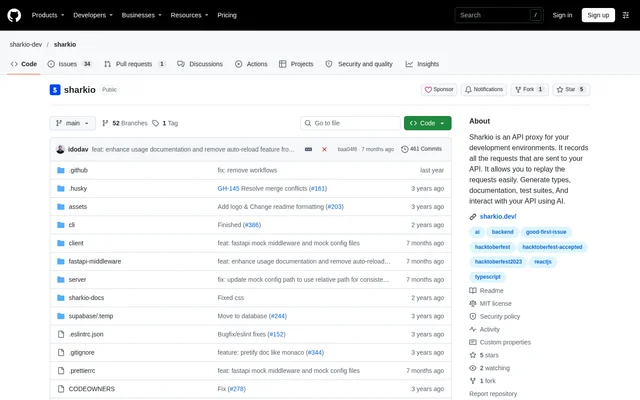
What is Sharkio?
Sharkio is an open-source API proxy for developers who need to record and examine requests sent to their servers. Sharkio provides a traffic dashboard and request replay, alongside generators that use real API data. The repository describes Sharkio as a development tool for API developers and distributes the source code under the MIT license.
Sharkio focuses on development environments rather than presenting itself as a general-purpose production gateway. The repository’s feature table distinguishes available capabilities from entries without availability checkmarks. That distinction matters for AI-related claims: although the repository overview mentions interacting with APIs using AI, ChatGPT integration is also described as a roadmap item.
What Sharkio can do
Sharkio combines traffic capture with tools for working with recorded requests. The available feature list includes inspection, search, filtering and repeat requests, as well as generators and request organisation. Sharkio also lists microservice support and request mocks as available, giving API developers several ways to reuse captured traffic during development.
- Sharkio records requests sent to API servers.
- Sharkio lets developers inspect, search and filter traffic.
- Sharkio repeats captured requests.
- Sharkio generates TypeScript types and JSON schemas.
- Sharkio generates OpenAPI output.
- Sharkio supports request mocks.
- Sharkio saves requests and groups requests into collections.
- Sharkio supports microservices.
How Sharkio works
Sharkio’s documented hosted workflow begins with logging in at sharkio.dev. Developers then set up a proxy, using a local server with ngrok or an alternative, and change their project configuration to use the generated Sharkio proxy subdomain. Once traffic passes through that proxy, Sharkio records requests for inspection and replay through the dashboard.
Sharkio also includes instructions for running the project from source. The backend and frontend have separate dependency installation and development commands, while a root command runs both. A demonstration server is available for testing traffic capture. For production deployment, the repository documents Docker Compose for the whole project and Docker commands for individual backend or frontend components.
Who Sharkio is for
Sharkio is intended for API developers working with requests sent to backend servers. Sharkio’s recorded-data workflow suits developers who need to inspect traffic, repeat requests or generate types from actual API exchanges. Microservice support is explicitly listed, while saved requests and collections provide ways to organise captured requests for later use.
- API developers can inspect traffic reaching development servers.
- Backend developers can repeat recorded requests.
- TypeScript developers can generate types from real data.
- Developers working with microservices can use Sharkio’s listed microservice support.
Sharkio pricing and access
Sharkio is available as an open-source project under the MIT license, with source code and setup instructions in the repository. Sharkio documents both access through sharkio.dev and running the project using local development commands or Docker. The supplied Sharkio documentation does not specify hosted subscription plans or hosted service prices.
Sharkio strengths and limitations
Sharkio brings request inspection, replay, generators and mocks into the same development tool. MIT-licensed source code and documented Docker deployment give developers an alternative to the hosted workflow. Sharkio nevertheless requires proxy configuration and project changes, and the repository does not mark every listed capability as available. Roadmap descriptions should therefore be read separately from confirmed features.
- Sharkio requires developers to configure a proxy and update their project configuration.
- Sharkio does not mark ChatGPT integration or request sharing as available.
- Sharkio lists team functions and Postman integration on the roadmap.
Sharkio FAQ
What is Sharkio?
Sharkio is an open-source API proxy for development environments that records requests sent to API servers. Sharkio provides a dashboard for inspecting traffic, searching and filtering requests, and replaying captured requests.
Is Sharkio free?
Sharkio is available as MIT-licensed open-source code with instructions for running the project locally or using Docker. The supplied Sharkio documentation does not state hosted service pricing or describe paid subscription plans.
Can Sharkio generate TypeScript types and API schemas?
Sharkio lists TypeScript generation, JSON Schema generation and OpenAPI generation as available features. The repository also describes generating types from real data captured through the API proxy.
Does Sharkio integrate with ChatGPT or Postman?
Sharkio describes ChatGPT integration and Postman integration in its roadmap. ChatGPT integration also appears in the feature table without an availability checkmark, so the supplied documentation does not confirm either integration as available.
Can Sharkio be self-hosted?
Sharkio documents running the project from source and deploying with Docker. The repository provides separate backend and frontend development instructions, a command for running both, and Docker Compose instructions for running the whole project.
How do developers start using Sharkio?
Sharkio’s documented hosted setup starts with logging in at sharkio.dev, setting up a proxy with ngrok or an alternative, and updating the project configuration to use the generated Sharkio proxy subdomain.
From the community
No reviews yet
Be the first to review this tool. What you write helps the next person choose.