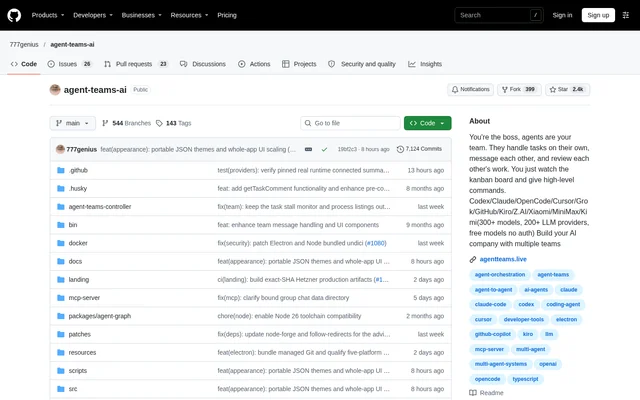
What is agent-teams-ai?
agent-teams-ai is an open-source desktop orchestration app for AI agent teams working on coding and broader projects. Users create teams with different roles, give high-level instructions, and monitor task progress through a kanban board. Agents can work autonomously in parallel, communicate with teammates, and review each other's work. Native desktop versions support macOS, Windows, and Linux, and the repository carries an AGPL-3.0 license.
What agent-teams-ai can do
agent-teams-ai combines agent coordination with tools for inspecting work, managing context, and monitoring resource use. Teams can be grouped into nested organizations, with a live overview showing task progress, dependencies, delegation, and communication. Users can inspect individual assignments rather than relying only on a shared activity stream, and can intervene through messages, task comments, or kanban actions.
- agent-teams-ai lets agents create tasks, exchange messages, and review work across teams.
- agent-teams-ai tracks input, output, cache, and reasoning token usage.
- agent-teams-ai displays task-specific runtime logs, actions, messages, and workflow history.
- agent-teams-ai provides a terminal workspace and a code editor with Git support.
- agent-teams-ai supports external tools through a built-in MCP server and extensible agent plugins.
How agent-teams-ai works
agent-teams-ai can begin with a free model that requires no authentication, or detect installed Claude Code, Codex, and OpenCode runtimes. Additional connections, including Cursor, SuperGrok, GitHub Copilot, Z.AI, MiniMax, and Kiro, are available through the interface. Users can create a team from a prompt, send instructions to the lead, and attach images that become part of the resulting task context.
agent-teams-ai keeps human feedback connected to ongoing work through direct messages, group chat, comments, and code-change review. Users can approve, reject, or comment on task changes and choose autonomous operation or individual approval of supported tool actions. Per-teammate branch settings allow agents to use the main checkout or separate Git worktrees, while context recovery restores team-management instructions after runtime compaction.
Who agent-teams-ai is for
agent-teams-ai serves developers and people managing broader project work through AI agents. The workflow suits users who want to delegate parallel assignments while retaining visibility into tasks, code changes, and agent communication. Solo mode provides a single agent that creates tasks and displays live progress, with the option to expand into a full team later.
- agent-teams-ai supports parallel coding assignments with role-based teams and peer review.
- agent-teams-ai supports coordination between departments, squads, and other nested team structures.
- agent-teams-ai helps users investigate task outcomes through linked logs, messages, and code changes.
agent-teams-ai pricing and access
agent-teams-ai is described as a free desktop app and is available as an open-source project under the AGPL-3.0 license. The included free-model starting path requires no signup, API key, or payment card. Users can also connect supported providers through subscriptions or API keys they already have. Token analytics include estimated-cost budgets and alerts to help monitor usage across agents, tasks, projects, models, and sessions.
agent-teams-ai strengths and limitations
agent-teams-ai brings task management, agent communication, code review, and terminal access into a shared desktop workspace. Cross-platform availability and a no-authentication starting model reduce initial setup requirements, while task-level records make individual assignments easier to inspect. Provider connections and runtime behavior still introduce constraints: account-based options use existing credentials, and some recovery and approval features apply only under the conditions described in the repository.
- agent-teams-ai may trigger Windows SmartScreen during installation.
- agent-teams-ai automatically resumes a rate-limited Claude lead only when the reset time is known.
- agent-teams-ai offers individual approval for supported tool actions, not an explicitly universal approval mechanism.
agent-teams-ai FAQ
What is agent-teams-ai?
agent-teams-ai is a free, open-source desktop app for coordinating AI agent teams on coding and broader project work. Agents can work in parallel, manage tasks, exchange messages, and review work while users monitor a kanban board.
Is agent-teams-ai free?
agent-teams-ai is described as a free desktop app with a free model requiring no signup, API key, or card. Supported account-based providers can also be connected using existing subscriptions or API keys.
Which operating systems does agent-teams-ai support?
agent-teams-ai supports macOS, Windows, and Linux as a native desktop app. The installation notes state that Windows SmartScreen may appear and that administrator mode may be needed for a specific reported OpenCode symlink or permission error.
Which AI providers and tools does agent-teams-ai connect to?
agent-teams-ai detects installed Claude Code, Codex, and OpenCode runtimes and supports interface connections for Cursor, SuperGrok, GitHub Copilot, Z.AI, MiniMax, and Kiro. A built-in MCP server supports external tool integration and extensible agent plugins.
Can users control what agent-teams-ai agents do?
agent-teams-ai supports autonomous work or individual approval of supported tool actions. Users can also send direct messages, comment on tasks, use kanban quick actions, and approve, reject, or comment on code changes associated with tasks.
From the community
No reviews yet
Be the first to review this tool. What you write helps the next person choose.