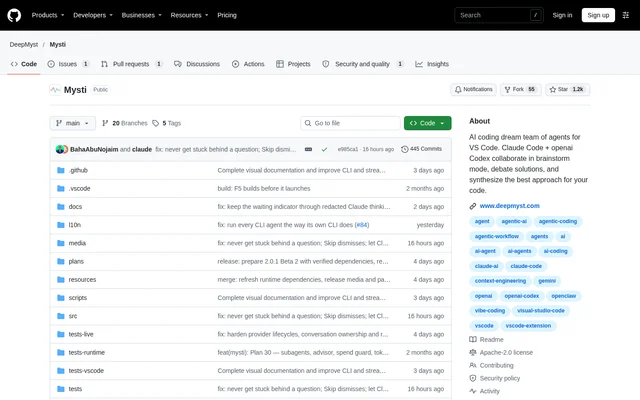
What is Mysti?
Mysti is an open-source VS Code extension for bringing coding agents into a shared workflow. Mysti helps developers ask for independent opinions, pass completed work to another agent and keep context, progress and answers in one conversation. Supported workflows range from everyday chat with a single provider to multi-agent reviews and structured discussions. Mysti remains beta, and the repository directs developers to review verified status and remaining work before choosing Mysti for a project.
What Mysti can do
Mysti combines coding conversations with review, discussion and visual workflows inside the editor. Mysti attributes responses and activity to individual agents so developers can distinguish their contributions. Brainstorm provides discussion strategies including Quick, Debate, Red Team, Perspectives and Delphi. Canvas and Visual Test address different needs: Canvas explores a visual artifact, while Visual Test gathers evidence from a running application.
- Mysti sends a shared question to explicitly named agents for independent answers.
- Mysti passes a completed task result to a subsequent agent for review.
- Mysti adds files, selected text, diagnostics and Git summaries to conversations.
- Mysti renders Canvas artifacts with live previews, device formats and theme controls.
- Mysti collects screenshots, findings and reports through Visual Test.
How Mysti works
Mysti runs in a trusted local workspace on Windows, macOS or Linux with VS Code 1.86 or newer. Developers install a VSIX package or the Marketplace version, open Mysti chat and follow a provider setup card. Each provider retains its own model, account and capability settings. Independent read-only assignments can run concurrently, while work that may write to the shared workspace runs serially. Dependent steps wait for completed prerequisites and are blocked if a prerequisite fails.
- Mysti supports Claude Code, OpenAI Codex, Google Gemini CLI and other coding tools.
- Mysti supports local-model configuration through Ollama or LocalAI.
- Mysti offers coordinator access through DeepMyst sign-in or a configured direct OpenRouter key.
Who Mysti is for
Mysti serves developers who want coding agents to contribute different perspectives without moving the discussion outside VS Code. Mysti supports tasks that involve understanding code, proposing changes, challenging an approach and reviewing the result. Built-in and custom personas, reusable skills and catalog roles help apply task-specific perspectives. Developers can begin with a single agent and add a reviewer when another perspective is needed.
- Mysti supports independent reviews of code for edge cases.
- Mysti supports design discussions about changes such as adding an API cache.
- Mysti supports implementation followed by review using the completed result as context.
- Mysti supports explaining diagnostics and reviewing current Git changes.
Mysti licensing and access
Mysti is an open-source project distributed under the Apache-2.0 license. Mysti is available as a downloadable VSIX and through the VS Code Marketplace. The repository identifies the reviewed GitHub release as 2.0.1 Beta 2 and notes that the Marketplace version should be checked separately. Provider models, subscriptions, attachments, approvals and controls depend on the selected provider and account; access to the extension does not establish uniform terms for connected services.
Mysti strengths and limitations
Mysti keeps agent contributions visible and makes review handoffs explicit, while allowing developers to retain their preferred supported providers. Mysti also exposes context selection and provider-supported approval controls. Recovery features include conversation branches and checkpoints for supported local code changes, but the repository advises keeping normal version control and backups. Cancelling a request does not undo completed external actions, and read-only proactive monitoring does not authorize an agent to act.
- Mysti requires a second configured provider for workflows involving two agents.
- Mysti does not forward composer attachments to explicit multi-agent collaborators.
- Mysti displays Ollama and LocalAI tool proposals without executing them through those adapters.
- Mysti may require browser setup for Visual Test.
- Mysti does not make every connected feature offline when local-model chat is used.
Mysti FAQ
What is Mysti?
Mysti is an open-source VS Code extension that brings Claude Code, Codex and other coding agents into a shared conversation. Mysti supports independent answers, sequential handoffs, code review and Brainstorm discussions using workspace context.
Is Mysti open source?
Mysti is an open-source project distributed under the Apache-2.0 license and available through a VSIX download or the VS Code Marketplace. Mysti uses configured provider accounts, whose subscriptions and capabilities depend on the selected provider.
Which coding agents and local models does Mysti support?
Mysti includes adapters for Claude Code, OpenAI Codex, Google Gemini CLI, GitHub Copilot CLI, Cline, Cursor and other tools. Mysti also supports Ollama, LocalAI, OpenRouter and MiniMax, with setup requirements and capabilities varying by provider.
How do you install Mysti in VS Code?
Mysti can be installed from the VS Code Marketplace or by downloading a VSIX and choosing Extensions: Install from VSIX in the Command Palette. Mysti requires VS Code 1.86 or newer, a trusted local workspace and a configured provider.
How does Mysti coordinate multiple coding agents?
Mysti lets developers address agents in the same message for independent answers or sequential handoffs. Mysti passes completed results to dependent agents, runs independent read-only assignments concurrently and serializes work that may write to the shared workspace.
Does Mysti work entirely offline with local models?
Mysti supports local models through Ollama and LocalAI, but local-model chat does not make every connected feature offline. Mysti sends prompts and supplied context to the configured provider, while connected DeepMyst features use the account and selected connections.
From the community
No reviews yet
Be the first to review this tool. What you write helps the next person choose.