What is AIWritingPal?
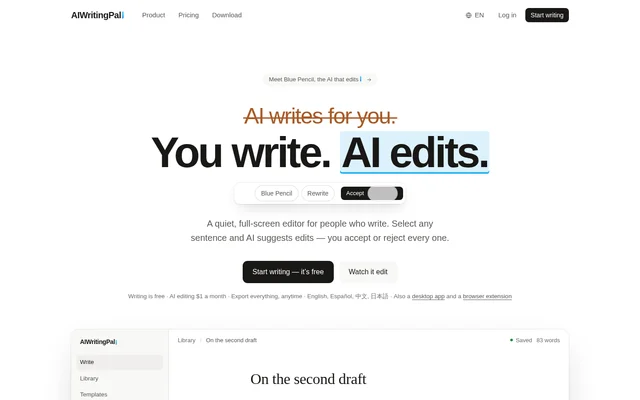
AIWritingPal is a full-screen writing editor for people who want to revise their own work with AI assistance. Its AI editor, Blue Pencil, marks up proposed changes rather than replacing text immediately. Writers select passages, request edits and decide which suggestions to accept or reject.
AIWritingPal combines document writing with editing controls, focus tools and export options. Documents are stored in an account so writers can sign in on another device and continue working. The website also offers an editor demonstration that visitors can type into without signing up.
What AIWritingPal can do
AIWritingPal supports sentence-level revision and broader work on a complete draft. Blue Pencil can respond to predefined editing commands or a request written in the writer’s own words. Starter templates can produce an initial draft from a brief, while editing suggestions remain subject to acceptance before entering a document.
- AIWritingPal suggests improvements, shorter versions, expansions and corrections.
- AIWritingPal changes tone and translates selected text.
- AIWritingPal reviews whole drafts and answers questions about them.
- AIWritingPal supports English, Spanish, Chinese and Japanese with language-specific prompts.
- AIWritingPal provides focus mode, typewriter scrolling and paragraph focus.
- AIWritingPal exports documents to Markdown, Word, PDF and HTML.
How AIWritingPal works
AIWritingPal uses a selection-based editing workflow: writers highlight text, choose an editing action or describe a change, and inspect the resulting markup. Deleted wording and proposed additions are shown separately. Accepting a suggestion applies the change, while rejecting a suggestion leaves the original text unchanged.
AIWritingPal also offers a desktop app and browser extensions for Safari and Chrome. The browser extensions work inside a website’s own text box, including replies, emails and forms. Blue Pencil reads selected text and surrounding context when asked to edit, or the whole draft when Ask or Review is used.
Who AIWritingPal is for
AIWritingPal is intended for people who write and want assistance revising text without handing over approval of changes. The page demonstrates draft revision and browser-based replies, and lists editing support for English, Spanish, Chinese and Japanese. Focus tools serve writers who prefer a quieter editing environment.
- Writers can shorten drafts and remove unnecessary wording.
- People composing emails and online replies can correct text in place.
- Multilingual writers can edit or translate passages in the supported languages.
- Writers can use templates to turn a brief into a first version.
AIWritingPal pricing and plans
AIWritingPal offers free unlimited writing and documents, focus tools and every export format. Free AI editing is a one-time trial of 1,000 words, counting only words generated by AI rather than the writer’s own typing. After the trial, AI editing pauses, but writing, saving and exporting continue to work.
AIWritingPal Pro costs $1 a month, billed $12 a year, and includes unlimited AI editing for the subscriber’s own writing. The free plan includes 9 starter templates, compared with 13 on Pro. A full refund is available within 14 days of payment or renewal, once per person.
AIWritingPal strengths and limitations
AIWritingPal keeps writers in control through explicit acceptance of suggested changes and makes writing and exports available without a paid plan. The service states that there are no ads or third-party trackers, no data sales and no AI training on users’ writing. AI access to drafts occurs only when requested.
- AIWritingPal requires Pro for continued AI editing after the free trial.
- AIWritingPal does not let users select the AI model.
- AIWritingPal prohibits automated use, reselling and sharing an account.
AIWritingPal FAQ
What is AIWritingPal?
AIWritingPal is a full-screen writing editor with an AI editor called Blue Pencil. AIWritingPal suggests marked-up revisions to selected text and lets writers accept or reject every change, alongside focus tools, document storage and export options.
Is AIWritingPal free?
AIWritingPal provides free writing, saving, focus mode and exports, plus a one-time trial of 1,000 AI-generated words. AIWritingPal Pro costs $1 a month, billed $12 a year, and provides unlimited AI editing for the subscriber’s own writing.
Which languages does AIWritingPal support?
AIWritingPal supports English, Spanish, Chinese and Japanese with prompts written for each language rather than translated from English. AIWritingPal counts Chinese and Japanese by character, counts English and Spanish by word, and handles mixed-script spacing and local punctuation.
Does AIWritingPal write content or only edit?
AIWritingPal primarily edits existing writing through improvements, shortening, expansion, corrections, translation and custom requests. AIWritingPal also offers starter templates that can draft a first version from a brief. No proposed content enters a document until the writer accepts the change.
Does AIWritingPal read everything I write?
AIWritingPal only sends writing to Blue Pencil when the writer requests assistance. AIWritingPal uses selected text plus some surrounding context for an edit, or the whole draft for Ask or Review. Blue Pencil sees nothing while the user is simply writing.
Does AIWritingPal have browser extensions?
AIWritingPal offers browser extensions for Safari and Chrome that edit text within a website’s own text box. AIWritingPal can improve or correct selected writing in replies, emails and forms, showing proposed changes for acceptance or rejection.
From the community
No reviews yet
Be the first to review this tool. What you write helps the next person choose.