What is Anime Upscaler?
Anime Upscaler is an online AI image enhancement tool from Imglarger for anime, manga, waifu images, VTuber assets, and digital illustrations. Anime Upscaler increases resolution while preserving the visual characteristics of illustrated artwork, including outlines, shading, color balance, and character appearance. The tool serves artists, editors, collectors, and creators who need clearer versions of existing images.
Anime Upscaler differs from Imglarger’s general image upscaler by focusing on anime and illustration styles rather than portraits, landscapes, and real-world photography. The stated goal is to improve detail and image clarity without replacing the original artistic style. Supported material includes screenshots, fan art, game illustrations, manga pages, and AI-generated anime artwork.
What Anime Upscaler can do
Anime Upscaler combines enlargement with artwork-specific enhancement. The anime page offers 200% and 400% scaling and describes improvements to outlines, textures, facial details, and visual effects. A comparison preview lets users review the processed artwork alongside the original before downloading, while batch processing supports larger collections on eligible plans.
- Anime Upscaler enlarges anime and manga images by 200% or 400%.
- Anime Upscaler sharpens outlines while preserving smooth line art.
- Anime Upscaler reduces blur, compression artifacts, and pixelation.
- Anime Upscaler refines facial details and textures in AI-generated illustrations.
- Anime Upscaler processes multiple images with batch support.
How Anime Upscaler works
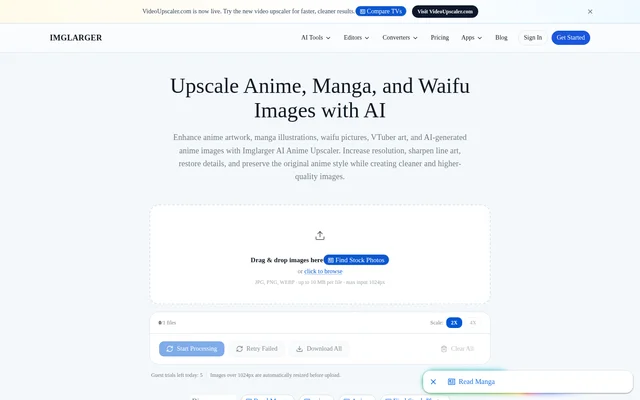
Anime Upscaler runs in a browser without requiring software installation. Users drag an image into the uploader or browse for a file, select an enlargement ratio, and start processing. After enhancement, users can preview the result, compare the original and processed images, and download the final artwork.
Anime Upscaler supports JPG, JPEG, PNG, and WebP images. The displayed uploader specifies up to 10 MB per file and a maximum input dimension of 1024 px. Imglarger notes that sign-in requirements, processing options, and usage limits can vary by tool and plan. Uploaded and processed images are automatically deleted within six hours.
Who Anime Upscaler is for
Anime Upscaler is intended for anime artists, collectors, content creators, manga editors, and VTuber designers. Anime Upscaler supports both individual artwork enhancement and collection workflows through batch processing. The page identifies digital sharing, streaming graphics, wallpapers, posters, and printing projects as uses for the higher-resolution output.
- Anime Upscaler enhances manga pages and fan art for sharing.
- Anime Upscaler prepares wallpapers, profile pictures, and social media graphics.
- Anime Upscaler improves VTuber assets and streaming overlays.
- Anime Upscaler enlarges illustrations for posters and printing projects.
Anime Upscaler strengths and limitations
Anime Upscaler offers a focused workflow for illustrated images, with style-preserving enhancement, common file-format support, and before-and-after review. Browser access avoids an installation step, and automatic deletion provides a defined retention period for uploaded and processed files. Access remains subject to credits, plan restrictions, and the limits shown in the uploader.
- Anime Upscaler limits free-plan processing to single images.
- Anime Upscaler restricts free-plan scaling to 2X.
- Anime Upscaler requires a paid plan for batch processing.
- Anime Upscaler applies file-size and input-dimension limits.
Anime Upscaler FAQ
What is Anime Upscaler?
Anime Upscaler is an online AI enhancement tool from Imglarger for anime, manga, waifu artwork, and VTuber illustrations. Anime Upscaler increases resolution and sharpens details while preserving clean line art, shading, color balance, and the original anime style.
What image formats and sizes does Anime Upscaler support?
Anime Upscaler supports JPG, JPEG, PNG, and WebP images. The anime page’s uploader displays a limit of 10 MB per file and a maximum input dimension of 1024 px. Imglarger states that processing options and usage limits may vary by tool and plan.
Can Anime Upscaler enhance AI-generated anime art?
Anime Upscaler can enhance AI-generated anime images, character illustrations, and VTuber artwork. Anime Upscaler refines facial details, line work, and textures while increasing resolution, with the stated aim of preserving the original illustration style and character appearance.
Does Anime Upscaler support batch processing?
Anime Upscaler supports processing multiple anime or manga images simultaneously. Imglarger’s pricing page includes batch processing in Premium and Business plans, while the Free plan is limited to single-image processing. Batch workflows are intended for creators and collectors managing larger artwork libraries.
Does Anime Upscaler keep uploaded images?
Anime Upscaler automatically deletes uploaded and processed images within six hours, according to Imglarger’s processing policy. Imglarger states that images are not retained as a permanent public gallery, and users can preview and download processed artwork through the browser workflow.
From the community
No reviews yet
Be the first to review this tool. What you write helps the next person choose.