What is AudioAlter?
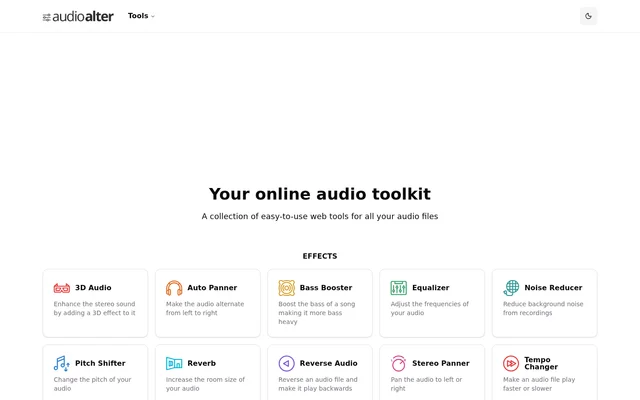
AudioAlter is an online collection of tools for editing audio files, applying effects, and converting between audio formats. AudioAlter serves people working with recordings or songs, whether the task is to cut out part of a file, make a recording louder, or change how a track sounds. The toolkit also includes utilities that do not apply an effect to the audio, such as a tempo detector that reports beats per minute and tools that turn audio into waveform or spectrogram images.
What AudioAlter can do
AudioAlter covers both corrective edits and creative changes. Noise Reducer targets background noise in recordings, while the equalizer and bass booster change the balance of frequencies. Stereo Panner places the sound to the left or right, whereas Auto Panner makes it alternate between sides. AudioAlter also provides controls for reversing playback and applying reverb.
- AudioAlter cuts out part of an audio file with Trimmer / Cutter.
- AudioAlter changes pitch with Pitch Shifter and playback speed with Tempo Changer.
- AudioAlter makes audio louder or quieter with Volume Changer.
- AudioAlter uses Vocal Remover to leave the instrumental part of a song.
- AudioAlter reduces the number of audio channels with Downmixer.
- AudioAlter converts audio files to another format with Converter.
How AudioAlter works
AudioAlter organizes its web tools into effects, other tools, and presets. The relevant tool depends on the intended output: Tempo Changer alters playback speed, while BPM Detector measures the existing tempo. Converter changes the file format, while Downmixer reduces the channel count. AudioAlter also combines effects in presets. Its 8D Audio preset uses auto panning to make the sound alternate from left to right and adds reverb to create the impression of sound moving around the listener.
Who AudioAlter is for
AudioAlter is suited to people who need to make a specific change to a recording or song. Someone cleaning up a recording can focus on background noise, volume, or trimming. Someone modifying a track can change its pitch, make it play backward, or give it a slowed and reverb effect. The visualization tools serve a different purpose: they create an image from an audio file instead of changing how the recording sounds.
- Reduce background noise in a recording.
- Remove vocals to leave the instrumental.
- Generate a waveform or spectrogram image from an audio file.
AudioAlter strengths and tool scope
AudioAlter combines task-specific controls with presets for particular sounds. Bass boost presets range from very light to extreme, while reverb presets cover vocal tracks and spaces such as bathrooms, rooms, a church hall, and a cathedral. The scope of each tool is specific: Downmixer is for reducing the number of channels, while Waveform Image and Spectrogram Image create images. Noise Reducer is described as reducing background noise, rather than removing it altogether.
AudioAlter FAQ
What is AudioAlter?
AudioAlter is an online toolkit for editing audio files, applying sound effects, and converting file formats. AudioAlter also provides tools for detecting a song’s tempo and generating waveform or spectrogram images from audio.
Can AudioAlter remove vocals from a song?
AudioAlter offers a Vocal Remover designed to remove the vocals from a song and leave the instrumental. AudioAlter lists Vocal Remover as a separate effect from Noise Reducer, which is intended to reduce background noise in recordings.
Can AudioAlter change the pitch or speed of audio?
AudioAlter can change pitch with Pitch Shifter and make an audio file play faster or slower with Tempo Changer. AudioAlter also offers a Slowed and Reverb preset that adds a slowed playback effect and reverb to a song.
Can AudioAlter detect the BPM of a song?
AudioAlter has a BPM Detector that measures the tempo of a song in beats per minute. The detector is distinct from AudioAlter’s Tempo Changer, which changes how fast or slow an audio file plays.
What is the 8D Audio effect in AudioAlter?
AudioAlter offers an 8D Audio preset that makes a song sound as though it is moving around the listener. AudioAlter uses Auto Panner to alternate the sound from left to right and adds reverb to give the track a live-concert impression.
From the community
No reviews yet
Be the first to review this tool. What you write helps the next person choose.